

.SNAGTHEME Bestandsextensie
Snagit-thema
| Ontwikkelaar | TechSmith |
| Populariteit |
3,0 | 1 stem |
Wat is een SNAGTHEME-bestand?
Een SNAGTHEME-bestand is een thema dat wordt gebruikt door TechSmith Snagit, een programma voor schermopnamen en beeldannotaties. Het bevat JSON-gegevens waarin de kleuren, het lettertype en de stijl van het thema zijn vastgelegd. SNAGTHEMES zorgen voor een consistente uitstraling van tekst en vormen die aan schermopnamen zijn toegevoegd.
Meer informatie
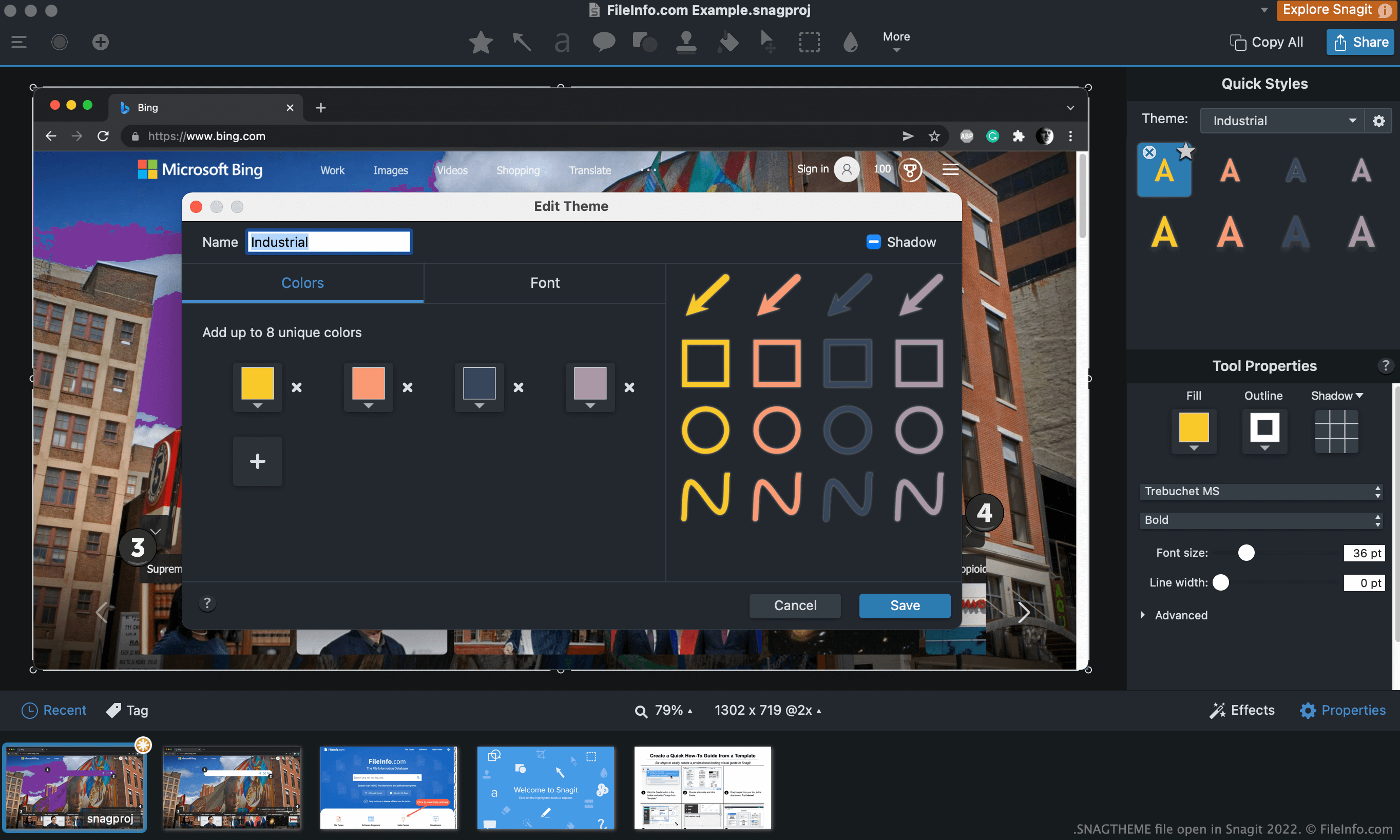
Nadat je een schermopname hebt gemaakt met de opnamefuncties van Snagit, kun je tekst, pijlen, toelichtingen en andere annotaties aan die schermopname toevoegen. Veel van deze annotaties kunnen van een thema worden voorzien, zodat ze hetzelfde kleurenschema en dezelfde stijl hebben.
Als je bijvoorbeeld zowel tekst als een pijl aan een schermopname wilt toevoegen, kun je het thema Industrial selecteren en de voorinstellingen ervan gebruiken om ervoor te zorgen dat beide elementen dezelfde kleur en stijl hebben. Je kunt thema's ook voor meerdere afbeeldingen gebruiken, zodat elementen in al die afbeeldingen hetzelfde worden weergegeven.
Hoe maak ik een SNAGTHEME-bestand?
Zo maak je je eigen SNAGTHEME-bestand:
- Open een hulpmiddel waarmee je thema's kunt selecteren (zoals het hulpmiddel Tekst).
- Klik op het vervolgkeuzemenu voor thema's (Windows) of het tandwielpictogram (Mac) en selecteer .
Een SNAGTHEME-bestand openen
Zo importeer je een SNAGTHEME-bestand in Snagit:
- Open Snagit en selecteer een hulpmiddel dat thema's gebruikt (zoals het hulpmiddel Tekst).
- Klik op het vervolgkeuzemenu voor thema's (Windows) of het tandwielpictogram (Mac) en selecteer .
- Ga naar je SNAGTHEME-bestand en open het.
Als je de JSON-gegevens in je SNAGTHEME-bestand wilt bekijken, kun je het bestand openen in Microsoft Notepad, Apple TextEdit of een andere teksteditor.
Hoe bewerk ik een SNAGTHEME-bestand?
Zo bewerk je een thema dat je in Snagit hebt geïmporteerd:
- Open een hulpmiddel waarmee je het thema kunt selecteren.
- Selecteer het thema.
- Klik op het vervolgkeuzemenu voor thema's (Windows) of het tandwielpictogram (Mac) en selecteer .
Hoe exporteer ik een thema als SNAGTHEME-bestand?
Zo exporteer je een thema als SNAGTHEME-bestand:
- Open een hulpmiddel waarmee je het thema kunt selecteren.
- Selecteer het thema.
- Klik op het vervolgkeuzemenu voor thema's (Windows) of het tandwielpictogram (Mac) en selecteer .