

.SNAGTHEME Dateiendung
Snagit-Design
| Entwickler | TechSmith |
| Beliebtheit |
3,0 | 1 Stimme |
Was ist eine SNAGTHEME-Datei?
Eine SNAGTHEME-Datei ist ein Design, das von TechSmith Snagit, einem Programm für Bildschirmaufnahmen und Bildanmerkungen, verwendet wird. Sie enthält JSON-Daten, die die im Design enthaltenen Farben, die Schriftart und den Stil festlegen. SNAGTHEMES sorgen für ein einheitliches Erscheinungsbild von Texten und Formen, die in Bildschirmaufnahmen platziert werden.
Weitere Informationen
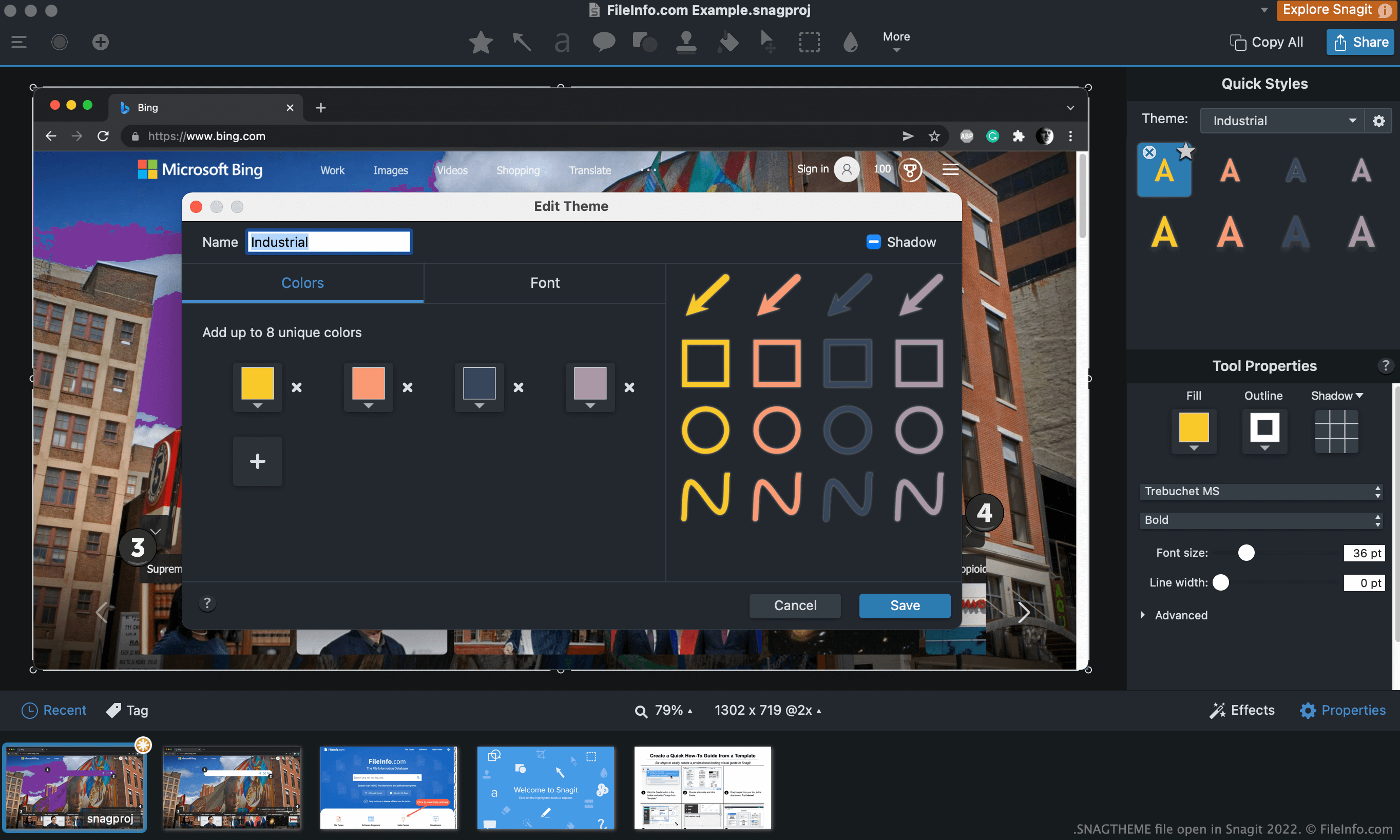
Nachdem Sie mit den Aufnahmefunktionen von Snagit einen Screenshot erstellt haben, können Sie diesem Screenshot Text, Pfeile, Sprechblasen und andere Anmerkungen hinzufügen. Viele dieser Anmerkungen können mit einem Design versehen werden, damit sie in einem einheitlichen Farbschema und Stil erscheinen.
Wenn Sie beispielsweise einem Screenshot sowohl Text als auch einen Pfeil hinzufügen möchten, können Sie das Design „Industrial“ auswählen und seine Voreinstellungen verwenden, damit beide Elemente dieselbe Farbe und denselben Stil verwenden. Sie können Designs auch für mehrere Bilder verwenden, damit Elemente in all diesen Bildern einheitlich erscheinen.
Wie erstelle ich eine SNAGTHEME-Datei?
So erstellen Sie Ihre eigene SNAGTHEME-Datei:
- Öffnen Sie ein Werkzeug, mit dem Sie Designs auswählen können (z. B. das Textwerkzeug).
- Klicken Sie auf das Dropdownmenü für Designs (Windows) oder das Zahnradsymbol (Mac) und wählen Sie aus.
So öffnen Sie eine SNAGTHEME-Datei
So importieren Sie eine SNAGTHEME-Datei in Snagit:
- Öffnen Sie Snagit und wählen Sie ein Werkzeug aus, das Designs verwendet (z. B. das Textwerkzeug).
- Klicken Sie auf das Dropdownmenü für Designs (Windows) oder das Zahnradsymbol (Mac) und wählen Sie aus.
- Navigieren Sie zu Ihrer SNAGTHEME-Datei und öffnen Sie sie.
Wenn Sie die JSON-Daten Ihrer SNAGTHEME-Datei anzeigen möchten, können Sie sie in Microsoft Notepad, Apple TextEdit oder einem anderen Texteditor öffnen.
Wie bearbeite ich eine SNAGTHEME-Datei?
So bearbeiten Sie ein Design, das Sie in Snagit importiert haben:
- Öffnen Sie ein Werkzeug, mit dem Sie das Design auswählen können.
- Wählen Sie das Design aus.
- Klicken Sie auf das Dropdownmenü für Designs (Windows) oder das Zahnradsymbol (Mac) und wählen Sie aus.
Wie exportiere ich ein Design als SNAGTHEME-Datei?
So exportieren Sie ein Design als SNAGTHEME-Datei:
- Öffnen Sie ein Werkzeug, mit dem Sie das Design auswählen können.
- Wählen Sie das Design aus.
- Klicken Sie auf das Dropdownmenü für Designs (Windows) oder das Zahnradsymbol (Mac) und wählen Sie aus.