.RMD Bestandsextensie

R Markdown File

Ontwikkelaar The R Project for Statistical Computing
Populariteit
3.8  |  18 Stemmen
 

Wat is een RMD-bestand?

An RMD file is an R Markdown file created using RStudio, an open-source Integrated Development Environment (IDE) for the R programming language. It contains YAML metadata, Markdown-formatted plain text, and chunks of R code that, when rendered using RStudio, combine to form a sophisticated data analysis document.

Meer informatie

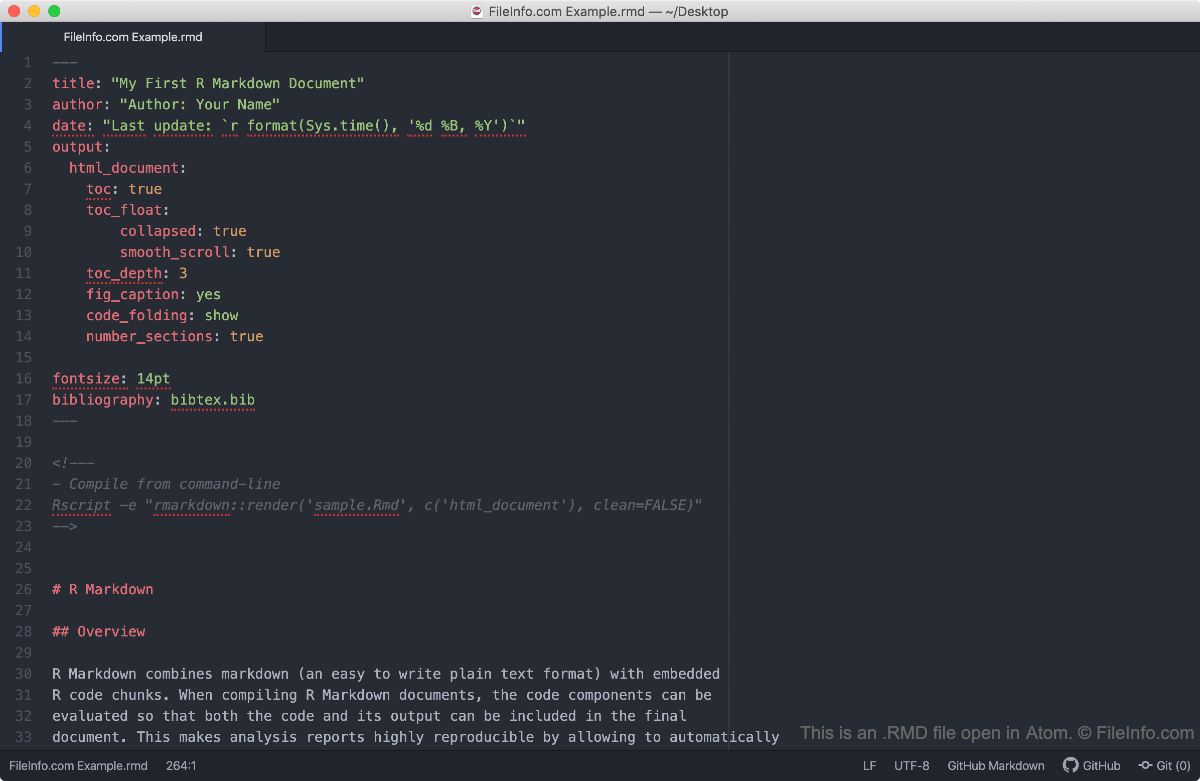
Schermafbeelding van een .rmd-bestand in Atom
RMD-bestand geopend in Atom

Because RMD files can contain both markdown-formatted text and chunks of R code, statisticians and data scientists use them to create dynamic presentations, reports, and other documents. This allows these users to write their reports, embed R-based data summaries within them, and export the reports to a more usable format, using just one file.

Using RStudio, you can convert R Markdown files to a number of other formats, including .HTML, .PDF, .DOCX, and .PPTX. When R Studio converts an RMD file to another format, it executes the code contained within the file, creating the graphs or other data summaries that appear in the converted file.

Een RMD-bestand openen

Typically, you should open an RMD file in RStudio, as it supports RMD syntax and can actually execute the code contained within an RMD file. However, if you wish to simply view the contents of an RMD file, you can open it using any text editor.

Open meer dan 400 bestandsformaten met File Viewer Plus.Gratis downloaden

Programma's die RMD-bestanden openen of ernaar verwijzen

Windows
Gratis
Gratis
Mac
Gratis
Gratis
Linux
Gratis
Gratis
Categorie: Gegevens
Bijgewerkt: 2020-07-07

Reference Manager Data File

Ontwikkelaar Thomson Reuters
Populariteit
3.2  |  5 Stemmen
 

An RMD file is a data file created by Reference Manager, an application used for creating bibliographies. It saves the references for the bibliography and is also saved with a separate .RMX index file. RMD files are used for storing citations and other references.

Programma's die RMD-bestanden openen

Categorie: Gegevens
Bijgewerkt: 2020-07-07

RealPlayer Media File

Ontwikkelaar RealNetworks
Populariteit
3.2  |  5 Stemmen
 

An RMD file is a media file used by RealPlayer, a multimedia playback and streaming program. It may include audio or video data, or a reference to a streaming media location that is played back while it is downloaded. RMD files are often used for standalone audio and video, or Internet radio and video streams.

Programma's die RMD-bestanden openen

Categorie: Video
Bijgewerkt: 2020-07-07

RED Metadata File

Ontwikkelaar RED
Populariteit
2.8  |  6 Stemmen
 

An RMD file is a video metadata file created by REDCINE-X, a video editing application for RED digital video cameras. It contains edits, such as color and sharpness adjustments, for a raw REDCODE .R3D video file. RMD files are similar to .XMP files in that they enable a user to perform non-destructive edits on an R3D video file.

Meer informatie

RED developed the RED Metadata (RMD) format to not only provide nondestructive editing capabilities, but the format also allows you to manage "looks" for R3D video. For example, if you have created a Sepia aesthetic that you want to load directly in a compatible RED video camera, you can save your settings by selecting File → Save Current Look... in REDCINE-X.

If you do not explicitly save an RMD file to load in a digital camera, REDCINE-X automatically generates an RMD file to store your edits when you modify the properties of R3D video. REDCINE-X saves the RMD file in the same directory as the R3D file and names it the same as the R3D file. For example, the RMD file accompanying a video.r3d file is named video.rmd.

OPMERKING: If you delete the RMD file, you will lose all edits to the corresponding R3D video file.

Een RMD-bestand openen

RMD files are not intended to be opened manually. Instead, they are referenced by the application that supports the corresponding R3D video file for which the RMD file stores metadata. REDCINE-X (multiplatform) and Adobe Premiere Pro (multiplatform) support R3D video and their RMD metadata files.

Since RMD files are saved in plain text, you can open them with a text editor, such as Microsoft Notepad (Windows) and Apple TextEdit (Mac) to view and edit the metadata.

Programma's die RMD-bestanden openen

Windows
Gratis
Gratis proefversie
Mac
Gratis
Gratis proefversie
Categorie: Video
Bijgewerkt: 2022-09-21

Geverifieerd door FileInfo.com

Het FileInfo.com-team heeft onafhankelijk onderzoek gedaan naar alle bestandsformaten en softwareprogramma's die op deze pagina worden vermeld. Ons doel is 100% nauwkeurigheid en we publiceren alleen informatie over bestandstypen die we hebben geverifieerd.

Als u aanvullingen of updates voor deze pagina wilt voorstellen, kunt u het ons laten weten.