.ESD Bestandsextensie

Windows Electronic Software Download

Ontwikkelaar Microsoft
Populariteit
4.2  |  72 Stemmen
 

Wat is een ESD-bestand?

An ESD file contains an encrypted Windows update or upgrade file. Microsoft's Electronic Software Download (ESD) program creates ESD files when you purchase Windows through the Microsoft Store or update Windows using Microsoft Upgrade Assistant.

Meer informatie

ESD files are encrypted .WIM files. Electronic Software Download creates ESD files used to install, update, or upgrade Windows. For example, Microsoft Upgrade Assistant uses ESD files to upgrade users to new versions of Windows.

You may find ESD files in the following directory:

C:/​Users/​YourUserName/​AppData/​Local/​Microsoft/​WebSetup/​Download

Veelvoorkomende .ESD-bestandsnamen

WinPayload.esd - The file Microsoft Upgrade Assistant uses to upgrade to Windows 8.

Install.esd - The file Microsoft Upgrade Assistant uses to upgrade to Windows 10.

Een ESD-bestand openen

ESD files are not meant to be opened. Instead, Windows Upgrade and Update Assistant utilities access ESD files to upgrade Windows to newer versions or updates.

However, you can also open ESD files with several archive programs, such as wimlib, 7-Zip, and PeaZip.

Open meer dan 400 bestandsformaten met File Viewer Plus.Gratis downloaden

Programma's die ESD-bestanden openen of ernaar verwijzen

Windows
Microsoft Windows Upgrade Assistant
Microsoft Windows Update Assistant
Gratis
Gratis
Gratis
Linux
Gratis
Categorie: Overig
Bijgewerkt: 2022-06-13

Easy Street Draw Casebook File

Ontwikkelaar SmartSafety Software
Populariteit
2.0  |  1 Stem
 

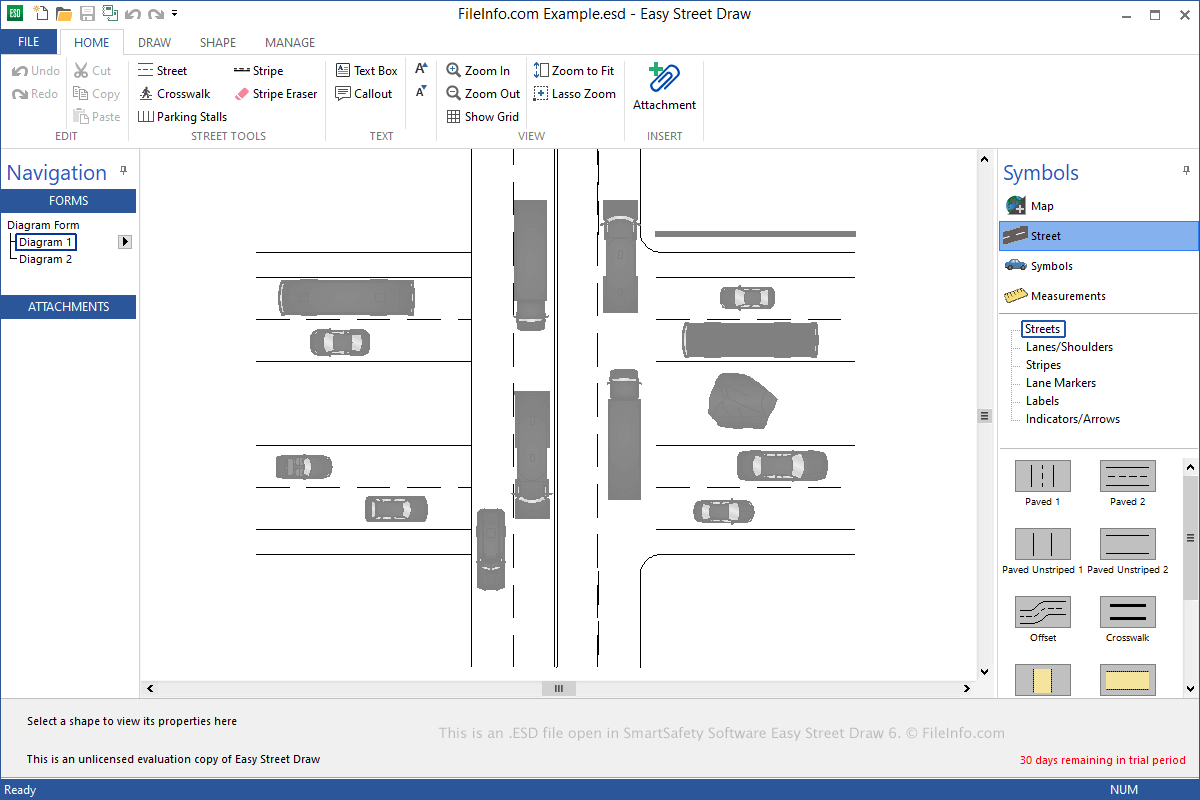
An ESD file contains a casebook, which includes one or more diagrams created by Easy Street Draw, a tool used to re-create traffic collisions. It stores one or more drawings, which include streets, symbols, and text that depict a traffic incident. ESD files may also include image, audio, video, or .PDF file attachments that enhance the depiction of the collision.

Meer informatie

Schermafbeelding van een .esd-bestand in SmartSafety Software Easy Street Draw 6
ESD-bestand geopend in SmartSafety Software Easy Street Draw 6

Local and state public officials commonly use Easy Street Draw to re-create and document traffic incidents. You can use the software to create streets from scratch or generate them from imported maps and add symbols, such as vehicles, pedestrians, and roadway objects, to illustrate the collision(s).

When saving a casebook, Easy Street Draw creates an ESD file to store the contents. After saving the file, you can close it, re-open it, and continue editing the casebook.

To save a casebook as an ESD file with Easy Street Draw, select File → Save or Save As. When you are done editing your casebook, you can select File → Export to export an ESD file as an .XML, PDF, or .PPT file.

Een ESD-bestand openen

You can open ESD files with Easy Street Draw in Windows. To open an ESD file, select File → Open.

Programma's die ESD-bestanden openen

Windows
Categorie: Gegevens
Bijgewerkt: 2021-06-09

Geverifieerd door FileInfo.com

Het FileInfo.com-team heeft onafhankelijk onderzoek gedaan naar alle bestandsformaten en softwareprogramma's die op deze pagina worden vermeld. Ons doel is 100% nauwkeurigheid en we publiceren alleen informatie over bestandstypen die we hebben geverifieerd.

Als u aanvullingen of updates voor deze pagina wilt voorstellen, kunt u het ons laten weten.