.NDX 파일 확장자

dBASE Index (Legacy)

개발사 dBASE
인기도
3.8  |  12 투표
 

NDX 파일이란 무엇인가요?

An NDX file is an index file used by previous versions of dBASE, a popular database management system. It is associated with a database (.DBF) file and contains pointers to data stored in that database. In version IV of dBase, the .MDX format replaced the NDX format.

추가 정보

Application developers and database managers use dBASE to create, maintain, and access databases. Optionally, dBASE users can create one or more index files for a dBASE database. These files contain select data and pointers to associated full records in the database, which dBASE can use to retrieve those records more quickly.

In versions III and below, dBASE saved index files in the NDX format. Notably, dBASE did not automatically update a database's associated NDX file(s) when a user made changes to the database. Instead, the user had to manually command dBASE to update the NDX file(s). In contrast, dBASE IV and above automatically update index files when a user makes a change to an associated database.

참고: dBASE stands for "dataBased Intelligence."

NDX 파일을 여는 방법

You can open an NDX file with dBASE (Windows) while editing an associated database.

File Viewer Plus(으)로 400개 이상의 파일 형식을 여세요.무료 다운로드

NDX 파일을 여는 프로그램

Windows
무료 체험판
카테고리: 데이터
업데이트: 2023-10-18

Neat 5 Archive File

개발사 The Neat Company
인기도
3.0  |  7 투표
 

Archive file created by Neat 5, a digital document organizer; contains an exported copy of a Neat folder of documents or single document, such as a receipt or recipe, that can be shared between Neat users.

추가 정보

To create a NDX file, select the folder under the cabinet that you want to export, click Export → To Neat File → Selected Folder... (for entire folder) or Selected Item(s)... (for selected items from a folder), choose the save location, and click Save.

To import a NDX file, select Import → Neat File..., click "Browse," navigate to your NDX file, and click Open.

참고: The NDX file is similar to .NRX, .NRT, and .NRF files, which are used by older versions of Neat.

NDX 파일을 여는 프로그램

Windows
Mac
카테고리: 데이터
업데이트: 2016-05-12

MyDraw XML Drawing

개발사 Nevron Software
인기도
2.0  |  1 투표
 

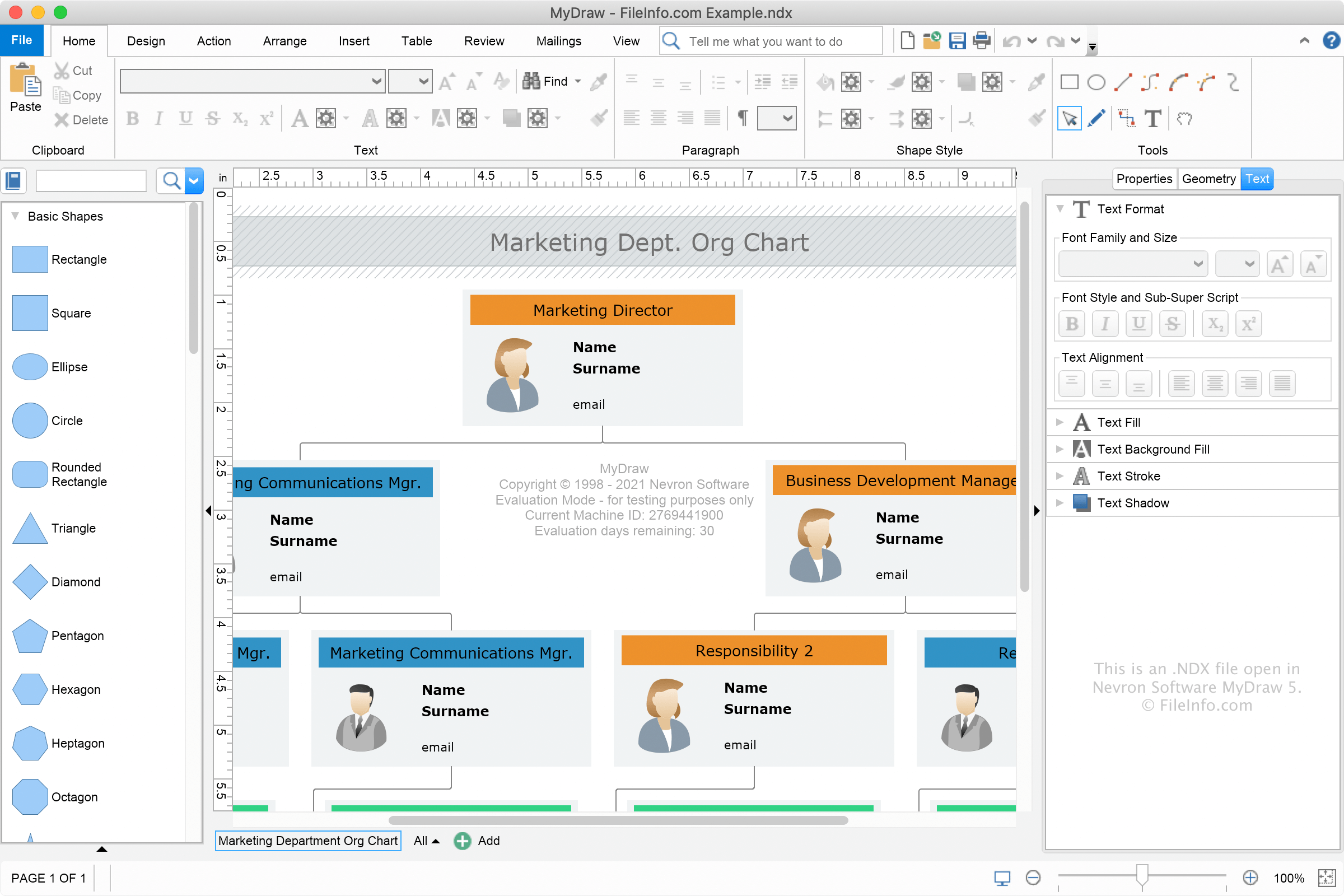
An NDX file is a drawing created by Nevron Software MyDraw, an application for creating various diagrams and technical illustrations. It stores text, shapes, lines, and other objects arranged together on a free-form canvas. NDX files are similar to MyDraw .NDB drawings but are saved in XML format instead of binary format.

추가 정보

Nevron Software MyDraw 5에서 열린 .ndx 파일의 스크린샷
Nevron Software MyDraw 5에서 열린 NDX 파일

MyDraw utilizes the NDX and NDB drawing formats for saving various types of diagrams, such as flowcharts, organizational charts, family trees, mind maps, and data flow processes. You can open, edit, save, and convert NDX drawings with MyDraw.

You can create an NDX file with MyDraw by selecting File → Save As..., then choose the "MyDraw XML Drawing" format. If you want to save the drawing in a different format, such as the "MyDraw Binary Drawing" format or the "MyDraw XML Drawing Template" format, choose another format from the dropdown menu.

NDX 파일을 여는 방법

You can open NDX files with Nevron Software MyDraw in Windows and macOS by selecting File → Open.

How do I convert an NDX file?

After you finish modifying an NDX drawing with MyDraw, you can convert it to various formats, such as .JPEG, .PNG, .EMF, .SVG, .VSDX, .DXF, and .PDF. To convert an NDX file, select File → Export.

NDX 파일을 여는 프로그램

Windows
무료 체험판
Mac
무료 체험판

검증자 FileInfo.com

FileInfo.com 팀 이 페이지에 나열된 모든 파일 형식과 소프트웨어 프로그램을 독자적으로 조사했습니다. 저희의 목표는 100% 정확성이며, 검증한 파일 유형에 대한 정보만 게시합니다.

이 페이지에 추가하거나 업데이트할 내용을 제안하고 싶으시면 알려 주세요.