.DIP 파일 확장자

DipTrace Printed Circuit Board File

개발사 Novarm
인기도
3.4  |  10 투표
 

DIP 파일이란 무엇인가요?

A DIP file contains a printed circuit board (PCB) created by DipTrace, a schematic and PCB design program. It stores a PCB layout, which includes one or more layers of electrical wires, central processors, conductive tracks, and other electrical component connections.

추가 정보

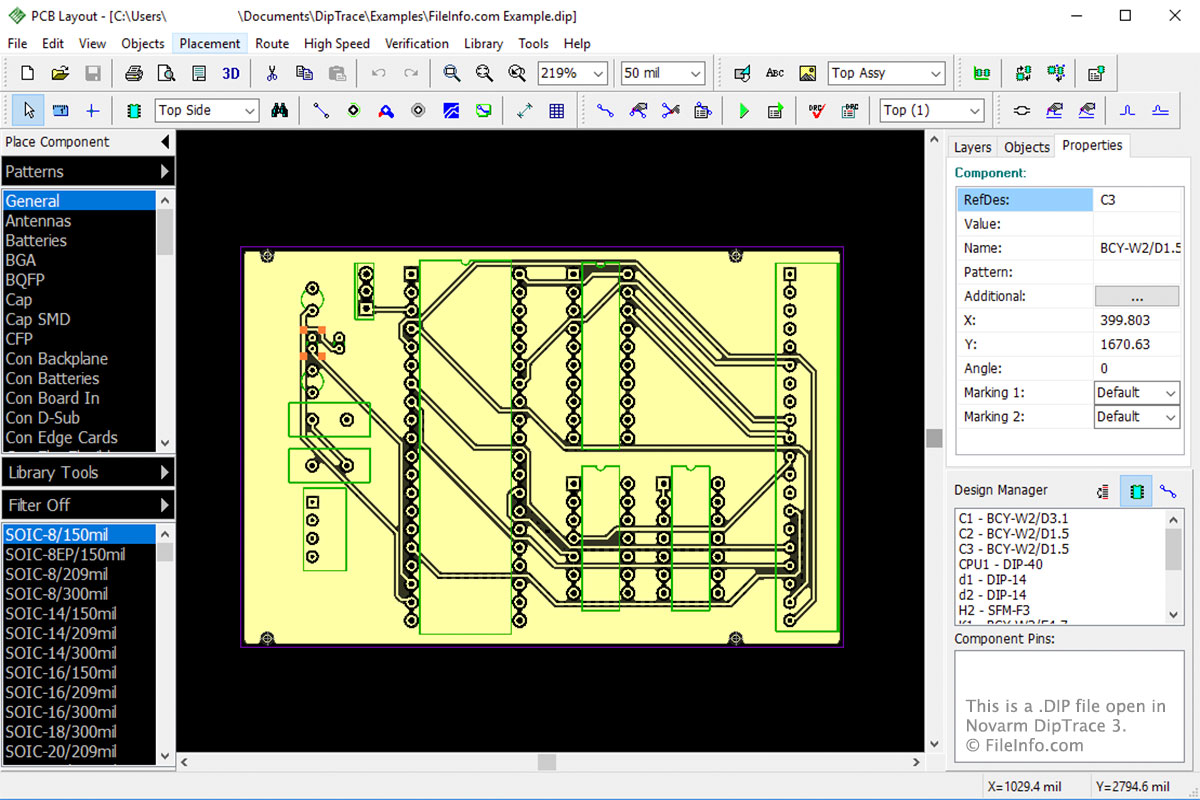
Novarm DipTrace 3에서 열린 .dip 파일의 스크린샷
Novarm DipTrace 3에서 열린 DIP 파일

DipTrace consists of four modules:

  • Schematic Capture Editor
  • PCB Layout Editor
  • Component Editor
  • Pattern Editor

The DIP file is the main file type associated with the PCB Layout Editor. The module allows you to design the layout of your PCB then save it in the DIP file. When you finish designing your PCB layout and verify that it is valid, you can order it through DipTrace. To do this, select File → Order PCB → Place Order are used for printing the physical PCB.

File Viewer Plus(으)로 400개 이상의 파일 형식을 여세요.무료 다운로드

DIP 파일을 여는 프로그램

Windows
무료 체험판
Mac
무료 체험판
카테고리: 데이터
업데이트: 2017-09-15

Dr. DivX Encoding Profile

개발사 DivX
인기도
2.0  |  1 투표
 

A DIP file is an encoding profile created by Dr. DivX, a .DIVX video creation tool. It contains text-based settings that control how Dr. DivX encodes videos. DIP files can be opened and edited in any text editor, but are meant to be opened and edited in Dr. DivX's Profile Editor.

추가 정보

Dr. DivX is a discontinued Windows program that allows users to import video files and convert them to DivX videos. Users can then play their DivX videos on DivX media players and devices, such as DivX Player.

If a user wants to change the default settings Dr. DivX uses to encode converted videos, they can do so using the Dr. DivX's Profile Editor. In the Profile Editor, users can adjust the audio, bitrate, and other settings Dr. DivX uses when creating DivX videos. Users can also choose from preset encoding profiles, which align with DivX's various certification settings.

If a user wants to save a set of custom encoding settings, so they can reuse those settings in the future, they can do so by selecting File → Save from the Profile Editor's menu bar. This will save the user's settings in a DIP file. DIP files are plain text files that can be opened and edited in any text editor. However, it is best to open DIP files and edit the settings they contain in Dr. DivX's Profile Editor.

DIP 파일을 여는 방법

DIP files are meant to be opened in Dr. DivX's Profile Editor. To open a DIP file in the Profile Editor, select File → Open. Then, navigate to and open your DIP file.

DIP 파일을 여는 프로그램

Windows
무료
Mac
OS에 포함됨
Linux
무료
카테고리: 설정
업데이트: 2021-07-08

검증자 FileInfo.com

FileInfo.com 팀 이 페이지에 나열된 모든 파일 형식과 소프트웨어 프로그램을 독자적으로 조사했습니다. 저희의 목표는 100% 정확성이며, 검증한 파일 유형에 대한 정보만 게시합니다.

이 페이지에 추가하거나 업데이트할 내용을 제안하고 싶으시면 알려 주세요.