.DIP ファイル拡張子

DipTrace Printed Circuit Board File

開発元 Novarm
人気度
3.4  |  10 
 

DIPファイルとは?

A DIP file contains a printed circuit board (PCB) created by DipTrace, a schematic and PCB design program. It stores a PCB layout, which includes one or more layers of electrical wires, central processors, conductive tracks, and other electrical component connections.

詳細情報

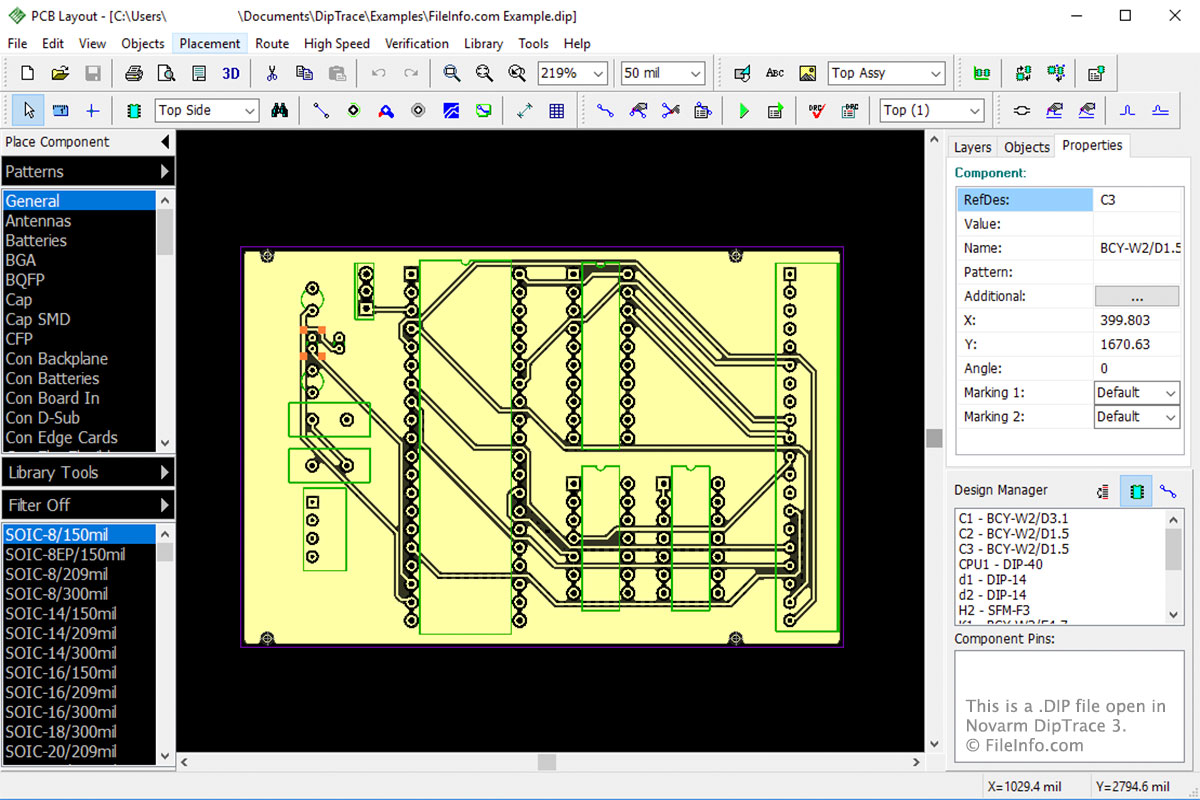
Novarm DipTrace 3で開いた.dipファイルのスクリーンショット
Novarm DipTrace 3で開いたDIPファイル

DipTrace consists of four modules:

  • Schematic Capture Editor
  • PCB Layout Editor
  • Component Editor
  • Pattern Editor

The DIP file is the main file type associated with the PCB Layout Editor. The module allows you to design the layout of your PCB then save it in the DIP file. When you finish designing your PCB layout and verify that it is valid, you can order it through DipTrace. To do this, select File → Order PCB → Place Order are used for printing the physical PCB.

File Viewer Plusで400種類以上のファイル形式を開けます。無料ダウンロード

DIPファイルを開くプログラム

Windows
無料体験版
Mac
無料体験版
カテゴリ: データ
更新日: 2017-09-15

Dr. DivX Encoding Profile

開発元 DivX
人気度
2.0  |  1 
 

A DIP file is an encoding profile created by Dr. DivX, a .DIVX video creation tool. It contains text-based settings that control how Dr. DivX encodes videos. DIP files can be opened and edited in any text editor, but are meant to be opened and edited in Dr. DivX's Profile Editor.

詳細情報

Dr. DivX is a discontinued Windows program that allows users to import video files and convert them to DivX videos. Users can then play their DivX videos on DivX media players and devices, such as DivX Player.

If a user wants to change the default settings Dr. DivX uses to encode converted videos, they can do so using the Dr. DivX's Profile Editor. In the Profile Editor, users can adjust the audio, bitrate, and other settings Dr. DivX uses when creating DivX videos. Users can also choose from preset encoding profiles, which align with DivX's various certification settings.

If a user wants to save a set of custom encoding settings, so they can reuse those settings in the future, they can do so by selecting File → Save from the Profile Editor's menu bar. This will save the user's settings in a DIP file. DIP files are plain text files that can be opened and edited in any text editor. However, it is best to open DIP files and edit the settings they contain in Dr. DivX's Profile Editor.

DIPファイルの開き方

DIP files are meant to be opened in Dr. DivX's Profile Editor. To open a DIP file in the Profile Editor, select File → Open. Then, navigate to and open your DIP file.

DIPファイルを開くプログラム

Windows
Mac
OSに同梱
Linux
無料
カテゴリ: 設定
更新日: 2021-07-08

検証者 FileInfo.com

FileInfo.comチーム は、このページに掲載されているすべてのファイル形式とソフトウェアについて独自に調査しました。 私たちの目標は100%の正確性であり、検証済みのファイルタイプに関する情報のみを公開しています。

このページへの追加や更新をご提案いただける場合は、お知らせください。