.CPF ファイル拡張子

Cognos Project File

開発元 IBM
人気度
3.6  |  11 
 

CPFファイルとは?

Project file created by Cognos Framework Manager, a data modeling tool included with IBM Cognos Business Intelligence (BI) software; contains data "metamodels" that that organize BI data from underlying databases; provides the means to store data models that can be used for BI analysis.

File Viewer Plusで400種類以上のファイル形式を開けます。無料ダウンロード

CPFファイルを開くプログラム

Windows
カテゴリ: データ
更新日: 2011-10-31

Caesium Profile

開発元 SaeraSoft
人気度
3.8  |  4 
 

A CPF file is a settings profile created and used by Caesium, a free image compression tool for Windows. It contains a list of a user's Caesium settings, written in plain text. CPF files specify the compression settings, file format, resizing settings, and output directory Caesium uses while compressing images.

詳細情報

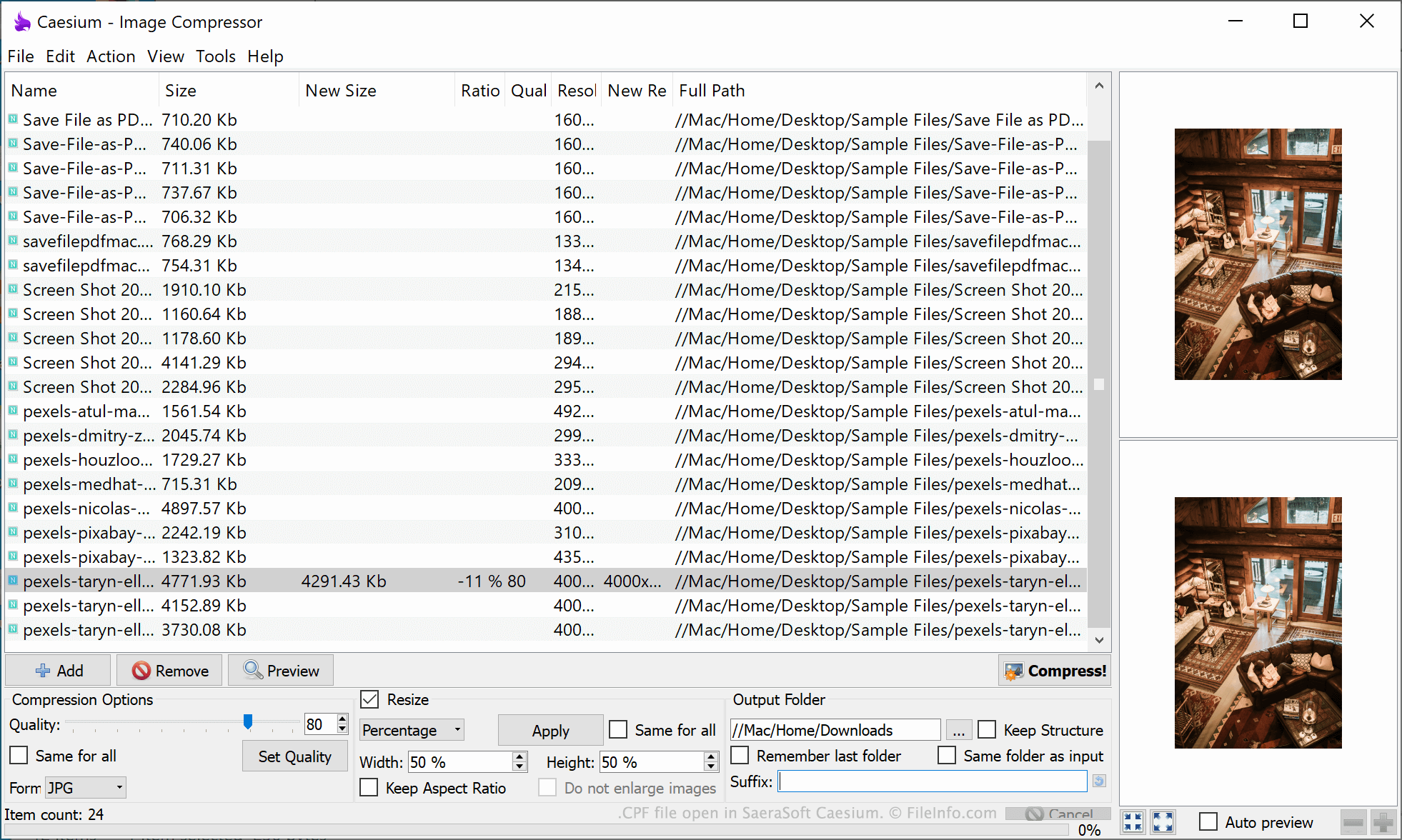
SaeraSoft Caesiumで開いた.cpfファイルのスクリーンショット
SaeraSoft Caesiumで開いたCPFファイル

Caesium is a free tool that allows users to compress, resize, and convert images. While manipulating images, users can specify a number of compression- and resizing-related settings. For example, users can choose their desired image quality, file format, and size. Users can also specify where Caesium should save compressed images.

If a user wants to save their current Caesium settings, so they can quickly apply the settings in the future, they can do so by selecting File → Save Profile... from Caesium's menu bar. This saves the user's settings in a CPF file.

CPF files are plain text files that, when opened in a text editor such as Microsoft Notepad, show a user's settings as a simple text list. CPF files always start with the header [Profile], before listing a user's quality, format, output, and resizing settings.

CPFファイルの開き方

You can open a CPF file in Caesium (Windows). To do so, select File → Load Profile... from Caesium's menu bar. Then, navigate to and open your CPF file.

If you do not have access to Caesium, or you just want to see the plain text information your CPF file contains, you can also open the file in any text editor, such as Microsoft Notepad (Windows) or Apple TextEdit (Mac).

CPFファイルを開くプログラム

Windows
Mac
OSに同梱
Linux
無料
カテゴリ: 設定
更新日: 2021-10-05

Cab Provisioning Format File

開発元 Microsoft
人気度
2.4  |  7 
 

File used to configure, or "provision," a Windows Mobile device; may contain settings for security, applications, and connectivity; saved in the .CAB format and includes data encoded from an XML file using the Makecab.exe program; used by manufacturers when configuring devices for vendors.

詳細情報

The process of provisioning takes place after the operating system is loaded onto the device.

CPFファイルを開く、または参照するプログラム

Windows
カテゴリ: 設定
更新日: 2011-10-31

Archicad Teamwork Draft Preferences File

開発元 GRAPHISOFT
人気度
1.0  |  1 
 

A CPF file contains preferences for a teamwork draft (.PLC file) created with GRAPHISOFT Archicad architectural designing software. It stores preferences, including working methods applied to the team project (.PLP file) and dimensions, calculation units, and rules for the team project design.

詳細情報

GRAPHISOFT Archicad is a building information modeling (BIM) application often used by professional architects. The software comes with tools to design, visualize, and document the appearance of buildings, including their interiors, exteriors, and landscapes.

Archicad also provides collaboration capabilities for working remotely with a team of other users via the GRAPHISOFT BIMcloud storage space. For example, through BIMcloud, you can create a PLP teamwork project file that team members can edit with access to the project.

If you would like to work on the teamwork project but not immediately apply your edits, you can save a draft of the teamwork project as a PLC file on your local machine, edit the draft, then send it to the teamwork project when ready. Archicad also saves the preferences for the PLC draft file in a CPF file.

CPFファイルの開き方

You can only open CPF files with GRAPHISOFT Archicad in Windows and macOS.

CPFファイルを開くプログラム

Windows
無料体験版
Mac
無料体験版
カテゴリ: 設定
更新日: 2023-03-29

検証者 FileInfo.com

FileInfo.comチーム は、このページに掲載されているすべてのファイル形式とソフトウェアについて独自に調査しました。 私たちの目標は100%の正確性であり、検証済みのファイルタイプに関する情報のみを公開しています。

このページへの追加や更新をご提案いただける場合は、お知らせください。