.CPF 文件扩展名

Cognos Project File

开发者 IBM
受欢迎程度
3.6  |  11 
 

什么是 CPF 文件?

Project file created by Cognos Framework Manager, a data modeling tool included with IBM Cognos Business Intelligence (BI) software; contains data "metamodels" that that organize BI data from underlying databases; provides the means to store data models that can be used for BI analysis.

使用File Viewer Plus打开 400 多种文件格式。免费下载

可打开 CPF 文件的程序

Windows
分类: 数据
更新时间: 2011-10-31

Caesium Profile

开发者 SaeraSoft
受欢迎程度
3.8  |  4 
 

A CPF file is a settings profile created and used by Caesium, a free image compression tool for Windows. It contains a list of a user's Caesium settings, written in plain text. CPF files specify the compression settings, file format, resizing settings, and output directory Caesium uses while compressing images.

更多信息

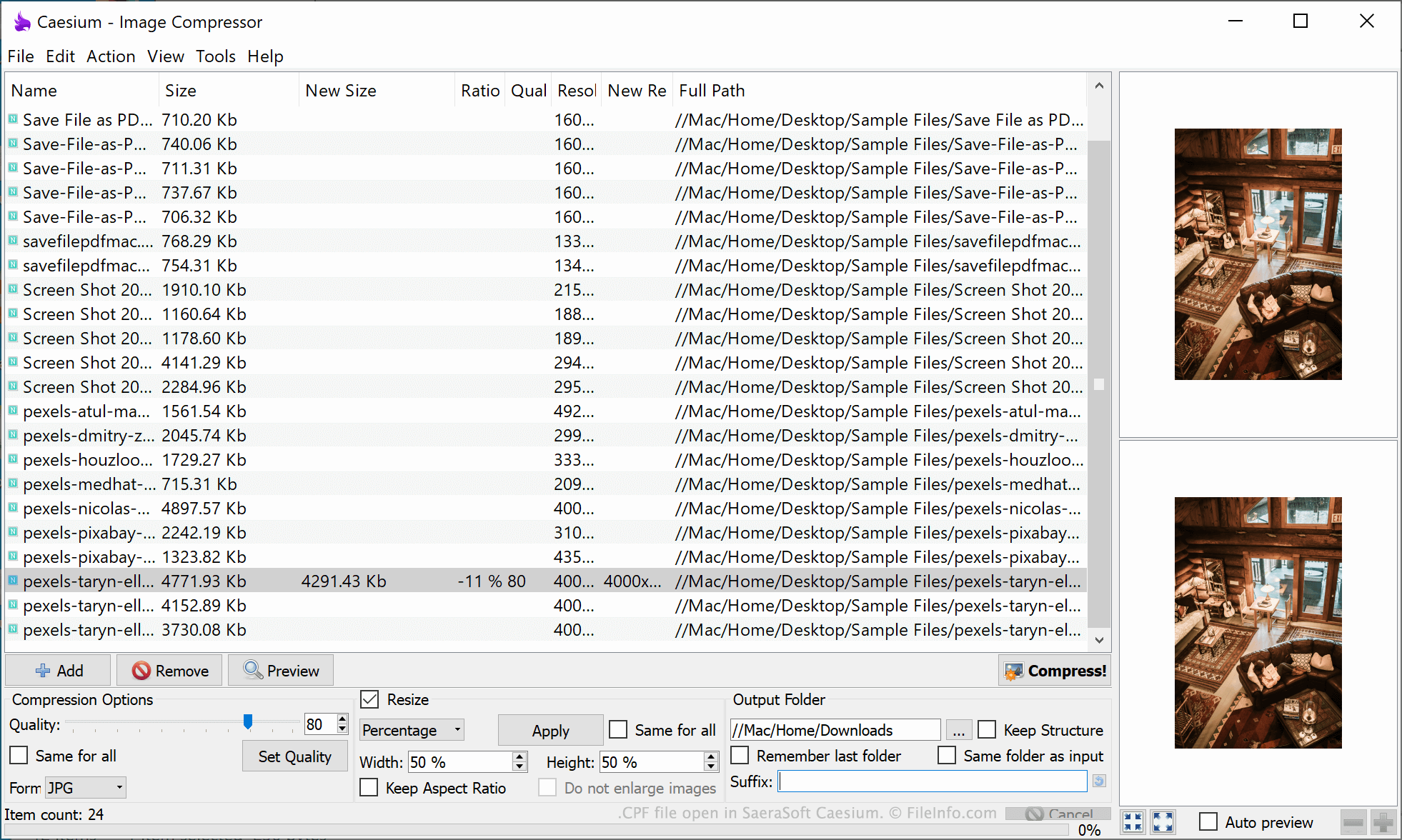
在 SaeraSoft Caesium 中打开的 .cpf 文件截图
在 SaeraSoft Caesium 中打开的 CPF 文件

Caesium is a free tool that allows users to compress, resize, and convert images. While manipulating images, users can specify a number of compression- and resizing-related settings. For example, users can choose their desired image quality, file format, and size. Users can also specify where Caesium should save compressed images.

If a user wants to save their current Caesium settings, so they can quickly apply the settings in the future, they can do so by selecting File → Save Profile... from Caesium's menu bar. This saves the user's settings in a CPF file.

CPF files are plain text files that, when opened in a text editor such as Microsoft Notepad, show a user's settings as a simple text list. CPF files always start with the header [Profile], before listing a user's quality, format, output, and resizing settings.

如何打开 CPF 文件

You can open a CPF file in Caesium (Windows). To do so, select File → Load Profile... from Caesium's menu bar. Then, navigate to and open your CPF file.

If you do not have access to Caesium, or you just want to see the plain text information your CPF file contains, you can also open the file in any text editor, such as Microsoft Notepad (Windows) or Apple TextEdit (Mac).

可打开 CPF 文件的程序

Windows
操作系统自带
Mac
操作系统自带
Linux
免费
分类: 设置
更新时间: 2021-10-05

Cab Provisioning Format File

开发者 Microsoft
受欢迎程度
2.4  |  7 
 

File used to configure, or "provision," a Windows Mobile device; may contain settings for security, applications, and connectivity; saved in the .CAB format and includes data encoded from an XML file using the Makecab.exe program; used by manufacturers when configuring devices for vendors.

更多信息

The process of provisioning takes place after the operating system is loaded onto the device.

可打开或引用 CPF 文件的程序

Windows
操作系统自带
分类: 设置
更新时间: 2011-10-31

Archicad Teamwork Draft Preferences File

开发者 GRAPHISOFT
受欢迎程度
1.0  |  1 
 

A CPF file contains preferences for a teamwork draft (.PLC file) created with GRAPHISOFT Archicad architectural designing software. It stores preferences, including working methods applied to the team project (.PLP file) and dimensions, calculation units, and rules for the team project design.

更多信息

GRAPHISOFT Archicad is a building information modeling (BIM) application often used by professional architects. The software comes with tools to design, visualize, and document the appearance of buildings, including their interiors, exteriors, and landscapes.

Archicad also provides collaboration capabilities for working remotely with a team of other users via the GRAPHISOFT BIMcloud storage space. For example, through BIMcloud, you can create a PLP teamwork project file that team members can edit with access to the project.

If you would like to work on the teamwork project but not immediately apply your edits, you can save a draft of the teamwork project as a PLC file on your local machine, edit the draft, then send it to the teamwork project when ready. Archicad also saves the preferences for the PLC draft file in a CPF file.

如何打开 CPF 文件

You can only open CPF files with GRAPHISOFT Archicad in Windows and macOS.

可打开 CPF 文件的程序

Windows
Mac
分类: 设置
更新时间: 2023-03-29

验证者 FileInfo.com

FileInfo.com 团队 独立研究了本页面列出的所有文件格式和软件程序。 我们的目标是达到 100% 的准确率,并且仅发布我们已验证过的文件类型信息。

如果您想为此页面提出新增或更新建议,请告诉我们