.SSP Dateiendung

Scala Server Page

Entwickler Scalate
Beliebtheit
4.3  |  12 Stimmen
 

Was ist eine SSP-Datei?

An SSP file is a webpage script created using syntax from HTML and Scala, a general-purpose programming language. It contains HTML code and embedded "Ssp" tags which are evaluated to page text. SSP files are used to generate static webpages.

Weitere Informationen

SSP files can be evaluated to HTML files using Scalate, a template engine used to generate web documents. Similar to PHP, ASP, and JSP parsers, Scalate checks for opening and closing tags that demarcate Scala code. SSP uses <% ... %> tags.

Über 400 Dateiformate öffnen mit File Viewer Plus.Kostenloser Download

Programme, die .SSP-Dateien öffnen oder referenzieren

Windows
Kostenlos
Kategorie: Web
Aktualisiert: 2021-01-11

SlideShow Creator Project File

Entwickler Bolide Software
Beliebtheit
3.7  |  6 Stimmen
 

Multimedia project created by SlideShow Creator, a free program used for making personal slideshows; saves references to digital images and audio files, as well as information about transitions and effects; can be exported to .AVI, .WMV, and .MKV formats and supports HD resolution.

Weitere Informationen

SlideShow Creator projects can be used for making slideshow videos for weddings, holidays, birthday parties, business presentations, and other purposes.

Programme, die .SSP-Dateien öffnen

Windows
Kategorie: Daten
Aktualisiert: 2013-03-18

Screensaver Producer Project File

Entwickler Axialis Software
Beliebtheit
1.8  |  5 Stimmen
 

Project file created by Screensaver Producer, a program used to create Windows screensavers; may contain text, images, shapes, animation settings, and other screensaver graphics properties; also supports video, slides, sprites, and Adobe Flash components.

Weitere Informationen

Screensaver Producer projects can be exported to .SCR files, which can be set as the Windows screensaver.

Programme, die .SSP-Dateien öffnen oder referenzieren

Windows
Kostenlose Testversion
Kategorie: Daten
Aktualisiert: 2011-03-01

Serato Studio Project

Entwickler Serato
Beliebtheit
3.0  |  1 Stimme
 

An SSP file is a project file created by Serato Studio, a digital audio workstation (DAW) available for Windows and macOS. It contains JSON-formatted text that specifies the project's settings, included audio tracks, and effects. Serato Studio stores each SSP file in a project-specific directory, which also includes backups of that project.

Weitere Informationen

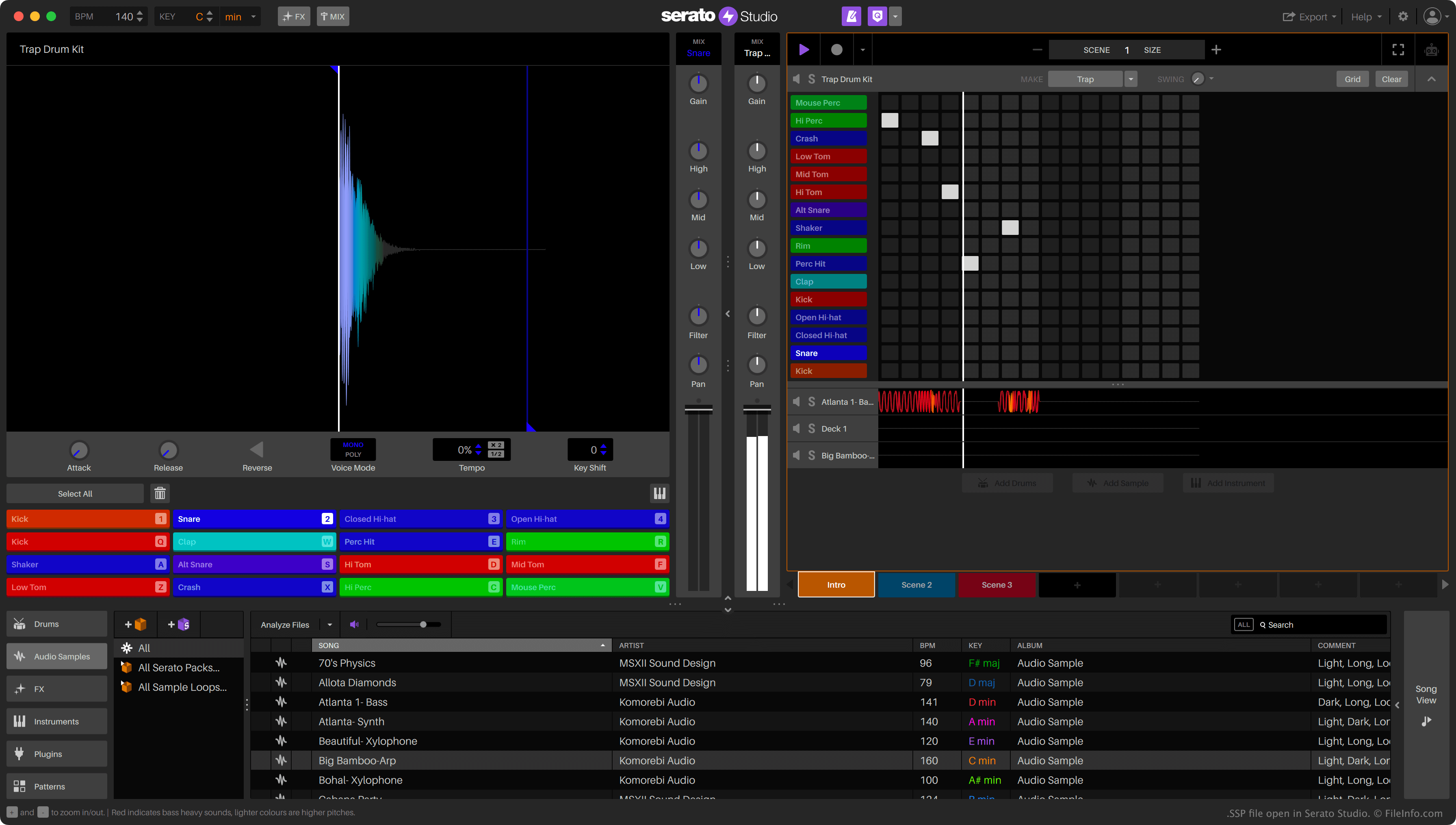
Screenshot einer .ssp-Datei in Serato Studio
SSP-Datei geöffnet in Serato Studio

Music producers use Serato Studio to create, edit, and mix audio samples into finished songs. Producers can also import existing audio files into Studio, to mix them into their songs.

Serato Studio saves producers' mixing projects as SSP files. These files specify a song's BPM, the file paths to the song's included audio samples, and the effects used to edit those samples. Notably, SSP files do not contain a copy of the audio used in the project. Therefore, if a producer moves an audio file referenced in an SSP file, Serato Studio will not be able to load that audio.

So öffnen Sie eine SSP-Datei

You can open an SSP file with Serato Studio (Windows, Mac). To do so, select File → Open Project... from the program's menu bar. Then, navigate to and open your SSP file.

If you want to view the JSON data an SSP file contains, you can open it with Microsoft Notepad (Windows), Apple TextEdit (Mac), or any other text editor. For example, you might want to open an SSP file with a text editor to see the locations of the audio files it references.

So konvertieren Sie eine SSP-Datei

You can use Serato Studio to export the song an SSP file contains as a .WAV or .MP3 file. To do so, select File → Export Song... from the program's menu bar. In the Export Song window, choose how you want to export your song, then click Export.

Programme, die .SSP-Dateien öffnen

Windows
Kostenlos+
Mac
Kostenlos+
Kategorie: Audio
Aktualisiert: 2023-02-27

Geprüft von FileInfo.com

Das FileInfo.com-Team hat alle auf dieser Seite aufgeführten Dateiformate und Softwareprogramme unabhängig recherchiert. Unser Ziel ist 100% Genauigkeit, und wir veröffentlichen nur Informationen zu Dateitypen, die wir überprüft haben.

Wenn Sie Ergänzungen oder Aktualisierungen zu dieser Seite vorschlagen möchten, teilen Sie es uns bitte.