

.CYBERDUCKSEGMENT Dateiendung
Cyberduck-Downloadsegment
| Entwickler | Cyberduck |
| Beliebtheit |
2,0 | 1 Stimme |
Was ist eine CYBERDUCKSEGMENT-Datei?
Eine CYBERDUCKSEGMENT-Datei enthält ein Segment einer von Cyberduck heruntergeladenen Datei. Cyberduck ist ein quelloffener FTP- und SFTP-Client. Cyberduck erstellt CYBERDUCKSEGMENT-Dateien beim Herunterladen von Dateien, die größer als 100 MB sind (wenn die Einstellung "Segmented downloads with multiple connections per file" in Cyberduck aktiviert ist). Der Client lädt die Segmente über mehrere Verbindungen herunter, um die Downloadgeschwindigkeit zu erhöhen, und fügt sie automatisch zusammen, nachdem alle Teile des Downloads vollständig heruntergeladen wurden.
Weitere Informationen
Der Cyberduck-Client ist für Windows und macOS verfügbar. Zusätzlich zu FTP und SFTP unterstützt er auch WebDAV und Cloud-Speicherdienste wie Google Drive, OneDrive, Dropbox und Backblaze B2.
Damit Cyberduck Dateien mit einer Größe von über 100 MB schneller als CYBERDUCKSEGMENT-Dateien herunterladen kann, müssen Sie die Einstellung "Segmented downloads with multiple connections per file" aktivieren. So gehen Sie dabei vor:
- Wählen Sie ( in macOS).
- Klicken Sie auf .
- Wählen Sie und aktivieren Sie dann das Kontrollkästchen "Segmented downloads with multiple connections per file" im Abschnitt "Downloads".
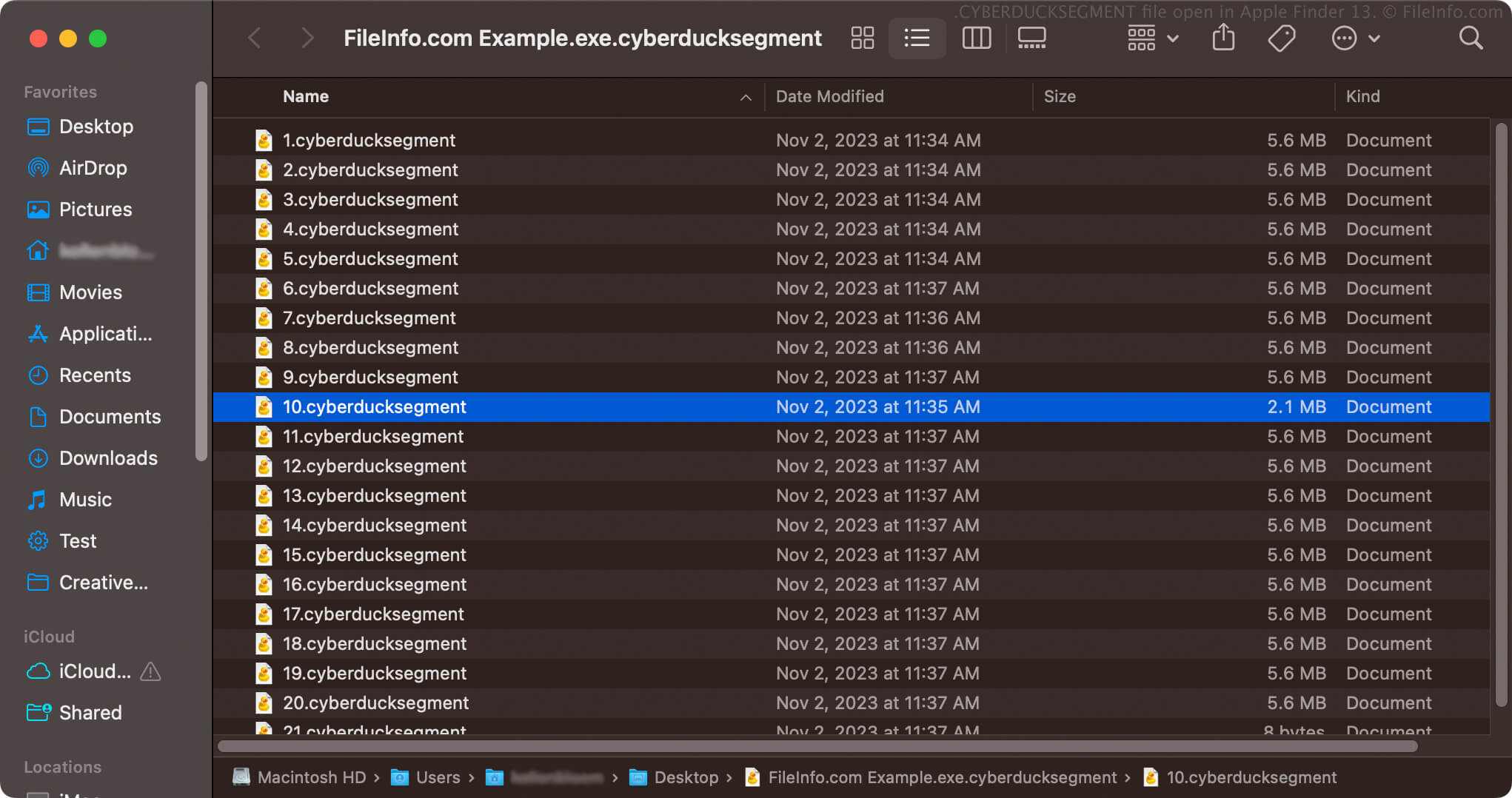
Nach der Aktivierung der Einstellung lädt Cyberduck Dateien, die größer als 100 MB sind, als einzelne CYBERDUCKSEGMENT-Archive herunter, in denen mehrere nummerierte Dateien mit der Dateierweiterung .cyberducksegment gespeichert sind. Wenn Sie beispielsweise eine .EXE-Datei namens example.exe herunterladen, lautet der Name des CYBERDUCKSEGMENT-Archivs example.exe.cyberducksegment. Es enthält mehrere nummerierte CYBERDUCKSEGMENT-Dateien (z. B. 1.cyberducksegment, 2.cyberducksegment und so weiter).
So öffnen Sie eine CYBERDUCKSEGMENT-Datei
Sie sollten nicht versuchen, CYBERDUCKSEGMENT-Dateien zu öffnen. Cyberduck fügt die Dateien automatisch zusammen, sobald alle Segmente vollständig heruntergeladen wurden. Nach dem Zusammenfügen werden die Dateien zu der einzelnen Datei, die Sie über Cyberduck heruntergeladen haben. Anschließend können Sie die Datei auf die entsprechende Weise öffnen.
Wenn Cyberduck nicht alle Teile der Datei herunterladen kann, können Sie die Datei nicht korrekt öffnen. Sie müssen die Datei erneut herunterladen oder den Download fortsetzen, um ihn abzuschließen, damit Cyberduck die CYBERDUCKSEGMENT-Dateien zur entsprechenden Datei zusammenfügen kann.
Sie sollten zwar nicht versuchen, CYBERDUCKSEGMENT-Dateien zu öffnen, aber Sie können ein CYBERDUCKSEGMENT-Archiv öffnen, um die darin gespeicherten nummerierten CYBERDUCKSEGMENT-Dateien anzuzeigen. Beispielsweise können Sie in macOS mit der rechten Maustaste auf ein CYBERDUCKSEGMENT-Archiv klicken und auswählen, um die darin enthaltenen segmentierten Dateien anzuzeigen.