.MAX Přípona souboru

3ds Max Scene File

Vývojář Autodesk
Popularita
3.3  |  207 Hlasů
 

Co je soubor MAX?

A MAX file is a three-dimensional scene created by Autodesk 3ds Max, a 3D modeling, animation, and rendering application. It contains one or more 3D models, including wireframes, textures, lighting effects, shading, animations, and other 3D design elements.

Další informace

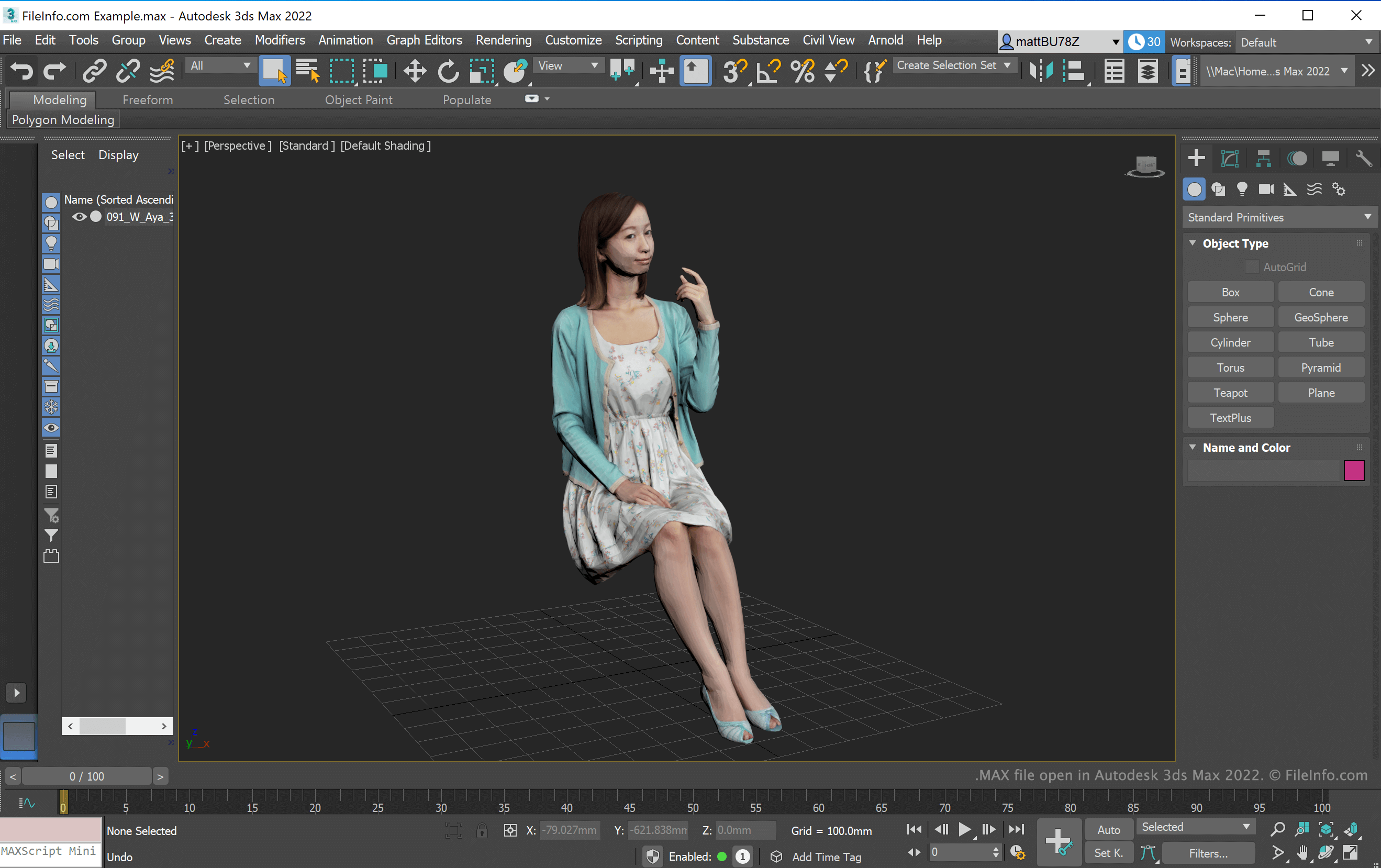
Snímek obrazovky souboru .max v Autodesk 3ds Max 2022
Soubor MAX otevřený v Autodesk 3ds Max 2022

Graphics professionals in the video game, film, television, and architecture industries use 3ds Max to create 3D models and animations. When you save a project with 3ds Max, the application creates a 3ds Max scene (MAX file) to store the contents. After saving the project, you can close it and re-open it to continue editing it.

POZNÁMKA: 3ds Max was previously known as 3D Studio MAX, which saved scenes in the MAX and .3DS formats. You can still export scenes as 3DS files with 3ds Max 2022 (and earlier versions).

Jak otevřít soubor MAX

You can open a MAX file with Autodesk 3ds Max in Windows. To do so, select File → Open... from the 3ds Max menu bar. Then, navigate to and open your MAX file.

Jak převést soubor MAX

Autodesk 3ds Max can convert MAX files to various formats, including the following file types:

  • .FBX - Autodesk FBX Interchange File
  • .AI - Adobe Illustrator Artwork
  • .DWG - AutoCAD Drawing
  • .DXF - Drawing Exchange Format
  • .IGS - IGES Drawing
  • .SAT - ACIS SAT 3D Model
  • .STL - Stereolithography File
Otevřete více než 400 formátů souborů pomocí File Viewer Plus.Stáhnout zdarma

Programy, které otevírají soubory MAX

Windows
Zkušební verze zdarma

OmniPage Scanned Document

Vývojář Nuance Communications
Popularita
3.5  |  15 Hlasů
 

Scanned image or text document saved by OmniPage scanning software; recognizes characters and words and detects page layout information using OCR software.

Další informace

OmniPage was previously developed by ScanSoft, which was acquired by Nuance Communications, Inc.

Programy, které otevírají soubory MAX

Windows
Zkušební verze zdarma
Linux
Zdarma

Action Replay Max Save File

Vývojář Datel
Popularita
3.1  |  23 Hlasů
 

Saved file created by Datel's Action Replay MAX, a PlayStation 2 (PS2) program used for applying cheats to PS2 games and creating PS2 saves; contains the saved state of a PS2 video game; can be saved to a hard drive or transferred to a PC using a USB flash drive.

Další informace

MAX files can be opened directly on the PlayStation 2 using the Memory Manager on the PS2 Action Replay MAX disc.

Programy, které otevírají soubory MAX

Windows
PS2 Save Converter  —  Ukončeno
Zdarma
Kategorie: Hra
Aktualizováno: 2007-11-14

PaperPort Scanned Document

Vývojář Nuance Communications
Popularita
3.1  |  19 Hlasů
 

A MAX file is a scanned document created by early versions of ScanSoft PaperPort, a document management and scanning application. It contains an image of a document captured with a scanner, such as letters, receipts, or forms, and may include annotations. PaperPort stores scanned pages in MAX files, allowing users to organize, view, and manage them within the program's document workspace.

Další informace

MAX files are saved in a proprietary image format used by early versions of PaperPort in the 1990s and 2000s, such as versions 7, 8, and 9. It was commonly used by home users and businesses to organize scanned documents, but the format is now considered legacy, as newer versions of PaperPort typically save documents in the .PDF format.

POZNÁMKA: PaperPort was originally developed by Visioneer. The company became ScanSoft in 1999, which later became Nuance Communications, then Kofax, and is now part of Tungsten Automation.

Jak otevřít soubor MAX

You can open a MAX file with compatible versions of PaperPort, such as 7, 8, and 9. However, these versions are no longer developed.

Programy, které otevírají soubory MAX

Windows
ScanSoft PaperPort  —  Ukončeno

Ověřil FileInfo.com

Tým FileInfo.com nezávisle prozkoumal všechny formáty souborů a programy uvedené na této stránce. Naším cílem je 100% přesnost a zveřejňujeme pouze informace o typech souborů, které jsme ověřili.

Pokud chcete navrhnout doplnění nebo aktualizaci této stránky, dejte nám vědět.