.INK Extensão de arquivo

Mimio Notebook

Desenvolvedor Mimio
Popularidade
3.7  |  94 Votos
 

O que é um arquivo INK?

An INK file is a whiteboard drawing created by Boxlight MimioStudio, an interactive whiteboard program used by teachers and students. It contains some combination of notes, diagrams, charts, drawings, images, and videos intended to be displayed on an electronic whiteboard. INK files are created by MimioStudio's Mimio Notebook tool.

Mais informações

Boxlight MimioStudio is a suite of tools that allows teachers and students to create, show, and interact with electronic whiteboard presentations. MimioStudio includes a tool called Mimio Notebook, which teachers use to create drawings, charts, slides, and other items they can present on a whiteboard. These presentations are saved as Mimio Notebook files, which use the .ink file extension.

INK files can contain any number of notebook pages, which can be shown and paged through on a whiteboard. Pages and objects on pages (such as drawings, text, and videos) can be moved within a notebook as teachers see fit. Teachers can also copy images and other select content from a notebook to other applications, such as Microsoft Office programs. If a teacher needs to share an INK file with a student or other teacher that does not have access to Mimio Notebook, they can export the INK file as an .HTML, .JPEG, .PNG, .GIF, .TIFF, or .PDF file.

NOTA: INK files created in newer versions of MimioStudio may not open in older versions of MimioStudio, because some MimioStudio features are not compatible across versions.

Como abrir um arquivo INK

You can open an INK file with the Mimio Notebook tool included in Boxlight MimioStudio. To do so:

  1. From within MimioStudio, open Mimio Notebook.
  2. Select Mimio Notebook's Open button.
  3. Navigate to and open your INK file.

How do I convert an INK file to other formats?

To convert a Mimio Notebook (INK file) to another file format:

  1. Open the INK file in Mimio Notebook.
  2. Select Mimio Notebook's Save button.
  3. When the Save As window appears, select the Save as type dropdown menu. Then, select the format you want to convert your INK file to.
  4. Select Save. A copy of your INK file will be saved in the format you selected in step 3.
Abra mais de 400 formatos de arquivo com File Viewer Plus.Download gratuito

Programas que abrem arquivos INK

Windows
Teste grátis
Mac
Teste grátis
Linux
Teste grátis
Categoria: Dados
Atualizado: 2021-03-24

InkML Image

Desenvolvedor W3C
Popularidade
3.5  |  17 Votos
 

Digital pen drawing saved using the Inke Markup Language (InkML), an XML file format used to save digitally drawn images and notes; contains a vector graphic stored as one or more sequences of connected points.

Mais informações

INK files are used for storing pen strokes and redrawing them using trace functions. They can be resized without losing the quality of the original pen stroke curves since the trace functions interpolate between points.

Programas que abrem ou fazem referência a arquivos INK

Windows
Linux

Pantone Reference File

Desenvolvedor Pantone
Popularidade
2.5  |  13 Votos
 

An INK file is a color or ink definition file used by several design applications, storing information about specific color values or ink settings used in a project. Designers and print professionals may use INK files to maintain consistent color appearance across digital or print workflows, depending on the software that created them.

Mais informações

INK files are typically found in proprietary or application-specific color management systems, where they store ink or palette-related data used in design or publishing projects. Their structure and purpose can vary significantly across software environments, and they are not part of a widely standardized cross-platform color format family.

In many modern workflows, color data is more commonly handled using standardized formats, such as .ICC profiles or .ASE swatch libraries, rather than INK files. As a result, INK files are generally dependent on specific software ecosystems and are not widely supported across current design applications.

Como abrir um arquivo INK

You can open INK files with CorelDRAW Graphics Suite. However, support may vary in modern versions of the software.

Programas que abrem arquivos INK

Windows

Pocket PC Handwritten Note

Desenvolvedor Pocket PC
Popularidade
2.8  |  8 Votos
 

Textual note or drawing created on a Pocket PC PDA using a digital pen; saved in a proprietary vector image format, which makes it possible to scale the drawing without losing quality.

Programas que abrem arquivos INK

Windows
InkNote Manager

Inker Image

Desenvolvedor Inker
Popularidade
3.0  |  3 Votos
 

An INK file is an image created using Inker, a vector art application available online and for Chrome, Android, and macOS devices. It contains JSON-formatted text used to show a vector graphic in Inker. INK files can be used to export images from Inker as .PNG, .SVG, or .EPS files.

Mais informações

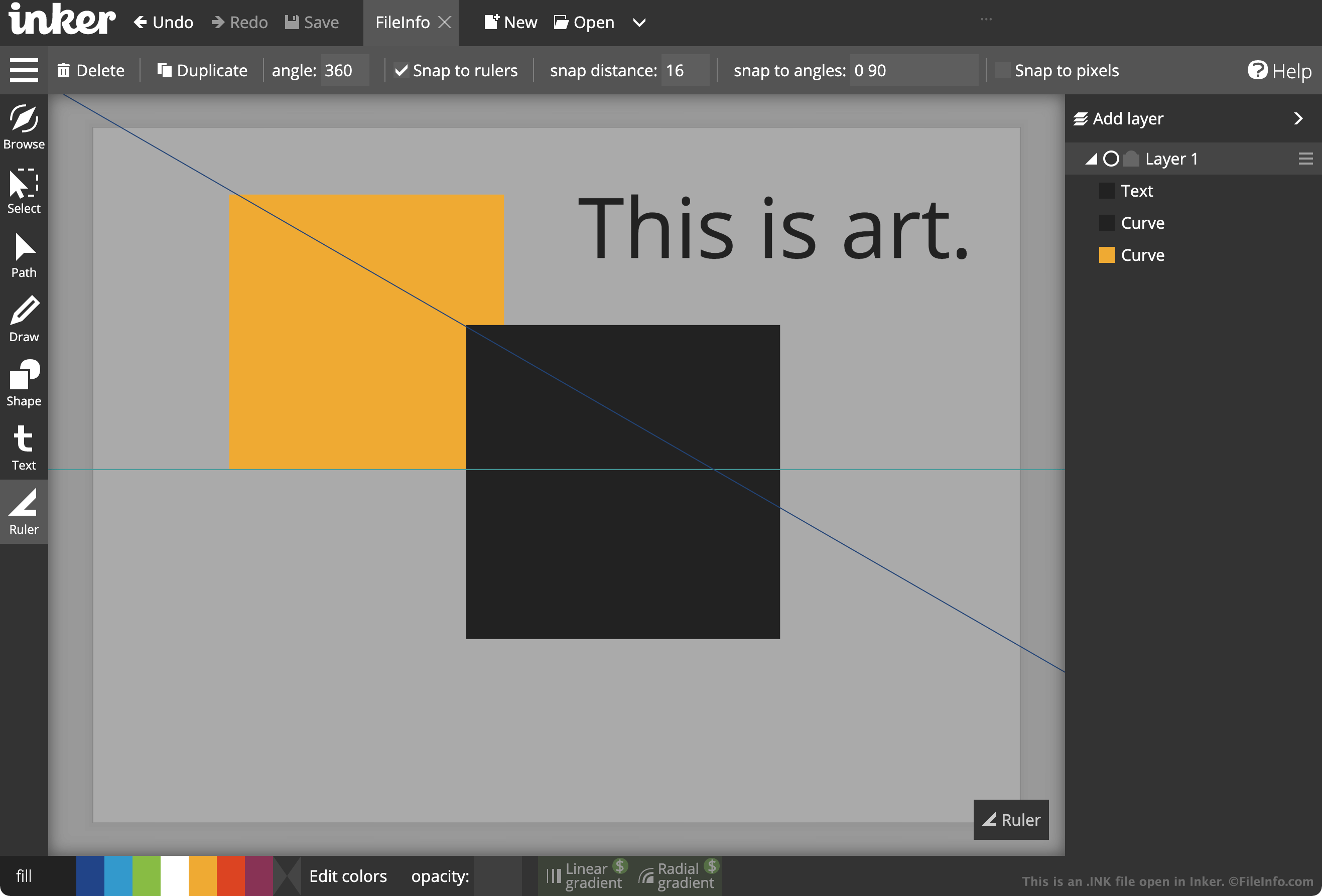
Captura de tela de um arquivo .ink em Inker
Arquivo INK aberto em Inker

Artists and graphic designers use Inker to create logos, mockups, drawings, and other images. If an artist wants to save a copy of an in-process Inker image to their desktop, so they can open and edit the image again later, they can click Inker's Save button. This saves the artist's image as an INK file.

When opened in Inker, INK files show the vector graphic an artist has created. The graphic may include lines, shapes, text, and ruler guidelines. When opened in a text editor, such as Microsoft Notepad or Apple TextEdit, INK files show the JSON-formatted text Inker "reads" to determine how an image should appear. For example, the "width and "height" settings listed in an INK file control how large an Inker image is. The remainder of the file's text specifies what layers, lines, shapes, text, and guidelines appear in the image.

After an artist finishes creating an image in Inker, they can export the image as a PNG, SVG, or EPS file. To do so, they must click the application's hamburger menu and then select the applicable Export button. All users can export Inker images as PNG files, but only paid users can export Inker images as SVG or EPS files.

Como abrir um arquivo INK

You can open an INK file (Inker Image) in Inker, which is available as a web application and for Chrome, Android, and macOS devices. To open an INK file in Inker, select Open from the program's menu bar. Then, navigate to and open your INK file.

Because INK files are plain text files, you can also open them in any text editor. This will show you the JSON-formatted text that Inker translates into a vector graphic. This may be useful if you do not have access to Inker but want to learn more about the image an INK file describes.

Programas que abrem arquivos INK

Windows
Mac
Grátis+
Linux
Web
Grátis+
Chrome OS
Grátis+
Incluído com o sistema operacional

Microsoft Journal Document

Desenvolvedor Microsoft
Popularidade
3.5  |  2 Votos
 

A INK file is a document created by Microsoft Journal, a note-taking application designed for stylus and touch input. It contains one or more pages of a journal in the Ink Serialized Format (ISF), which includes handwriting and drawings saved as a series of vector-based strokes, with each stroke defined by X and Y coordinates, pressure sensitivity, stroke width, and pen attributes (e.g., color, opacity). INK files also store time-based data for the order and timing of strokes (allows for playback or reordering of handwritten input) and metadata, such as page structure and background templates.

Mais informações

Captura de tela de um arquivo .ink em Microsoft Journal 1.23
Arquivo INK aberto em Microsoft Journal 1.23

Microsoft developed the INK format to store handwritten notes, sketches, and annotations made using digital ink technology. It initially introduced the format with Microsoft Windows XP Tablet PC Edition in 2002, alongside the built-in Microsoft Journal application for tablet users.

Users, particularly students, professionals, and designers, used INK files to write or draw directly on their devices, often with a stylus. The format allowed for pressure-sensitive handwriting and annotations, making it useful for note-taking, brainstorming, and reviewing documents. Microsoft eventually discontinued Journal and its Ink format but reintroduced Journal as a modern Windows app in 2021 with the updated ISF file format.

Journal saves INK files in the following directory by default:

C:\​Users\​[username]\​Documents\​Journals

Como abrir um arquivo INK

You can open INK files with Microsoft Journal in Windows. To open an INK file with Journal, place the file in the following directory:

C:\​Users\​[username]\​Documents\​Journals

Journal will then display the INK file in its home screen for you to open.

Como converter um arquivo INK

Microsoft Journal can convert INK files to .PDF and .ONE files. However, to convert an INK file to a ONE file, you must have Microsoft OneNote installed.

Programas que abrem arquivos INK

Windows

Verificado por FileInfo.com

A equipe do FileInfo.com pesquisou de forma independente todos os formatos de arquivo e programas listados nesta página. Nosso objetivo é 100% de precisão, e só publicamos informações sobre tipos de arquivo que verificamos.

Se quiser sugerir adições ou atualizações a esta página, avise-nos.