

.TRASH Rozszerzenie pliku
Magazyn kosza ChromeOS
| Deweloper | |
| Popularność |
3,3 | 6 Głosów |
Czym jest plik TRASH?
Na urządzeniach z systemem ChromeOS folder .Trash jest ukrytym folderem, w którym przechowywane są pliki przeniesione do kosza oraz metadane tych plików. Ten folder jest podobny do folderu ~/Trash używanego w systemach Linux. ChromeOS korzysta z plików i metadanych przechowywanych w folderze .Trash, aby umożliwić użytkownikom przywracanie plików przeniesionych do kosza z głównego folderu Trash.
Więcej informacji
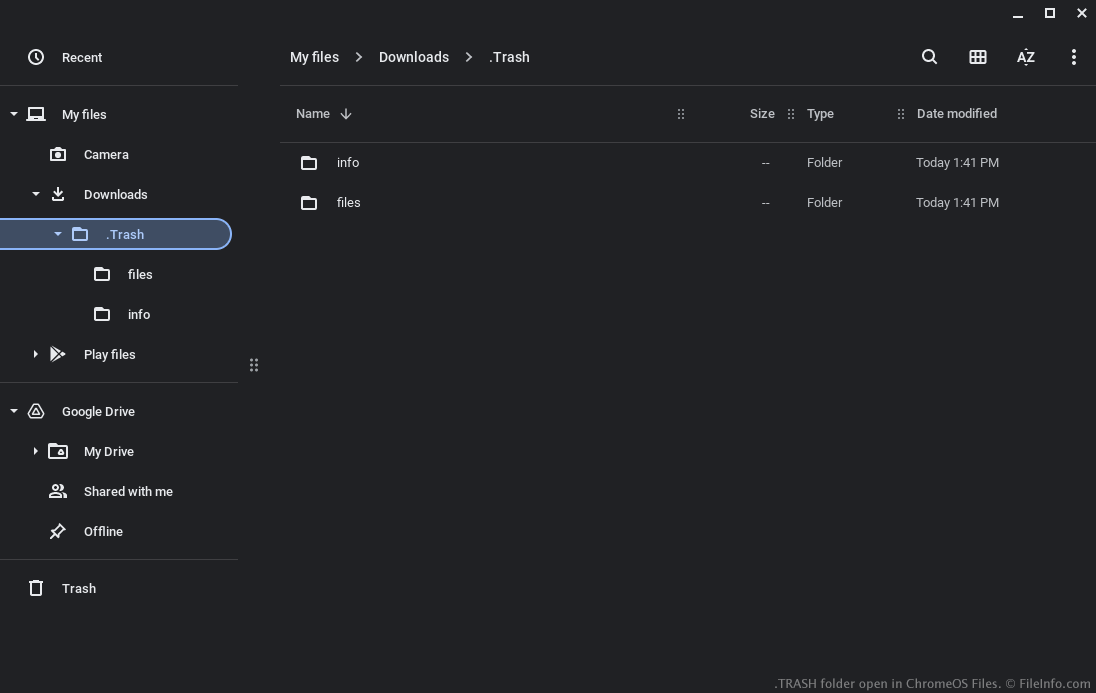
W grudniu 2022 roku Google dodało folder Trash do aplikacji Files w systemie ChromeOS. Z folderu Trash użytkownicy mogą przywracać usunięte pliki (przez maksymalnie 30 dni od ich usunięcia).
Aby umożliwić użytkownikom przywracanie usuniętych plików, ChromeOS zachowuje ich kopię w ukrytym folderze .Trash, znajdującym się w folderze Downloads. ChromeOS tworzy również powiązane pliki .TRASHINFO w tym folderze, w których zapisuje:
- Lokalizację, w której plik był przechowywany przed usunięciem
- Godzinę, o której plik został usunięty
Pliki przeniesione do kosza są przechowywane w folderze .Trash/files. Pliki TRASHINFO są przechowywane w folderze .Trash/info. Użytkownicy nie zobaczą folderu .Trash ani jego podfolderów, chyba że włączą wyświetlanie ukrytych plików (wybierając opcję z menu aplikacji Files oznaczonego trzema kropkami).
Jak otworzyć plik TRASH
Po włączeniu wyświetlania ukrytych plików w aplikacji ChromeOS Files możesz otworzyć folder .Trash i poruszać się po nim tak jak po każdym innym folderze. Aby przywrócić pliki przeniesione do kosza, należy użyć głównego folderu Trash w aplikacji Files.