

.TRASH 파일 확장자
ChromeOS 휴지통 저장소
| 개발사 | |
| 인기도 |
3.3 | 6 표 |
TRASH 파일이란 무엇인가요?
ChromeOS 기기에서 .Trash 폴더는 휴지통으로 이동된 파일과 해당 파일에 대한 메타데이터를 저장하는 숨겨진 폴더입니다. 이 폴더는 Linux 시스템에 있는 ~/Trash 폴더와 비슷합니다. ChromeOS는 .Trash 폴더에 저장된 파일과 메타데이터를 사용하여 사용자가 기본 Trash 폴더에서 휴지통으로 이동된 파일을 복원할 수 있도록 합니다.
추가 정보
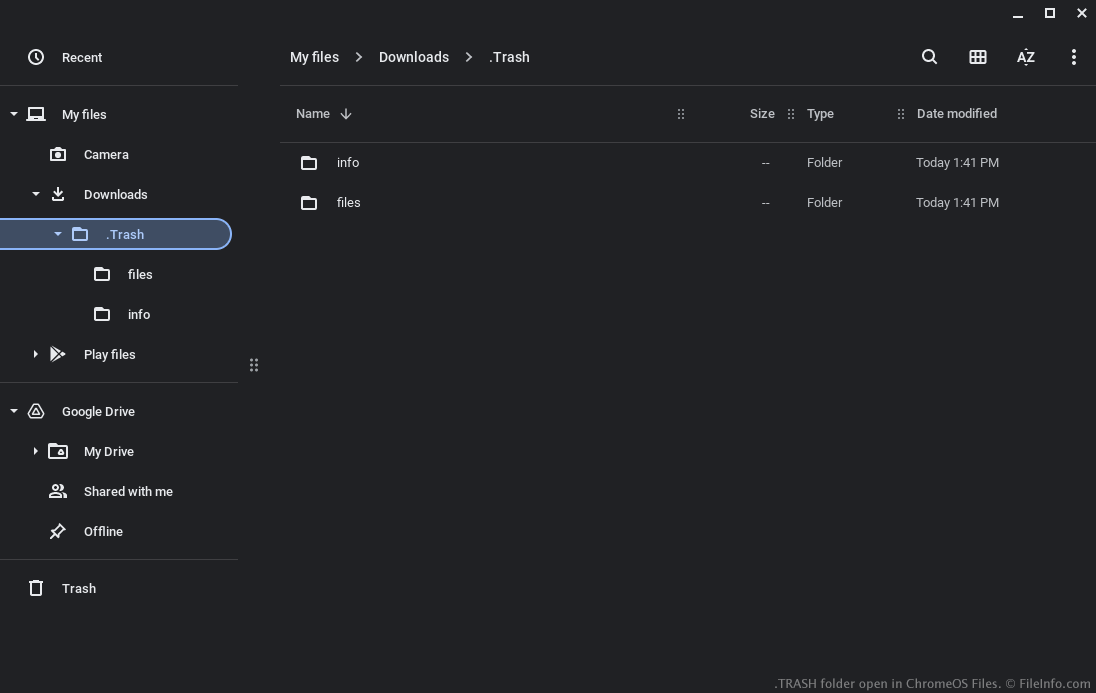
2022년 12월, Google은 ChromeOS의 파일 앱에 Trash 폴더를 추가했습니다. 사용자는 Trash 폴더에서 삭제된 파일을 복원할 수 있습니다(삭제 후 최대 30일 동안).
사용자가 삭제된 파일을 복원할 수 있도록 ChromeOS는 Downloads 폴더 안에 있는 숨겨진 .Trash 폴더에 해당 파일의 복사본을 보관합니다. 또한 ChromeOS는 이 폴더에 관련 .TRASHINFO 파일을 만들며, 이 파일에는 다음 정보가 기록됩니다.
- 파일이 삭제되기 전에 저장되어 있던 위치
- 파일이 삭제된 시간
휴지통으로 이동된 파일은 .Trash/files에 저장됩니다. TRASHINFO 파일은 .Trash/info에 저장됩니다. 사용자가 숨김 파일 표시를 선택하지 않는 한 .Trash 폴더와 그 하위 폴더는 표시되지 않습니다(파일 앱의 점 3개 메뉴에서 를 선택하면 됩니다).
TRASH 파일을 여는 방법
ChromeOS 파일 앱에서 숨김 파일 표시를 선택한 후에는 다른 폴더와 같은 방식으로 .Trash 폴더를 열고 탐색할 수 있습니다. 휴지통으로 이동된 파일을 복원하려면 파일 앱의 기본 Trash 폴더를 사용해야 합니다.
TRASH 파일을 여는 프로그램
Chrome OS
OS에 포함됨