

.TRASH Bestandsextensie
ChromeOS-prullenbakopslag
| Ontwikkelaar | |
| Populariteit |
3,3 | 6 stemmen |
Wat is een TRASH-bestand?
Op ChromeOS-apparaten is de map .Trash een verborgen map waarin bestanden in de prullenbak en metagegevens over die bestanden worden opgeslagen. Deze map is vergelijkbaar met de map ~/Trash op Linux-systemen. ChromeOS gebruikt de bestanden en metagegevens in de map .Trash om gebruikers in staat te stellen bestanden uit de prullenbak te herstellen vanuit de primaire map Trash.
Meer informatie
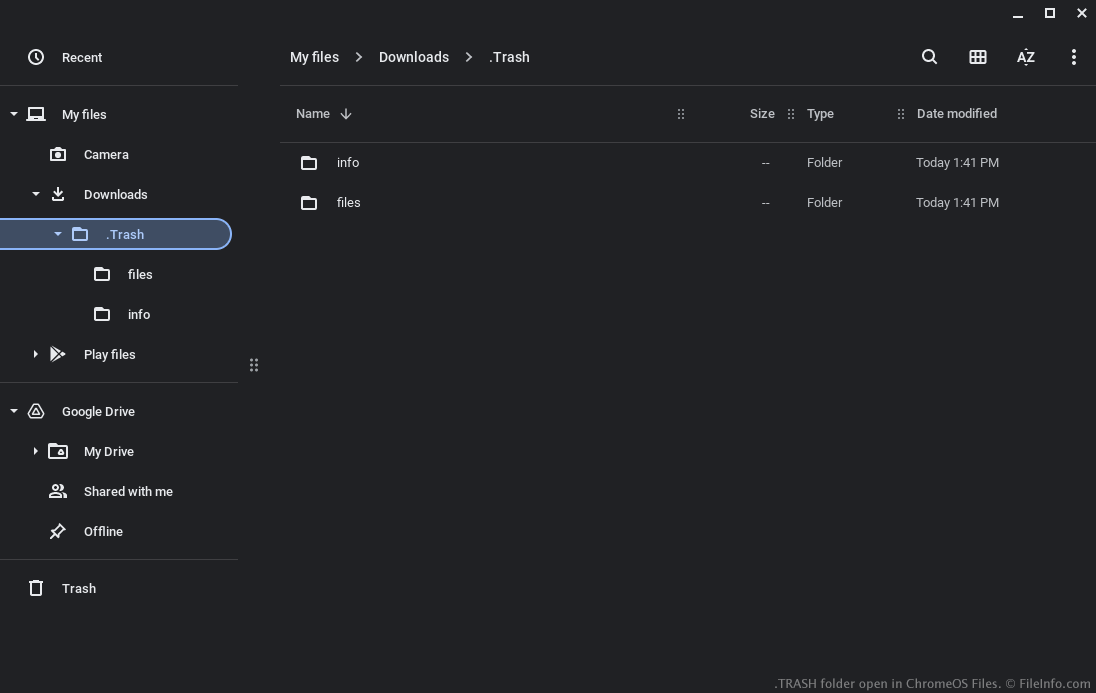
In december 2022 voegde Google een map Trash toe aan de app Files van ChromeOS. Vanuit de map Trash kunnen gebruikers verwijderde bestanden herstellen (tot 30 dagen na verwijdering).
Om ervoor te zorgen dat gebruikers verwijderde bestanden kunnen herstellen, bewaart ChromeOS een kopie van die bestanden in een verborgen map .Trash in de map Downloads. ChromeOS maakt in deze map ook bijbehorende .TRASHINFO-bestanden, waarin het volgende wordt vastgelegd:
- De locatie waar een bestand was opgeslagen voordat het werd verwijderd
- Het tijdstip waarop het bestand werd verwijderd
Bestanden in de prullenbak worden opgeslagen in .Trash/files. TRASHINFO-bestanden worden opgeslagen in .Trash/info. Gebruikers zien de map .Trash of de submappen ervan niet, tenzij ze ervoor hebben gekozen verborgen bestanden weer te geven (door te selecteren in het menu met drie puntjes van de app Files).
Een TRASH-bestand openen
Nadat je ervoor hebt gekozen verborgen bestanden weer te geven in de app Files van ChromeOS, kun je de map .Trash openen en erin navigeren zoals in elke andere map. Om bestanden uit de prullenbak te herstellen, gebruik je de primaire map Trash van de app Files.