.MENU Bestandsextensie

Quake 3 Engine Menu File

Ontwikkelaar id Software
Populariteit
4.3  |  8 Stemmen
 

Wat is een MENU-bestand?

Menu file used by id Tech 3 (Quake III engine) games; specifies the layout and properties for the game menus and the HUD (Head-Up Display) interface; saved in a plain-text format; commonly stored within .PK3 game packages.

Meer informatie

MENU files can be used for customizing buttons, backgrounds, and mouse over behaviors, and the first-person perspective display features, including menus, text styles, colors, textures, gun crosshairs, and the locations of interface elements.

Open meer dan 400 bestandsformaten met File Viewer Plus.Gratis downloaden

Programma's die MENU-bestanden openen of ernaar verwijzen

Windows
Inbegrepen bij het besturingssysteem
Mac
Inbegrepen bij het besturingssysteem
Linux
Vi
Gratis
Categorie: Spel
Bijgewerkt: 2010-05-24

macOS Menu Extra

Ontwikkelaar Apple
Populariteit
4.0  |  2 Stemmen
 

A MENU file is a Menu Extra used by Mac operating systems starting with Mac OS X 10.1. It contains a small program, sometimes referred to as a "menulet," that allows Mac OS X / macOS users to monitor and adjust settings on their computers. Examples include AirPort, Time Machine, and network preferences. MENU files replaced .DOCK files, which had previously been used to install Dock Extras.

Meer informatie

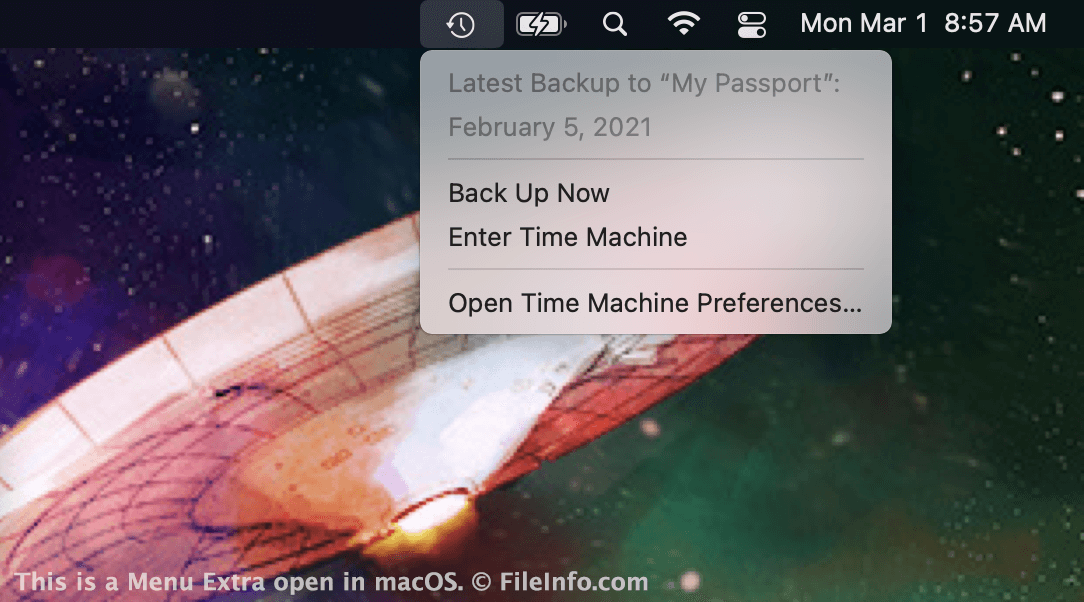
Schermafbeelding van een .menu-bestand in macOS
MENU-bestand geopend in macOS

Apple introduced Menu Extras with the release of Mac OS X 10.1. Menu Extras are small icons that appear in the right side of the macOS menu bar. They provide quick access to system and app settings. For example, the Time Machine Menu Extra allows you to quickly view your backup status or access your Time Machine backup.

MENU files are located in the following directory:

Macintosh HD/​System/​Library/​CoreServices/​Menu Extras

For example, TimeMachine.menu resides in this folder. The Battery, Wi-Fi, Spotlight Search, Control Center, and Notification Center icons that appear in Macs' Menu Bars are also Menu Extras. However, in recent versions of macOS, these Extras' MENU files no longer reside in the Menu Extras directory.

Een MENU-bestand openen

MENU files allow you to add Menu Extras to your Mac's menu bar. In most cases, they are installed automatically along with the corresponding program. However, you may also be able to install a Menu Extra by double-clicking a MENU file. When installed correctly, the Menu Extra will appear on the right side of your Mac's menu bar.

Programma's die MENU-bestanden openen of ernaar verwijzen

Mac
Inbegrepen bij het besturingssysteem
Categorie: Systeem
Bijgewerkt: 2021-03-01

Geverifieerd door FileInfo.com

Het FileInfo.com-team heeft onafhankelijk onderzoek gedaan naar alle bestandsformaten en softwareprogramma's die op deze pagina worden vermeld. Ons doel is 100% nauwkeurigheid en we publiceren alleen informatie over bestandstypen die we hebben geverifieerd.

Als u aanvullingen of updates voor deze pagina wilt voorstellen, kunt u het ons laten weten.