.MENU 파일 확장자

2개의 파일 유형.menu 확장자를 사용합니다.

Quake 3 Engine Menu File

개발사 id Software
인기도
4.3  |  8 투표
 

MENU 파일이란 무엇인가요?

Menu file used by id Tech 3 (Quake III engine) games; specifies the layout and properties for the game menus and the HUD (Head-Up Display) interface; saved in a plain-text format; commonly stored within .PK3 game packages.

추가 정보

MENU files can be used for customizing buttons, backgrounds, and mouse over behaviors, and the first-person perspective display features, including menus, text styles, colors, textures, gun crosshairs, and the locations of interface elements.

File Viewer Plus(으)로 400개 이상의 파일 형식을 여세요.무료 다운로드

MENU 파일을 열거나 참조하는 프로그램

Mac
OS에 포함됨
Linux
카테고리: 게임
업데이트: 2010-05-24

macOS Menu Extra

개발사 Apple
인기도
4.0  |  2 투표
 

A MENU file is a Menu Extra used by Mac operating systems starting with Mac OS X 10.1. It contains a small program, sometimes referred to as a "menulet," that allows Mac OS X / macOS users to monitor and adjust settings on their computers. Examples include AirPort, Time Machine, and network preferences. MENU files replaced .DOCK files, which had previously been used to install Dock Extras.

추가 정보

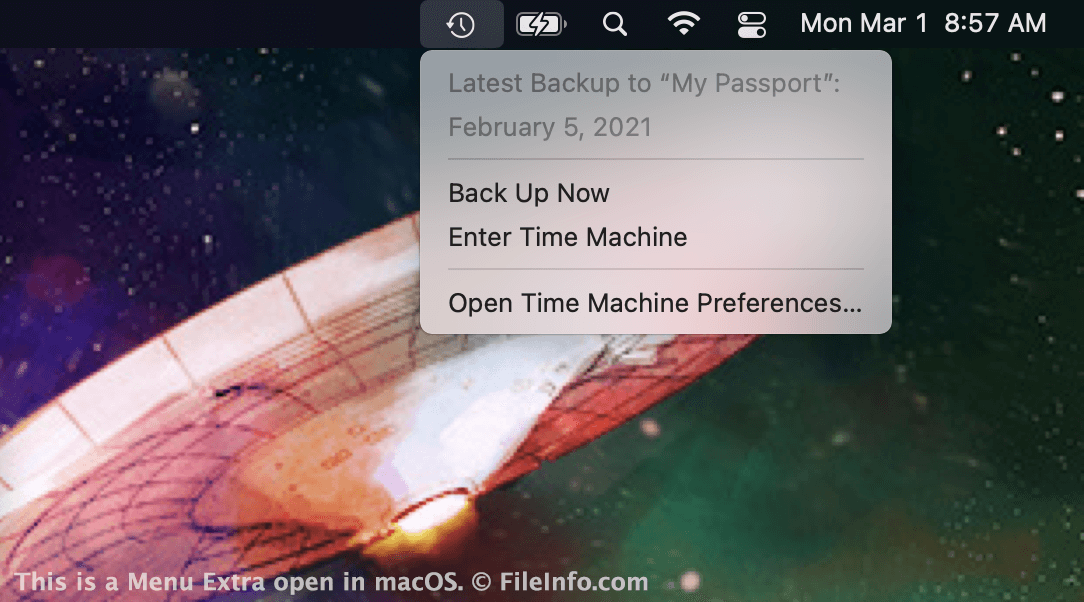
macOS에서 열린 .menu 파일의 스크린샷
macOS에서 열린 MENU 파일

Apple introduced Menu Extras with the release of Mac OS X 10.1. Menu Extras are small icons that appear in the right side of the macOS menu bar. They provide quick access to system and app settings. For example, the Time Machine Menu Extra allows you to quickly view your backup status or access your Time Machine backup.

MENU files are located in the following directory:

Macintosh HD/​System/​Library/​CoreServices/​Menu Extras

For example, TimeMachine.menu resides in this folder. The Battery, Wi-Fi, Spotlight Search, Control Center, and Notification Center icons that appear in Macs' Menu Bars are also Menu Extras. However, in recent versions of macOS, these Extras' MENU files no longer reside in the Menu Extras directory.

MENU 파일을 여는 방법

MENU files allow you to add Menu Extras to your Mac's menu bar. In most cases, they are installed automatically along with the corresponding program. However, you may also be able to install a Menu Extra by double-clicking a MENU file. When installed correctly, the Menu Extra will appear on the right side of your Mac's menu bar.

MENU 파일을 열거나 참조하는 프로그램

Mac
OS에 포함됨
카테고리: 시스템
업데이트: 2021-03-01

검증자 FileInfo.com

FileInfo.com 팀 이 페이지에 나열된 모든 파일 형식과 소프트웨어 프로그램을 독자적으로 조사했습니다. 저희의 목표는 100% 정확성이며, 검증한 파일 유형에 대한 정보만 게시합니다.

이 페이지에 추가하거나 업데이트할 내용을 제안하고 싶으시면 알려 주세요.