

.LSS 파일 확장자
LiveSplit 스플릿
| 개발사 | LiveSplit |
| 인기도 |
3.8 | 6 표 |
LSS 파일이란 무엇인가요?
LSS 파일은 비디오 게임 스피드러너가 사용하는 타이머 프로그램인 LiveSplit에서 사용하도록 만들어진 스플릿 파일입니다. 이 파일에는 스피드러너가 기록적인 시간 안에 완료하려는 일련의 스플릿 또는 비디오 게임의 하위 구간을 정의하는 XML 텍스트가 포함되어 있습니다. LSS 파일에는 이전에 기록된 실행 시간이 없는 빈 스플릿, 진행 중인 스플릿 또는 완료된 스플릿이 포함될 수 있습니다.
추가 정보
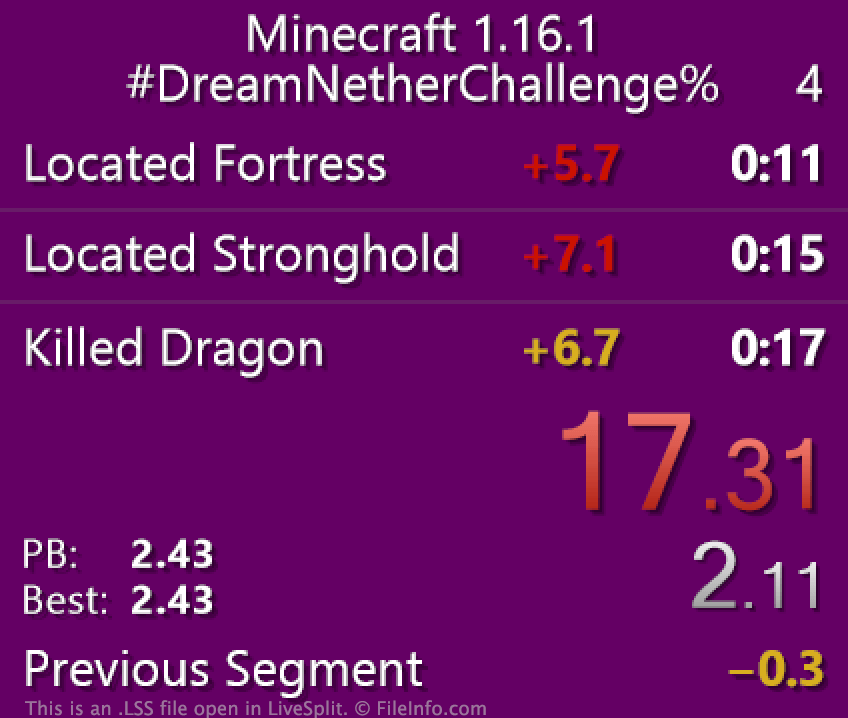
LiveSplit을 사용하면 비디오 게임 스피드러너가 비디오 게임 전체, 비디오 게임의 한 구간 또는 게임 내 도전을 진행하는 데 걸린 시간을 측정할 수 있습니다. 스피드러너는 자신의 진행 상황을 스플릿이라고 하는 하위 구간으로 나눌 수 있으며, 각 스플릿은 특정 레벨이나 목표를 나타냅니다. 예를 들어 Terraria를 기록적인 시간 안에 완료하려는 게이머는 각 보스를 물리치는 데 걸린 시간을 기준으로 게임을 여러 하위 구간으로 나눌 수 있습니다. 그러면 각 보스를 기준으로 한 스플릿이 LiveSplit에 별도로 표시되고 시간이 측정됩니다(스피드러너의 전체 시간과 함께 표시됨).
스피드러너가 미리 설정된 스플릿 세트를 LiveSplit에 불러오려는 경우 LSS 파일을 사용할 수 있습니다. LSS 파일은 특정 게임이나 도전에 대한 스플릿을 정의하는 XML 파일입니다. 예를 들어 스피드러너가 온라인 도전에 참여할 때 해당 도전의 LSS 파일을 다운로드하고 LiveSplit에 불러온 다음, 이를 사용해 스피드런 시간을 측정해야 할 수 있습니다.
LSS 파일을 여는 방법
LSS 파일을 LiveSplit에서 열려면 프로그램에서 마우스 오른쪽 버튼을 클릭하고 을 선택합니다. 그런 다음 LSS 파일이 있는 위치로 이동하여 파일을 선택합니다. 그러면 LiveSplit이 LSS 파일에 포함된 스플릿을 불러옵니다.
Microsoft Notepad(Windows), Apple TextEdit(Mac) 또는 GitHub Atom(크로스 플랫폼)과 같은 텍스트 편집기에서 LSS 파일을 열고 편집할 수도 있지만, 스플릿은 LiveSplit에서 직접 편집하는 것이 가장 좋습니다. 이렇게 하려면 LiveSplit에서 마우스 오른쪽 버튼을 클릭하고 을 선택합니다.
LSS 파일을 저장하려면 어떻게 하나요?
모든 LiveSplit 사용자는 현재 스플릿을 LSS 파일로 저장할 수 있습니다. 예를 들어 스피드런을 완료한 후 스플릿을 새 LSS 파일로 저장하면 자신의 기록을 남길 수 있습니다. 현재 스플릿을 새 LSS 파일로 저장하려면 LiveSplit에서 마우스 오른쪽 버튼을 클릭하고 를 선택합니다.
LSS 파일을 공유하려면 어떻게 하나요?
LiveSplit을 사용하면 일부 소셜 플랫폼에 스플릿 파일을 직접 공유할 수 있습니다. LSS 파일을 다른 사람과 공유하려면 LiveSplit의 마우스 오른쪽 버튼 메뉴에서 를 선택하고, 스플릿을 공유할 플랫폼을 선택한 다음 Attach Splits 확인란을 선택합니다. Attach Splits 확인란은 모든 소셜 플랫폼에서 사용할 수 있는 것은 아닙니다.