

.LSS Extension de fichier
Segments LiveSplit
| Développeur | LiveSplit |
| Popularité |
3,8 | 6 Votes |
Qu'est-ce qu'un fichier LSS ?
Un fichier LSS est un fichier de segments créé pour être utilisé avec LiveSplit, un programme de chronométrage utilisé par les speedrunners de jeux vidéo. Il contient du texte XML qui définit une série de segments, ou sous-sections de jeux vidéo, que les speedrunners tentent de terminer en un temps record. Les fichiers LSS peuvent contenir des segments vides, sans temps précédemment enregistrés, des segments en cours ou des segments terminés.
Plus d'informations
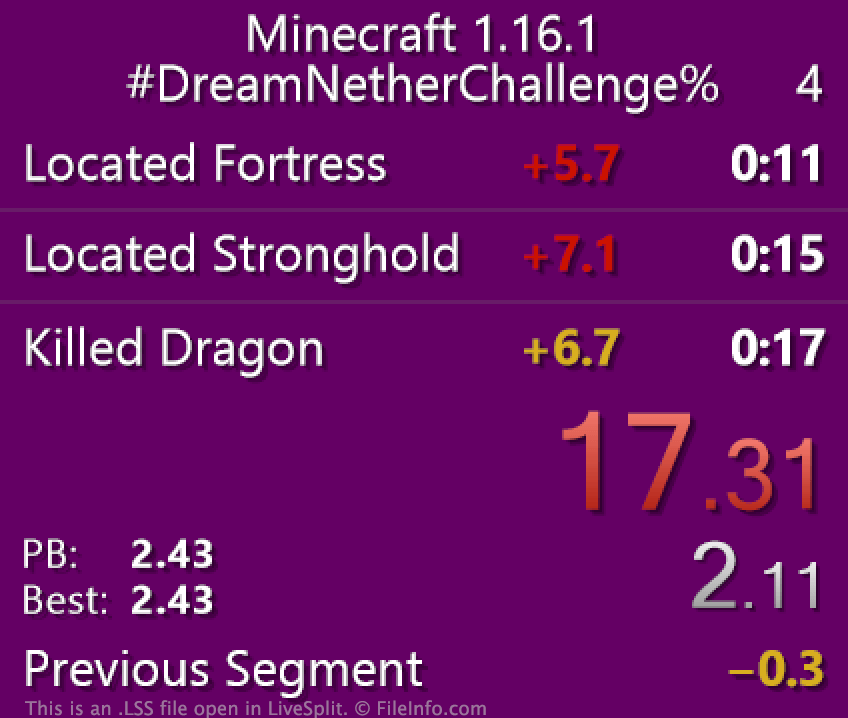
LiveSplit permet aux speedrunners de jeux vidéo de chronométrer leur progression dans un jeu vidéo, une section d'un jeu vidéo ou un défi en jeu. Les speedrunners peuvent diviser leur progression en sous-sections, appelées segments, qui représentent des niveaux ou des objectifs précis. Par exemple, un joueur qui essaie de terminer Terraria en un temps record peut diviser le jeu en sous-sections correspondant au temps nécessaire pour vaincre chacun des boss du jeu. Chaque segment basé sur un boss apparaît alors séparément dans LiveSplit et est chronométré séparément, en plus du temps total du speedrunner.
Si un speedrunner souhaite charger un ensemble de segments prédéfinis dans LiveSplit, il peut le faire à l'aide d'un fichier LSS. Les fichiers LSS sont des fichiers XML qui définissent les segments d'un jeu ou d'un défi précis. Par exemple, lorsqu'un speedrunner participe à un défi en ligne, il peut devoir télécharger le fichier LSS de ce défi, le charger dans LiveSplit et l'utiliser pour chronométrer sa performance.
Comment ouvrir un fichier LSS
Pour ouvrir un fichier LSS dans LiveSplit, cliquez avec le bouton droit de la souris dans le programme et sélectionnez . Accédez ensuite à votre fichier LSS et sélectionnez-le. LiveSplit chargera alors les segments contenus dans votre fichier LSS.
Vous pouvez également ouvrir et modifier un fichier LSS dans n'importe quel éditeur de texte, comme Microsoft Notepad (Windows), Apple TextEdit (Mac) ou GitHub Atom (multiplateforme), mais il est préférable de modifier les segments directement dans LiveSplit. Pour ce faire, cliquez avec le bouton droit de la souris dans LiveSplit et sélectionnez .
Comment enregistrer un fichier LSS ?
Tout utilisateur de LiveSplit peut enregistrer ses segments actuels dans un fichier LSS. Par exemple, vous pouvez vouloir enregistrer vos segments dans un nouveau fichier LSS après avoir terminé une performance, afin de conserver une trace de votre temps. Pour enregistrer vos segments actuels dans un nouveau fichier LSS, cliquez avec le bouton droit de la souris dans LiveSplit et sélectionnez .
Comment partager un fichier LSS ?
LiveSplit permet aux utilisateurs de partager leurs fichiers de segments directement sur certaines plateformes sociales. Pour partager votre fichier LSS avec d'autres personnes, sélectionnez dans le menu contextuel de LiveSplit, sélectionnez une plateforme sur laquelle partager vos segments, puis cochez la case Attach Splits. Notez que la case Attach Splits n'est pas disponible pour toutes les plateformes sociales.