

.CWC 파일 확장자
Coding with Chrome JavaScript 파일
| 개발사 | |
| 인기도 |
3.0 | 3 표 |
CWC 파일이란 무엇인가요?
CWC 파일은 교육용 통합 개발 환경(IDE)인 Coding with Chrome에서 만든 소스 코드 파일입니다. 기본 프로그램을 실행하는 데 사용되는 JavaScript가 포함되어 있습니다. 개발자는 Coding with Chrome의 Blockly 및 JavaScript 코드 편집기에서 CWC 파일을 만듭니다.
추가 정보
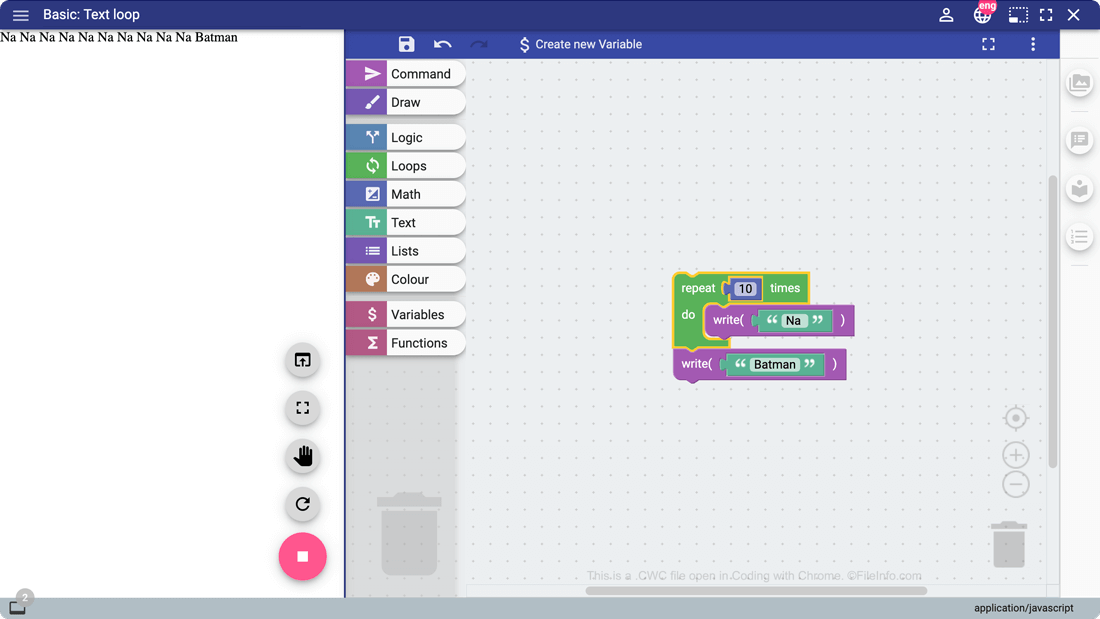
Coding with Chrome은 예비 개발자가 코딩의 기초를 배울 수 있도록 해 주는 Google Chrome 애플리케이션입니다. 초보 개발자는 Coding with Chrome의 블록 기반 개발 환경인 Blockly를 사용하여 기본 프로그램을 만들 수 있으며, 텍스트 기반 개발 환경으로 넘어간 개발자는 JavaScript, Python 및 CoffeeScript로 직접 프로그램을 작성할 수 있습니다.
Coding with Chrome 사용자가 JavaScript 기반 프로그램을 만들면 Coding with Chrome은 사용자의 프로그램을 CWC 파일에 저장합니다. 개발자가 Blockly에서 만드는 모든 프로그램은 CWC 파일에 저장되며, Coding with Chrome의 텍스트 기반 개발 환경에서 개발자가 만드는 모든 JavaScript 기반 프로그램도 CWC 파일에 저장됩니다.
CWC 파일을 여는 방법
CWC 파일은 모든 텍스트 편집기에서 열 수 있지만, CWC 파일은 Coding with Chrome(웹)에서 열도록 만들어졌습니다. Coding with Chrome에서 CWC 파일을 열려면 다음 단계를 따르세요:
- Google Chrome에 Coding with Chrome을 추가합니다.
- Chrome의 검색창에 chrome://apps를 입력하고 Coding with Chrome을 엽니다.
- Coding with Chrome의 햄버거 메뉴를 열고 을 선택합니다.
- CWC 파일이 있는 위치로 이동하여 파일을 엽니다.
CWC 파일을 여는 프로그램
Windows
Mac
Linux
Web
Chrome OS