

.YAML ファイル拡張子
YAMLドキュメント
| 開発元 | 不明 |
| 人気度 |
3.8 | 65 票 |
YAMLファイルとは?
YAMLファイルは、データのシリアル化に使用される、人間が読みやすいデータ形式であるYAML(YAML Ain't Markup Language)を使用してデータを構造化したテキストドキュメントです。特定のプログラミング言語に依存せずにデータを読み書きするために使用されます。YAMLファイルは、多くの場合、プログラムやアプリケーションの設定を定義するために使用される設定ファイルです。
詳細情報
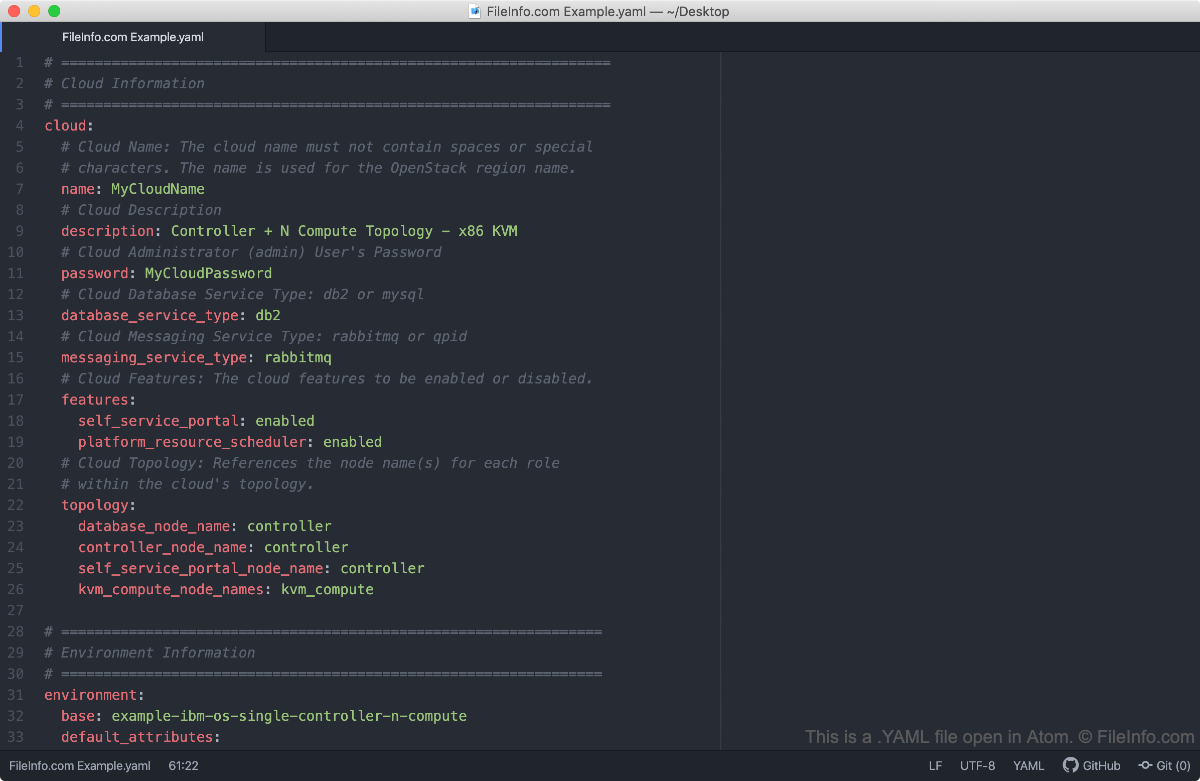
YAML形式は特定の言語に依存しないため、C/C++、Ruby、Python、Java、Perl、C#、PHPなど、YAMLライブラリをサポートするあらゆる言語で記述されたプログラムにYAMLファイルを含めたり、参照したりできます。YAMLという頭字語は、もともとYet Another Markup Languageを表していましたが、YAML形式の進化に伴い、現在の再帰的な意味を持つようになりました。
プログラムがYAMLファイルを設定ファイルとして使用している場合は、テキストエディターまたはソースコードエディターでYAMLファイルを開いて編集することで、プログラムの設定を変更できます。設定関連のYAMLファイルの多くには、そのファイルを使ってプログラムの設定を調整する方法を説明するコメントが含まれています。
注: プログラマーコミュニティではYAMLファイルをYAML拡張子で保存することが推奨されていますが、.YML拡張子で保存されたYAMLファイルに遭遇することもあります。
一般的な.YAMLファイル名
app.yaml - Google App Engineで使用されるYAMLファイルです。
YAMLファイルの開き方
YAMLファイルは、Microsoft Notepad(Windows)やApple TextEdit(Mac)など、任意のテキストエディターで開くことができます。ただし、YAMLファイルを編集する場合は、NotePad++(Windows)やGitHub Atom(クロスプラットフォーム)などのソースコードエディターで開くことをお勧めします。これらのアプリケーションには便利なソースコード編集ツールが用意されており、YAMLの構文も正しくハイライト表示されます。