.DST ファイル拡張子

AutoCAD Sheet Set

開発元 Autodesk
人気度
3.9  |  84 
 

DSTファイルとは?

A DST file is a drawing sheet set created by AutoCAD, a CAD design and documentation application. It contains information in XML format about an organized collection of sheets, which are select drawing layouts that have been extracted from multiple .DWG drawing files. DST files are commonly used to deliver drafted or completed designs.

詳細情報

Users can create sheet set files using AutoCAD's Sheet Set Manager (SSM) tool, which can be displayed on the interface by selecting the View tab and then Palettes panel → Sheet Set Manager.

Sheet set files do not contain the actual drawing layouts. Instead, they contain information pointing to the location of the layouts stored in the DWG drawing files. When a DST file is open in AutoCAD, the information is displayed in the SSM's Sheet List tab, with each sheet name acting as a shortcut you can click to view the layout of the DWG drawing file.

注: DST files are typically stored in the ~/​My Documents/​AutoCAD Sheet Sets directory.

DSTファイルの開き方

You can open a DST file in the desktop versions of Autodesk AutoCAD (Windows, Mac). To do so, open the Sheet Set Manager (View → Palettes → Sheet Set Manager) and then select your DST file from the Sheet List. (If your DST file does not appear in the Sheet List, make sure it is stored in your AutoCAD Sheet Sets directory.)

DSTファイルの変換方法

You can use JTB DST Tool (Windows) to convert DST files to the .XML format. This allows you to open and edit the files using Notepad++ or another text editor.

File Viewer Plusで400種類以上のファイル形式を開けます。無料ダウンロード

DSTファイルを開くプログラム

Windows
無料体験版
Mac
無料体験版
カテゴリ: CAD
更新日: 2022-07-21

Tajima Embroidery Format

開発元 Tajima
人気度
3.4  |  48 
 

A DST file is a computer-aided manufacturing (CAM) file saved in the Data Stitch Tajima (DST) embroidery format. It stores instructions for stitching an embroidery design with a sewing machine and includes codes that tell the machine to stop, jump, and trim, which directs the sewing needle.

詳細情報

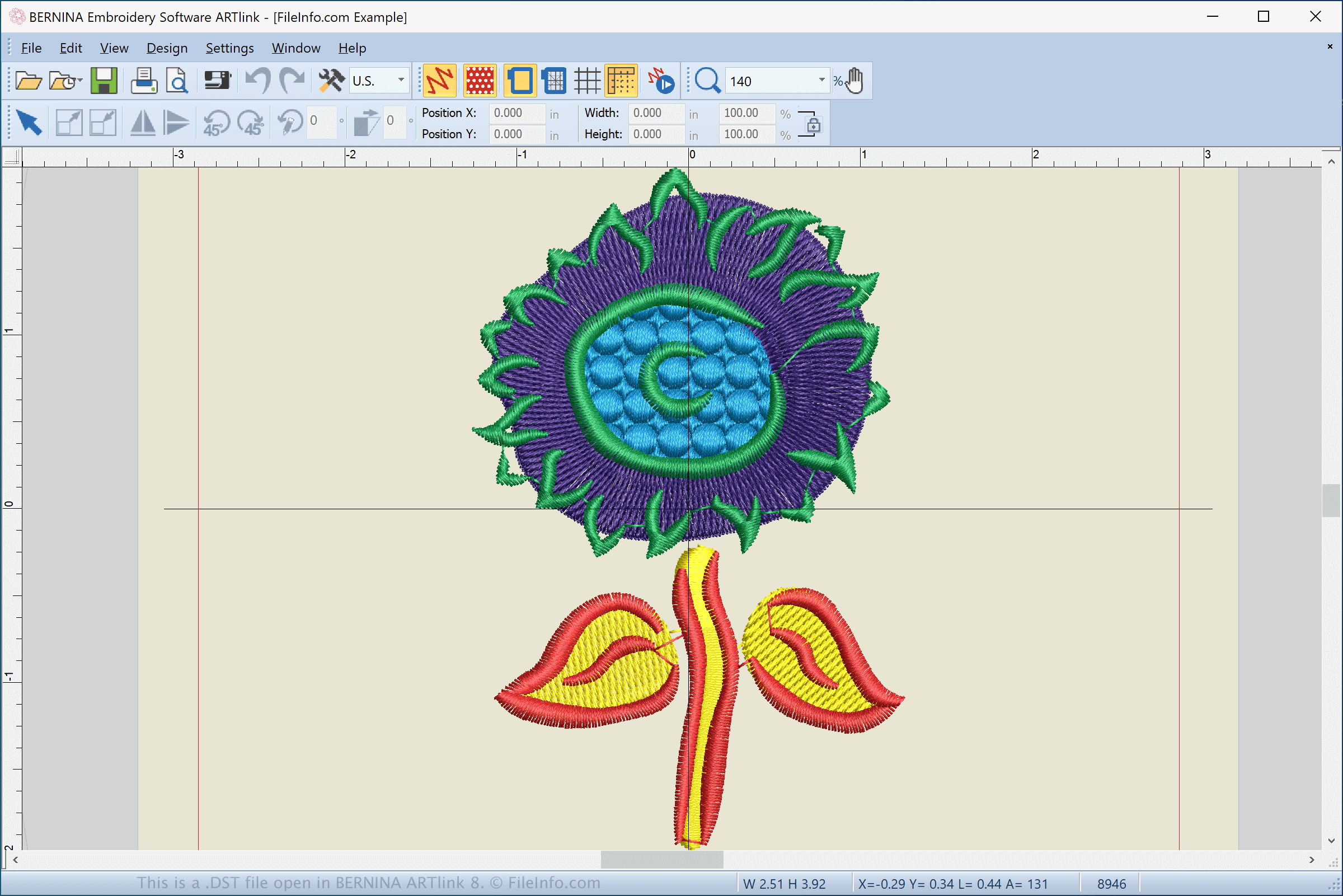
BERNINA ARTlink 8で開いた.dstファイルのスクリーンショット
BERNINA ARTlink 8で開いたDSTファイル

The DST format is one of the most common embroidery formats, partially because it is one of the oldest embroidery formats. Other common embroidery formats include .PES, .JEF, .EXP, .VP3, and .VIP.

If you are an embroidery enthusiast you may create your own DST embroidery designs, download them from an embroidery website or forum, or receive designs from other enthusiasts. You can modify the design with various applications, and when you complete it you can transfer it to a sewing machine (Tajima machine or another machine that supports the DST format), to stitch the design onto a piece of fabric.

How do I transfer a DST file from my computer to a sewing machine?

To transfer a DST file to a sewing machine, insert a USB storage device in your computer. Then, transfer the DST file from your computer to the connected storage device via File Explorer in Windows or Finder in macOS.

After transferring the file, eject the storage device from your computer and insert it into the sewing machine to transfer the design to embroider it onto the material. If your sewing machine is Wifi-enabled, you can download the design directly to the machine via its touchscreen interface.

DSTファイルの開き方

You can open DST files with various embroidery applications and sewing machines. Some applications that support the format include BALARAD Embird Studio (Windows), Buzz Tools BuzzXplore (Windows), S & S Computing SewWhat! (Windows), and PREMIER+ Embroidery (multiplatform).

You can also view and convert DST files to other formats with the Embroidery Viewer and Converter web application and plugin for the Google Chrome web browser. If you are an Android user, you can use Touch Embroidery Free and Embroidery Viewer to open DST files.

DSTファイルを開くプログラム

カテゴリ: その他
更新日: 2021-03-26

DeSmuME Save State

開発元 DeSmuME
人気度
3.8  |  9 
 

A DST file is a save state created by DeSmuME, a Nintendo DS emulator. It contains a record of a player's game progress. Players can load DST files in DeSmuME to resume their progress, after loading the associated game ROM.

詳細情報

DeSmuME is a Windows, macOS, and Linux app that allows gamers to play Nintendo DS games on their PCs. To do this, gamers load a Nintendo DS game ROM (often saved as an .NDS file).

While playing a game in DeSmuME, players can save their progress at any time (not just at the game's normal save points). To do so, they select File → Save State File. This saves the player's current game state as a DST file.

Players often create multiple DST files while playing a game, to allow them to revert to a previous save if they make a mistake or want to make a different gameplay choice. Players may also share DST files online to give others access to their saved games.

DSTファイルの開き方

You can open a DST file with DeSmuME (multiplatform). To do so:

  1. Load the corresponding game ROM (by selecting File → Load ROM...).
  2. Select File → Open State File....
  3. Navigate to and open your DST file.
The save state your DST file contains will then appear in DeSmuME.

DSTファイルを開くプログラム

Windows
無料
Mac
無料
Linux
無料
カテゴリ: ゲーム
更新日: 2023-04-18

検証者 FileInfo.com

FileInfo.comチーム は、このページに掲載されているすべてのファイル形式とソフトウェアについて独自に調査しました。 私たちの目標は100%の正確性であり、検証済みのファイルタイプに関する情報のみを公開しています。

このページへの追加や更新をご提案いただける場合は、お知らせください。