

.VCF Extension de fichier
Fichier vCard
| Développeur | N/D |
| Popularité |
3,4 | 1342 Votes |
Qu'est-ce qu'un fichier VCF ?
Un fichier VCF est un format de fichier standard utilisé pour stocker les coordonnées d'une ou de plusieurs personnes ou d'une entreprise. Il comprend généralement un nom, une adresse, un numéro de téléphone, une adresse e-mail et d'autres coordonnées. Les fichiers VCF prennent également en charge les champs personnalisés, les images et d'autres types de médias.
Plus d'informations
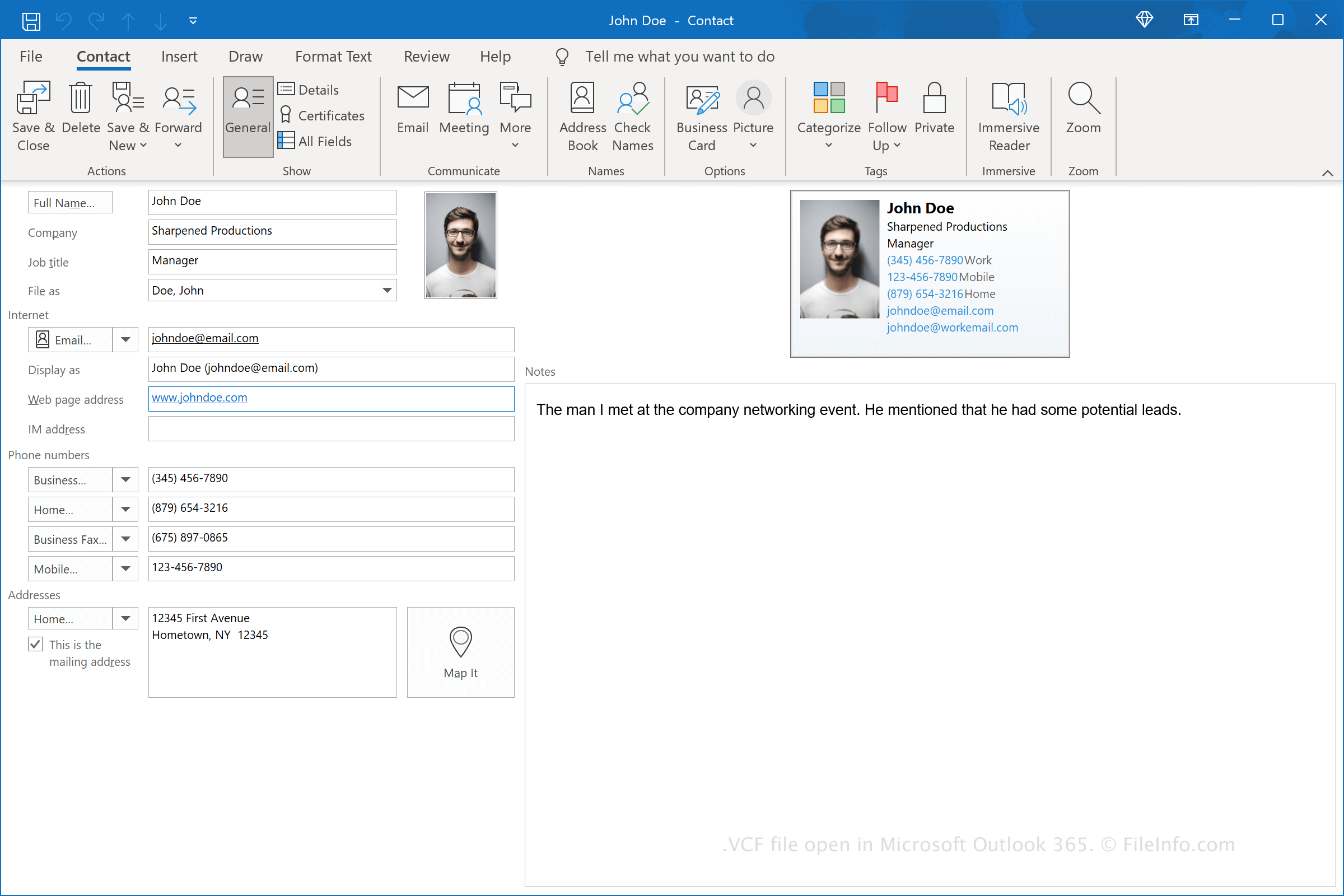
Le format VCF est largement utilisé pour échanger des coordonnées entre des applications et des appareils. Par exemple, vous pouvez exporter les coordonnées d'une personne sous forme de fichier VCF, puis les importer dans un programme de gestion des contacts sur votre ordinateur.
Les fichiers VCF étant relativement petits, vous pouvez joindre un fichier à un e-mail et vous l'envoyer à vous-même ou à d'autres contacts. Ces derniers peuvent ensuite importer les coordonnées contenues dans le fichier VCF dans leur propre logiciel de gestion des contacts, souvent en double-cliquant simplement sur le fichier.
Comment créer un fichier VCF
Vous pouvez créer des fichiers VCF à partir de zéro en créant un nouveau contact, puis en l'exportant. Par exemple, dans Microsoft Outlook, vous pouvez créer un contact, puis sélectionner pour créer un fichier VCF.
Vous pouvez également convertir d'autres formats de fichier au format VCF. Par exemple, vous pouvez enregistrer des fichiers .XLS ou .XLSX au format .CSV avec Microsoft Excel, puis les convertir en fichiers VCF à l'aide d'un simple programme de conversion, tel que « CSV to vCard ».
Exemple du format vCard (version 3.0) en texte brut
BEGIN:VCARD
VERSION:3.0
PRODID:-//Apple Inc.//macOS 11.5.2//EN
N:Doe;John;;;
FN:John Doe
ORG:Sharpened Productions;
EMAIL;type=INTERNET;type=HOME;type=pref:[email protected]
EMAIL;type=INTERNET;type=WORK:[email protected]
TEL;type=CELL;type=VOICE;type=pref:123-456-7890
ADR;type=HOME;type=pref:;;12345 First Avenue;Hometown;NY;12345;United States
ADR;type=WORK:;;67890 Second Avenue;Businesstown;NY;67890;United States
NOTE:The man I met at the company networking event. He mentioned that he had some potential leads.
item1.URL;type=pref:https://fileinfo.com/
item1.X-ABLabel:_$!<HomePage>!$_
BDAY:2000-01-01
END:VCARD
Comment ouvrir un fichier VCF
Vous pouvez ouvrir les fichiers VCF avec diverses applications. Les utilisateurs de Windows peuvent ouvrir les vCards avec Contacts Windows et Microsoft People (inclus avec Windows), ainsi qu'avec Microsoft Outlook (un client de messagerie inclus avec Microsoft Office). Les utilisateurs de Mac peuvent ouvrir les vCards avec l'application Contacts incluse avec macOS ou avec l'application tierce Flexibits Cardhop. Les utilisateurs d'Android et d'iOS peuvent également charger directement les vCards dans les applications Contacts incluses avec leurs systèmes d'exploitation respectifs.
Les vCards étant enregistrées dans un format texte, vous pouvez également les ouvrir avec un éditeur de texte brut. Toutefois, les fichiers peuvent aussi contenir un bloc de données binaires, souvent utilisé pour stocker une photo. De plus, les informations contenues dans le fichier ne s'afficheront pas de la même manière que si celui-ci était ouvert dans un programme de gestion des contacts.
Programmes qui ouvrent les fichiers VCF
Fichier Variant Call Format
| Développeur | 1000 Genomes Project |
| Popularité |
2,9 | 108 Votes |
Un fichier VCF est un fichier texte utilisé en bioinformatique pour stocker des informations sur des séquences génétiques variantes. Il contient des métadonnées qui décrivent le format du fichier, sa source, sa date de création et le génome de référence, ainsi que des données de séquençage génétique présentées sous forme de colonnes. Les fichiers VCF sont utilisés dans le cadre de projets de génotypage et de séquençage de l’ADN à grande échelle, comme le projet 1000 Genomes.
Plus d'informations
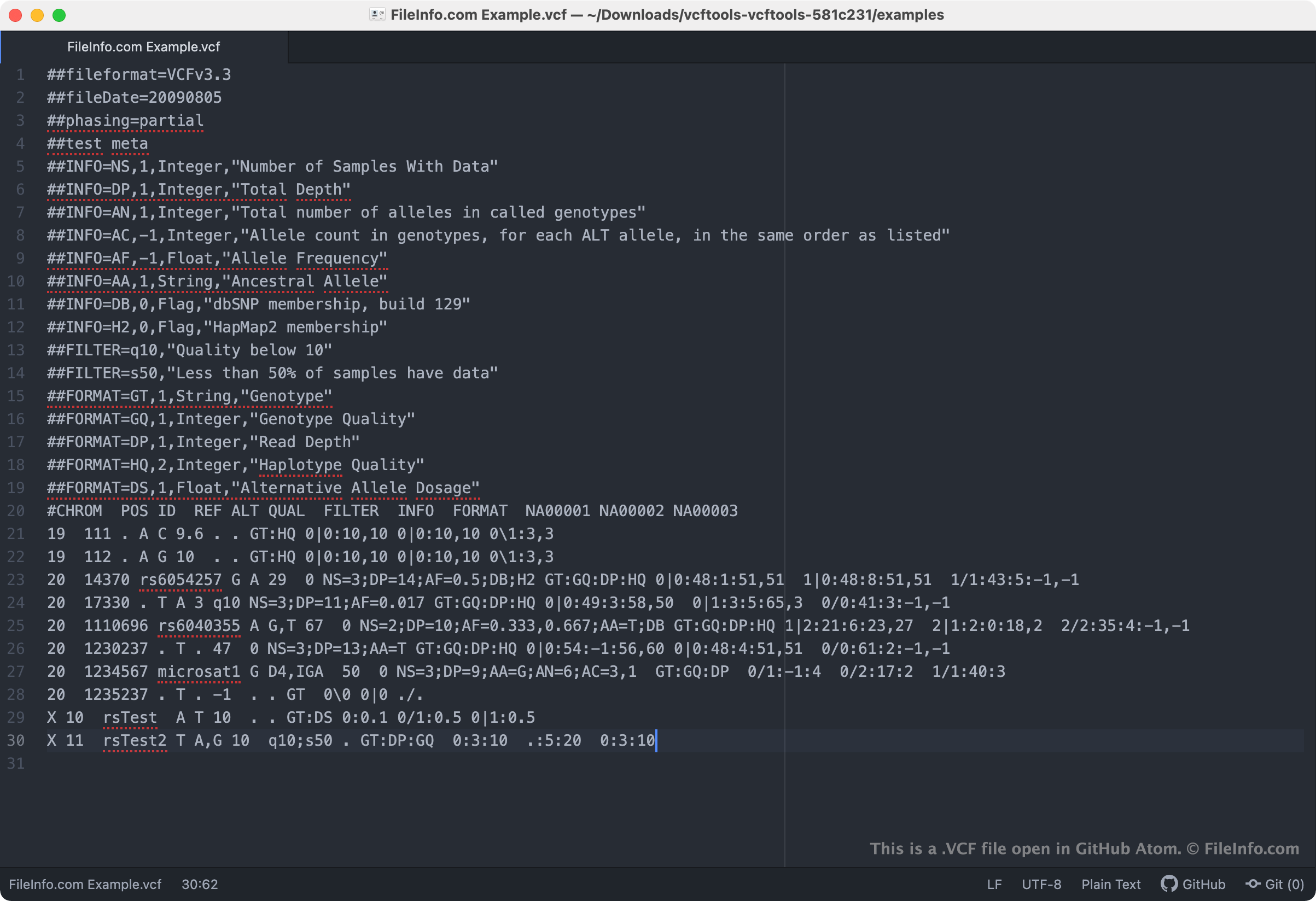
Pour simplifier le stockage des informations génétiques variantes, le projet 1000 Genomes a créé le Variant Call Format (VCF). Ce format permet aux bioinformaticiens de cataloguer les variations d’un génome sans enregistrer l’intégralité des données génétiques de ces variations. À la place, les bioinformaticiens enregistrent une copie de référence par défaut du génome dans un fichier .FASTA ou un autre fichier, puis décrivent les variations du génome dans un fichier VCF. Cela leur permet d’examiner et d’analyser rapidement les variations génétiques, sans devoir parcourir des données redondantes.
Dans son en-tête, le fichier VCF décrit son propre format, sa date de création, sa source et d’autres métadonnées pertinentes. La métadonnée la plus importante est ##reference du fichier VCF, qui indique où le génome de référence du fichier VCF est stocké.
Dans son corps, le fichier VCF contient des données de séquençage génétique variante réparties dans huit colonnes obligatoires, notamment :
- CHROM : nom de la séquence sur laquelle la variation est appelée
- POS : position, à partir de 1, de la variation sur la séquence donnée
- ID : identifiant de la variation ou . si l’identifiant est inconnu
- REF : base de référence à la position donnée sur la séquence de référence
- ALT : liste des allèles alternatifs à cette position
- QUAL : score de qualité associé à l’inférence des allèles donnés
- FILTER : indicateur précisant lesquels des filtres donnés la variation a passés
- INFO : liste extensible de paires clé-valeur décrivant la variation
Certains fichiers VCF peuvent contenir des colonnes de données supplémentaires, notamment FORMAT et SAMPLE.
Comment ouvrir un fichier VCF
Comme les fichiers VCF sont des fichiers texte brut, vous pouvez les ouvrir et les examiner avec n’importe quel éditeur de texte, comme Microsoft Notepad (Windows), Apple TextEdit (Mac) ou GitHub Atom (multiplateforme).
Cependant, les fichiers VCF sont destinés à être utilisés dans le cadre de catalogues de génotypage et de séquençage de l’ADN. Les personnes qui travaillent avec ces catalogues peuvent utiliser la bibliothèque open source VCFtools (multiplateforme) pour modifier et manipuler des fichiers VCF.