.SLP 文件扩展名

SpectraLayers Pro Project

开发者 Steinberg
受欢迎程度
4.0  |  6 
 

什么是 SLP 文件?

An SLP file is a project created by Steinberg SpectraLayers Pro, an audio editing application that displays sound as a visual spectrum. It contains the structure of an audio project, including audio layers, edits, selections, and applied processes. The SLP file type allows users to close and reopen a project and continue working without altering the original audio files directly.

更多信息

Audio engineers, music producers, post-production editors, and sound designers who need detailed control over complex recordings may use SpectraLayers Pro. The app allows users to work with audio in a layered environment, where individual sounds within a recording can be isolated and edited separately.

SLP files do not typically store the original audio recordings. Instead, they save references to the source media files along with information about how those files are arranged and modified in the project. The file type keeps track of layer data, spectral edits, filters, and other processing steps.

注: SpectraLayers was originally developed by Sony Creative Software. MAGIX acquired it in 2016, and Steinberg acquired it in 2019. It is now developed and distributed by Steinberg.

如何打开 SLP 文件

You can open SLP files with Steinberg SpectraLayers Pro. To open an SLP file with SpectraLayers Pro, select File → Open.

使用File Viewer Plus打开 400 多种文件格式。免费下载

可打开 SLP 文件的程序

Windows
Mac
分类: 音频
更新时间: 2026-02-12

Project Slippi Replay

开发者 Fizzi and Project Slippi Team
受欢迎程度
4.0  |  2 
 

An SLP file is a Super Smash Bros. Melee match replay created by Project Slippi. It contains a replay and statistics about the match shown in the replay. You can play SLP files in the Slippi Launcher desktop app.

更多信息

Project Slippi is a fan-made extension to Super Smash Bros. Melee that adds several features. One of the features Project Slippi adds is the ability to automatically save match replays as SLP files.

With this feature enabled, after a match played using Project Slippi concludes, the program automatically saves a replay of that match and the match's statistics in an SLP file. Players can watch the replay by transferring it to their PC and opening it in Slippi Launcher, which is available for Windows, macOS, and Linux.

如何打开 SLP 文件

You can open an SLP file in Slippi Launcher (multiplatform) to play the replay it contains. The easiest way to open an SLP file is to place it in the ~/​Users/​YourUserName/​Slippi directory, select Slippi Launcher's Replays tab, and then open your SLP file.

可打开 SLP 文件的程序

分类: 游戏
更新时间: 2022-06-06

Sisulizer Project

开发者 Sisulizer
受欢迎程度
3.5  |  2 
 

An SLP file is a project created by Sisulizer, a discontinued software localization tool used to translate applications into multiple languages. It stores the structure of a localization project in the XML standard, including language settings, project configuration details, and references to the original source files, such as executable files, .NET assemblies, resource files, or other supported formats. Sisulizer uses SLP files to manage, organize, and track translated content throughout the localization process.

更多信息

Software developers, localization specialists, and translation teams typically use SLP files as part of professional software internationalization workflows. The file does not contain the full compiled application itself; instead, it stores project data needed to generate localized builds. Sisulizer reads the SLP file to display translatable text in its visual interface, where translators and developers can review, edit, and validate translations before building the localized version of the application.

如何打开 SLP 文件

You can open SLP files with Sisulizer. However, Sisulizer is no longer developed.

可打开 SLP 文件的程序

Windows
Sisulizer  —  已停用
分类: 数据
更新时间: 2026-02-12

Stormworks Mod File

开发者 不适用
受欢迎程度
2.0  |  2 
 

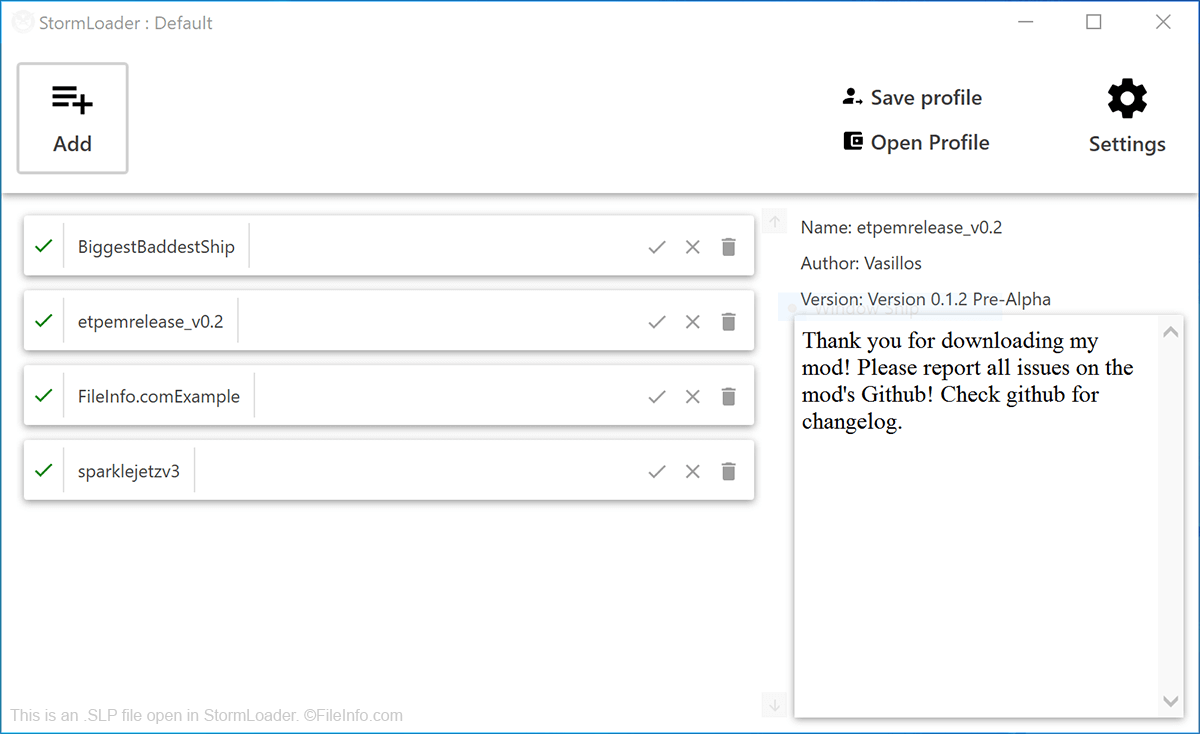
An SLP file is a mod file used with Stormworks, an air sea rescue simulation game. It contains data used to modify Stormworks's default gameplay. SLP files are installed using StormLoader, an open-source mod manager for Stormworks.

更多信息

在 StormLoader 中打开的 .slp 文件截图
在 StormLoader 中打开的 SLP 文件

Stormworks players use SLP files to add additional vehicles, parts, structures, cosmetic enhancements, and gameplay options to Stormworks. To do so, they download SLP files from Discord, GitHub, or another download source, import the files into StormLoader, and then launch Stormworks from within StormLoader. StormLoader then applies the player's selected mods to their copy of Stormworks.

Using StormLoader, players can also create separate profiles that include different collections of SLP files. This can be useful if a player wants to switch between several uniquely customized variations of Stormworks.

如何打开 SLP 文件

To import an SLP file into StormLoader, select the Add button located in the program's upper left-hand corner. You can import any number of SLP files before launching a modded game of Stormworks (by selecting StormLoader's Launch button).

可打开或引用 SLP 文件的程序

Windows
分类: 游戏
更新时间: 2020-08-27

验证者 FileInfo.com

FileInfo.com 团队 独立研究了本页面列出的所有文件格式和软件程序。 我们的目标是达到 100% 的准确率,并且仅发布我们已验证过的文件类型信息。

如果您想为此页面提出新增或更新建议,请告诉我们