.PCV 文件扩展名
Picocrypt Encrypted File
| 开发者 | Evan Su |
| 受欢迎程度 |
4.5 | 11 票 |
什么是 PCV 文件?
A PCV file is a file that has been encrypted by Picocrypt, a simple encryption tool. Picocrypt appends the .pcv extension to each file it encrypts, producing an extension like .png.pcv. You can decrypt a PCV file in Picocrypt, provided you know the password used to encrypt it.
更多信息
Picocrypt is a multiplatform encryption tool used to secure files. To encrypt a file or folder, users drag and drop it into Picocrypt, enter the password they want to use to encrypt it, and select Encrypt. Picocrypt then encrypts the file or folder using XChaCha20 encryption and saves the result in a PCV file.
If a user drags a folder into Picocrypt, all that folder's files will be compressed, encrypted, and saved in a .zip.pcv file. When the user decrypts this file, Picocrypt will produce a .ZIP archive, which much be decompressed to view the original files.
如何打开 PCV 文件
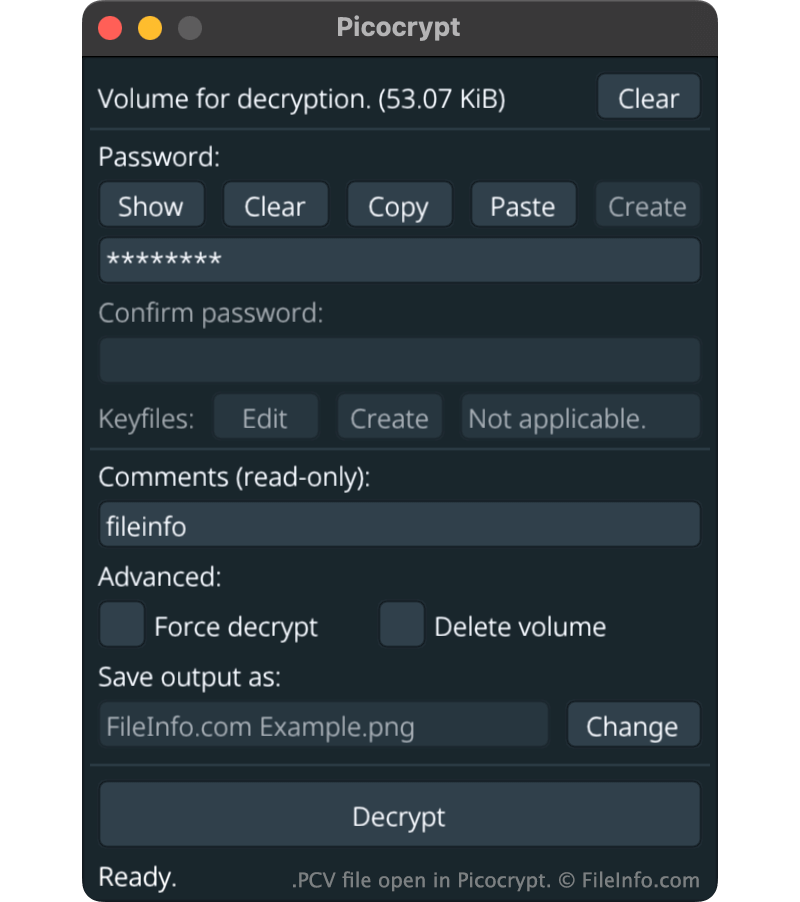
You can use Picocrypt (multiplatform) to decrypt a PCV file. To do so:
- Open Picocrypt and drag your PCV file to the application.
- In the Password: field, enter the password used to encrypt the file.
- Click Decrypt.
Picocrypt will then create a decrypted copy of your PCV file.
可打开 PCV 文件的程序
MozBackup Profile Backup
| 开发者 | MozBackup |
| 受欢迎程度 |
3.8 | 11 票 |
Backup file crated by MozBackup, a free utility used for backing up and restoring user profiles for Mozilla Thunderbird, Firefox, Mozilla Suite, and Netscape; saved in a compressed .ZIP format and contains bookmarks, email messages, contacts, and other profile data.
更多信息
You can decompress a PCV file manually by changing the ".pcv" file extension to ".zip" and unzipping the file with a decompression program such as WinZip. However, unless you know what to do with the extracted files, this may not be helpful in the restoration process. Therefore, it is best to treat PCV files as a "black box" and only open them using the MozBackup file.