.OV2 文件扩展名

TomTom Points of Interest Database

开发者 TomTom
受欢迎程度
3.0  |  13 
 

什么是 OV2 文件?

An OV2 file is a point of interest (POI) database used by a TomTom GPS device, such as the TomTom GO or TomTom Bridge. It contains a list of noteworthy locations and associated GPS coordinates. After importing an OV2 file into a supported TomTom device, users can select the locations that OV2 file contains from My Places.

更多信息

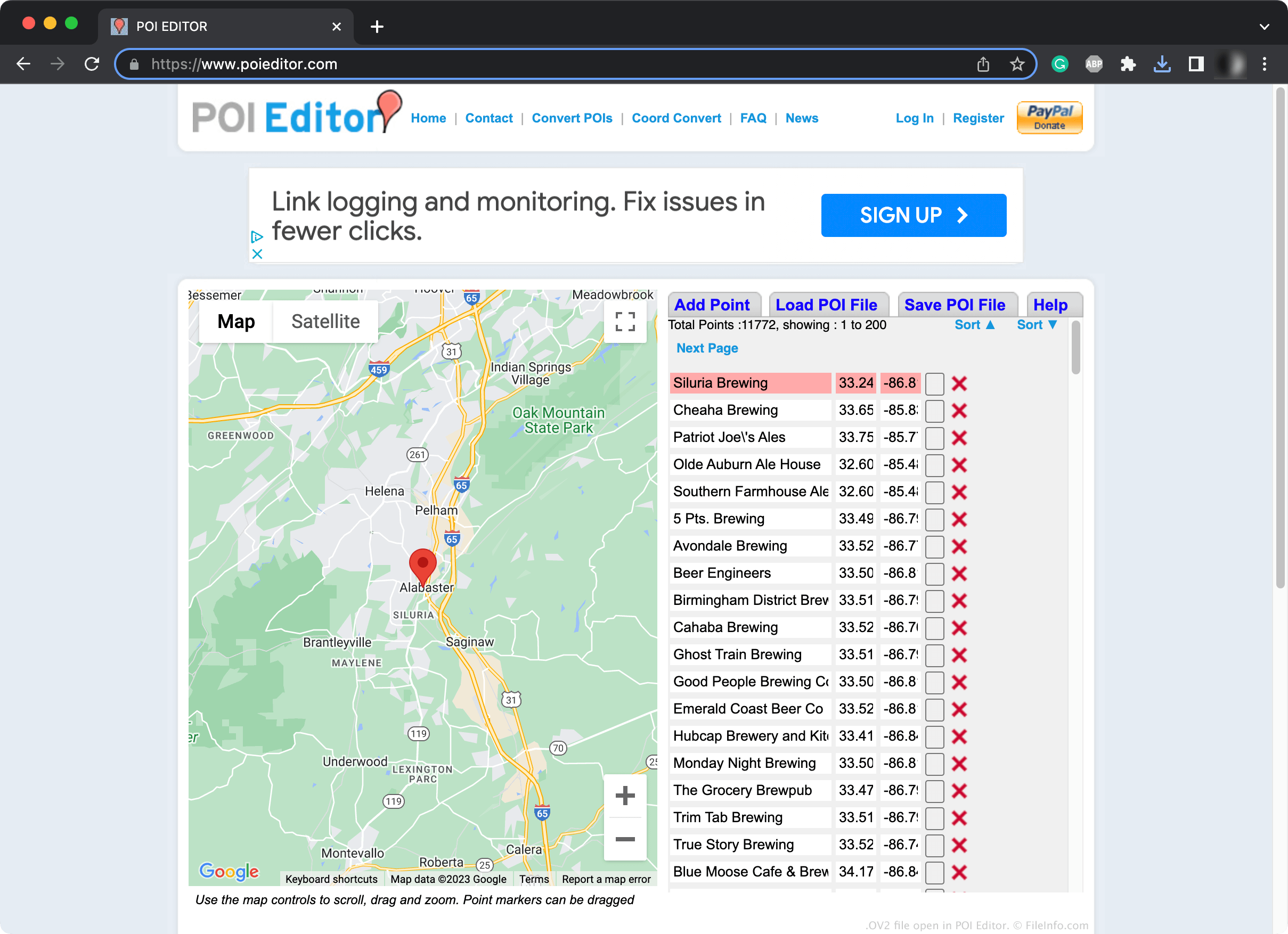
在 POI Editor 中打开的 .ov2 文件截图
在 POI Editor 中打开的 OV2 文件

TomTom users can create or download POI collections saved in the OV2 format. For example, a user might create their own OV2 file with TomTom Navigator, Global Mapper, POI Editor, or another mapping application. Or, a user might download an existing OV2 file from a TomTom-related forum.

Typically, users import OV2 files to their TomTom devices by uploading the files to their online TomTom MyDrive. Then, the next time the user's TomTom device syncs to their TomTom account, the device will import the OV2 file and the POIs it contains. However, users can also manually import OV2 files to a TomTom device.

注: Typically, each OV2 file contains a collection of related POIs, such as POIs for a particular city or region.

如何打开 OV2 文件

To import an OV2 file to your TomTom MyDrive (and synced TomTom devices):

  1. In a web browser, log in to your TomTom MyDrive.
  2. Select My Places → POI Files.
  3. Select Import POI file.
  4. Navigate to and upload your POI file.

The next time your TomTom device(s) syncs with your MyDrive, the POIs your OV2 file contains will appear in the device's My Places menu.

If you don't want to use TomTom MyDrive to add your OV2 file to your TomTom device, you can instead:

  • Use TomTom HOME (Windows, Mac) to import the OV2 file to the appropriate map directory on your device
  • Manually add the OV2 file to the appropriate map directory on your device (by connecting the device to your computer, selecting the drive that corresponds to your device, navigating to the appropriate map directory, and placing the OV2 file there)

How to create or edit an OV2 file

You can use POI Editor, a free online application, to create or edit OV2 files:

  • To create a new OV2 file, select Add Point and begin adding POIs
  • To edit an existing OV2 file, select Load POI File, load your POI file, and add or remove POIs as needed

After you've finished creating or editing your POI list, select Save POI File to download the resulting OV2 file.

如何转换 OV2 文件

You can use POI Editor to convert OV2 files to the following formats:

  • .CSV - Comma-Separated Values
  • .ASC - ASCII Text
  • .KML - Keyhole Markup Language
  • .GPX - GPS Exchange
  • .ITN - TomTom Navigator Itineary
  • .LMX - Landmark Exchange
  • .UPOI - iGO Points of Interest

To do so, load your OV2 file in POI Editor, select Save POI File, and then download your POI list in your desired format.

使用File Viewer Plus打开 400 多种文件格式。免费下载

可打开 OV2 文件的程序

Windows
Mac
Web
分类: GIS
更新时间: 2023-10-12

验证者 FileInfo.com

FileInfo.com 团队 独立研究了本页面列出的 TomTom Points of Interest Database 文件格式和 Mac and Windows 应用。 我们的目标是达到 100% 的准确率,并且仅发布我们已验证过的文件类型信息。

如果您想为此页面提出新增或更新建议,请告诉我们