.SKY Bestandsextensie

Emulated Skylander Character or Item

Ontwikkelaar N.v.t.
Populariteit
3.3  |  4 Stemmen
 

Wat is een SKY-bestand?

A SKY file contains data used to load a Skylander (or item) while playing a Skylander video game in a PC-based emulator, such as RPCS3 or Dolphin. Using SKY files allows players to load Skylanders without a connection to a Skylanders Portal. Players can create their own SKY files with RPCS3, or they can download pre-existing SKY files from the internet.

Meer informatie

Skylanders is a series of adventure video games that is paired with an accompanying toy line. To play as new characters in Skylanders, players place a toy representing that character on the Skylanders Portal (aka Portal of Power), a peripheral device connected to their gaming console or PC.

Players playing Skylanders in a video game console emulator may not own or be able to use a Skylanders Portal. For this reason, some emulators, including RPCS3 and Dolphin, include built-in systems that emulate the Portal. RPCS3 was the first emulator to include this built-in version of the Skylanders Portal; it supports creating and loading Skylanders saved as SKY files.

When a Skylander saved as a SKY file levels up or collects coins, that progress is saved to the SKY file. This allows players to load their leveled-up Skylanders while playing different games in different emulators.

Een SKY-bestand openen

You can load a SKY file while playing a Skylanders video game in RPCS3 or Dolphin. In RPCS3, select Manage → Skylanders Portal to access the portal-related menu and load your SKY file. In Dolphin, select Tools → Emulated USB Devices → Skylanders Portal to access the portal-related menu and load your SKY file.

Open meer dan 400 bestandsformaten met File Viewer Plus.Gratis downloaden

Programma's die SKY-bestanden openen

Windows
Gratis
Gratis
Mac
Gratis
Gratis
Linux
Gratis
Gratis
Android
Gratis
Categorie: Spel
Bijgewerkt: 2023-06-05

Photoshop Sky Replacement Preset

Ontwikkelaar Adobe
Populariteit
3.0  |  1 Stem
 

A SKY file is a preset pack for Adobe Photoshop's Sky Replacement tool. It contains one or more images of the sky, which can be imported and used to replace the sky in users' photos. Typically, SKY files contain several skyscapes that fit into the same category (sunsets, clear skies, rainbows, storms, etc.).

Meer informatie

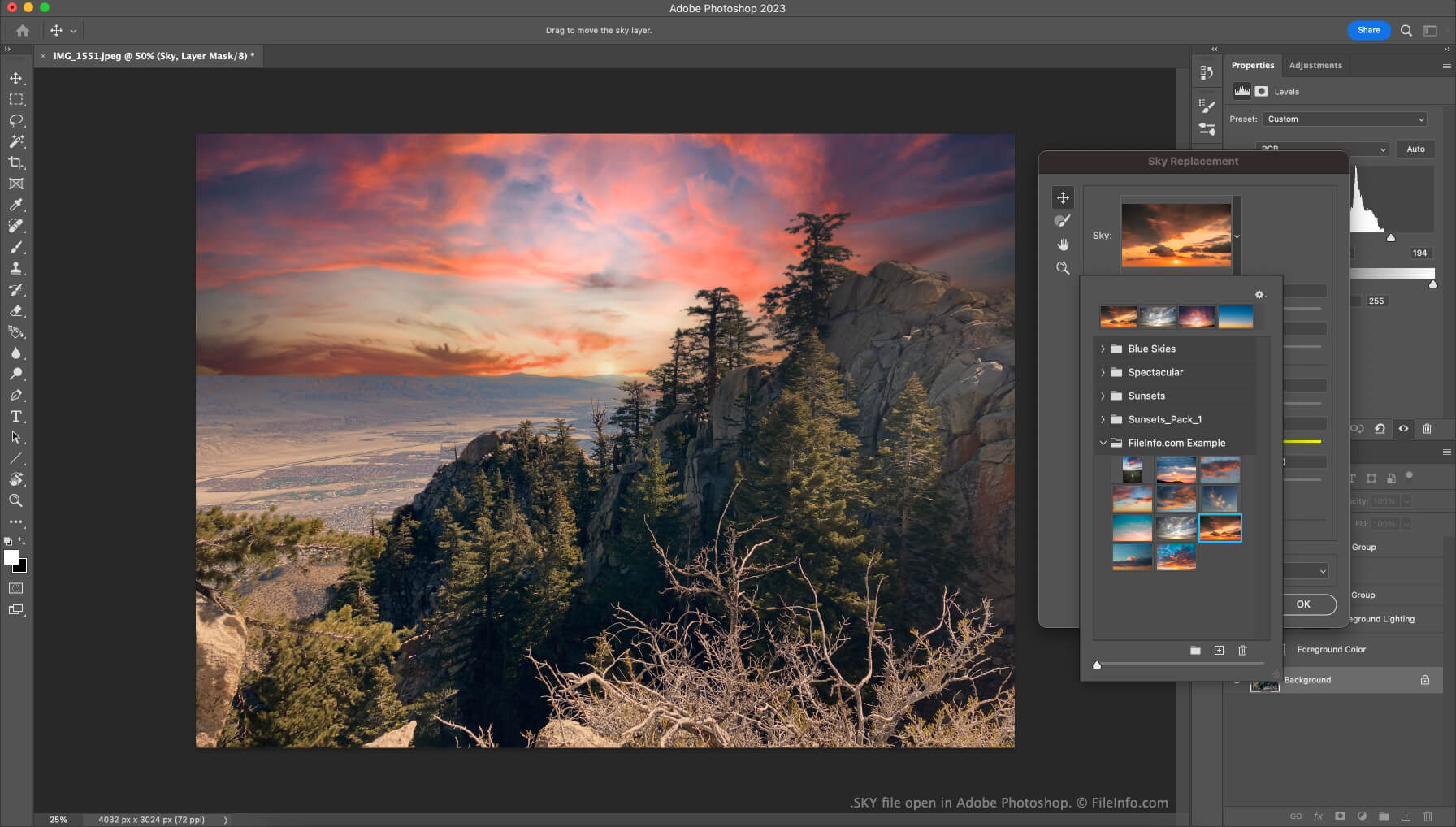
Schermafbeelding van een .sky-bestand in Adobe Photoshop
SKY-bestand geopend in Adobe Photoshop

In version 22 of Photoshop (released in October 2020), Adobe introduced the Sky Replacement feature. This tool allows users to replace the pictured sky in their photos with another image of the sky, to create more majestic (or otherwise-edited) photos.

Users who want to add additional images to the Sky Replacement tool can do so by importing individual images or preset packs, which contain a collection of images. These preset packs are saved as SKY files. Adobe makes several SKY files available for free on their website. Users can download these files and then import them from within the Sky Replacement tool.

Een SKY-bestand openen

To use a SKY file with Adobe Photoshop's Sky Replacement tool:

  1. Open Photoshop and select Edit → Sky Replacement....
  2. Click the drop-down arrow that appears in the Sky: field.
  3. Click the Gear icon.
  4. Select Get More Skies → Import Presets....
  5. Navigate to and open your SKY file.

The images your SKY file contains will then appear and be available for use in the Sky Replacement tool.

Programma's die SKY-bestanden openen

Windows
Gratis proefversie
Mac
Gratis proefversie

Geverifieerd door FileInfo.com

Het FileInfo.com-team heeft onafhankelijk onderzoek gedaan naar alle bestandsformaten en softwareprogramma's die op deze pagina worden vermeld. Ons doel is 100% nauwkeurigheid en we publiceren alleen informatie over bestandstypen die we hebben geverifieerd.

Als u aanvullingen of updates voor deze pagina wilt voorstellen, kunt u het ons laten weten.