.SKY 파일 확장자

Emulated Skylander Character or Item

개발사 해당 없음
인기도
3.3  |  4 투표
 

SKY 파일이란 무엇인가요?

A SKY file contains data used to load a Skylander (or item) while playing a Skylander video game in a PC-based emulator, such as RPCS3 or Dolphin. Using SKY files allows players to load Skylanders without a connection to a Skylanders Portal. Players can create their own SKY files with RPCS3, or they can download pre-existing SKY files from the internet.

추가 정보

Skylanders is a series of adventure video games that is paired with an accompanying toy line. To play as new characters in Skylanders, players place a toy representing that character on the Skylanders Portal (aka Portal of Power), a peripheral device connected to their gaming console or PC.

Players playing Skylanders in a video game console emulator may not own or be able to use a Skylanders Portal. For this reason, some emulators, including RPCS3 and Dolphin, include built-in systems that emulate the Portal. RPCS3 was the first emulator to include this built-in version of the Skylanders Portal; it supports creating and loading Skylanders saved as SKY files.

When a Skylander saved as a SKY file levels up or collects coins, that progress is saved to the SKY file. This allows players to load their leveled-up Skylanders while playing different games in different emulators.

SKY 파일을 여는 방법

You can load a SKY file while playing a Skylanders video game in RPCS3 or Dolphin. In RPCS3, select Manage → Skylanders Portal to access the portal-related menu and load your SKY file. In Dolphin, select Tools → Emulated USB Devices → Skylanders Portal to access the portal-related menu and load your SKY file.

File Viewer Plus(으)로 400개 이상의 파일 형식을 여세요.무료 다운로드

SKY 파일을 여는 프로그램

Windows
무료
무료
Mac
무료
무료
Linux
무료
무료
Android
무료
카테고리: 게임
업데이트: 2023-06-05

Photoshop Sky Replacement Preset

개발사 Adobe
인기도
3.0  |  1 투표
 

A SKY file is a preset pack for Adobe Photoshop's Sky Replacement tool. It contains one or more images of the sky, which can be imported and used to replace the sky in users' photos. Typically, SKY files contain several skyscapes that fit into the same category (sunsets, clear skies, rainbows, storms, etc.).

추가 정보

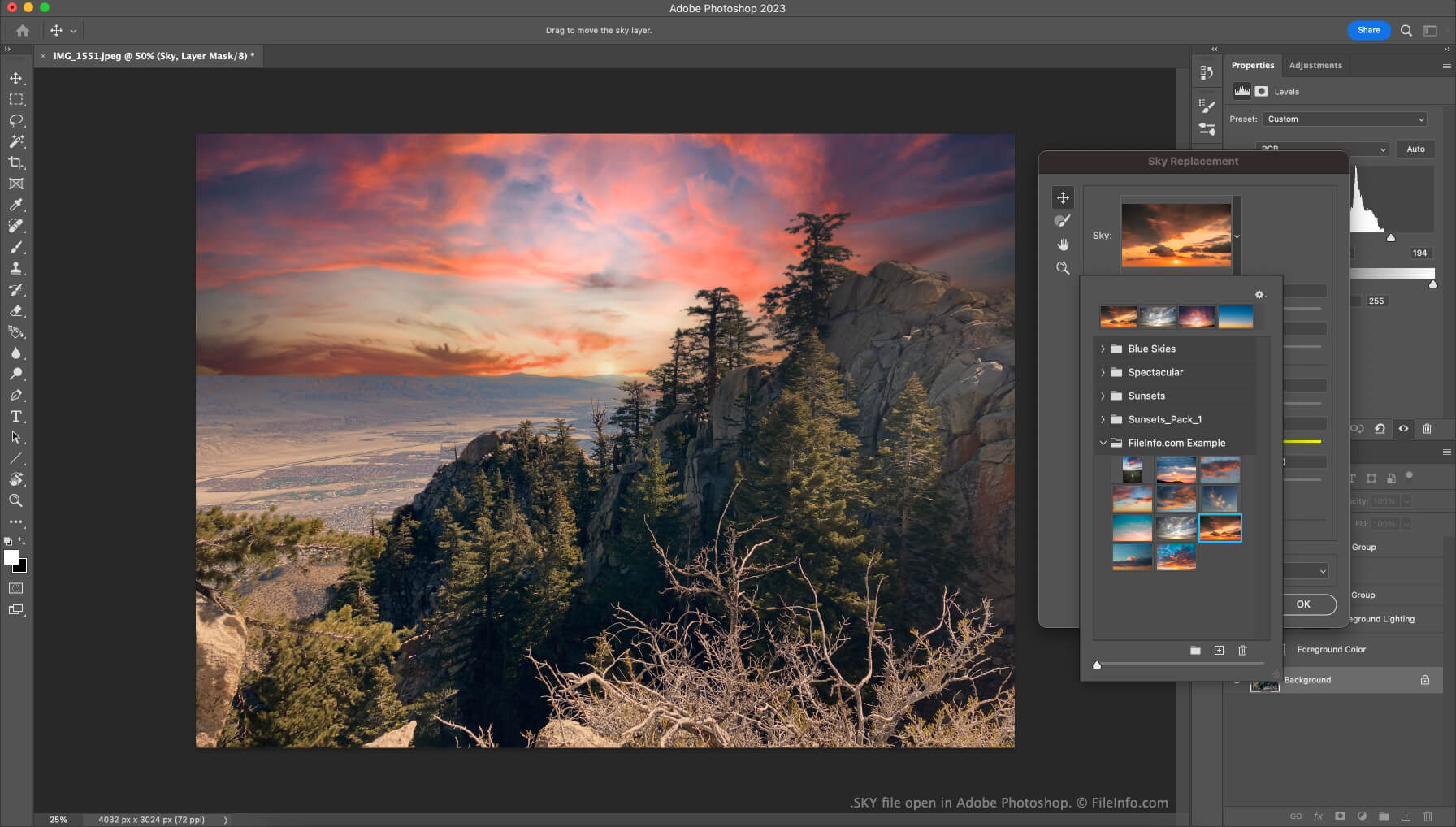
Adobe Photoshop에서 열린 .sky 파일의 스크린샷
Adobe Photoshop에서 열린 SKY 파일

In version 22 of Photoshop (released in October 2020), Adobe introduced the Sky Replacement feature. This tool allows users to replace the pictured sky in their photos with another image of the sky, to create more majestic (or otherwise-edited) photos.

Users who want to add additional images to the Sky Replacement tool can do so by importing individual images or preset packs, which contain a collection of images. These preset packs are saved as SKY files. Adobe makes several SKY files available for free on their website. Users can download these files and then import them from within the Sky Replacement tool.

SKY 파일을 여는 방법

To use a SKY file with Adobe Photoshop's Sky Replacement tool:

  1. Open Photoshop and select Edit → Sky Replacement....
  2. Click the drop-down arrow that appears in the Sky: field.
  3. Click the Gear icon.
  4. Select Get More Skies → Import Presets....
  5. Navigate to and open your SKY file.

The images your SKY file contains will then appear and be available for use in the Sky Replacement tool.

SKY 파일을 여는 프로그램

Windows
무료 체험판
Mac
무료 체험판

검증자 FileInfo.com

FileInfo.com 팀 이 페이지에 나열된 모든 파일 형식과 소프트웨어 프로그램을 독자적으로 조사했습니다. 저희의 목표는 100% 정확성이며, 검증한 파일 유형에 대한 정보만 게시합니다.

이 페이지에 추가하거나 업데이트할 내용을 제안하고 싶으시면 알려 주세요.