.SKY ファイル拡張子

Emulated Skylander Character or Item

開発元 不明
人気度
3.3  |  4 
 

SKYファイルとは?

A SKY file contains data used to load a Skylander (or item) while playing a Skylander video game in a PC-based emulator, such as RPCS3 or Dolphin. Using SKY files allows players to load Skylanders without a connection to a Skylanders Portal. Players can create their own SKY files with RPCS3, or they can download pre-existing SKY files from the internet.

詳細情報

Skylanders is a series of adventure video games that is paired with an accompanying toy line. To play as new characters in Skylanders, players place a toy representing that character on the Skylanders Portal (aka Portal of Power), a peripheral device connected to their gaming console or PC.

Players playing Skylanders in a video game console emulator may not own or be able to use a Skylanders Portal. For this reason, some emulators, including RPCS3 and Dolphin, include built-in systems that emulate the Portal. RPCS3 was the first emulator to include this built-in version of the Skylanders Portal; it supports creating and loading Skylanders saved as SKY files.

When a Skylander saved as a SKY file levels up or collects coins, that progress is saved to the SKY file. This allows players to load their leveled-up Skylanders while playing different games in different emulators.

SKYファイルの開き方

You can load a SKY file while playing a Skylanders video game in RPCS3 or Dolphin. In RPCS3, select Manage → Skylanders Portal to access the portal-related menu and load your SKY file. In Dolphin, select Tools → Emulated USB Devices → Skylanders Portal to access the portal-related menu and load your SKY file.

File Viewer Plusで400種類以上のファイル形式を開けます。無料ダウンロード

SKYファイルを開くプログラム

Windows
無料
無料
Mac
無料
無料
Linux
無料
無料
Android
無料
カテゴリ: ゲーム
更新日: 2023-06-05

Photoshop Sky Replacement Preset

開発元 Adobe
人気度
3.0  |  1 
 

A SKY file is a preset pack for Adobe Photoshop's Sky Replacement tool. It contains one or more images of the sky, which can be imported and used to replace the sky in users' photos. Typically, SKY files contain several skyscapes that fit into the same category (sunsets, clear skies, rainbows, storms, etc.).

詳細情報

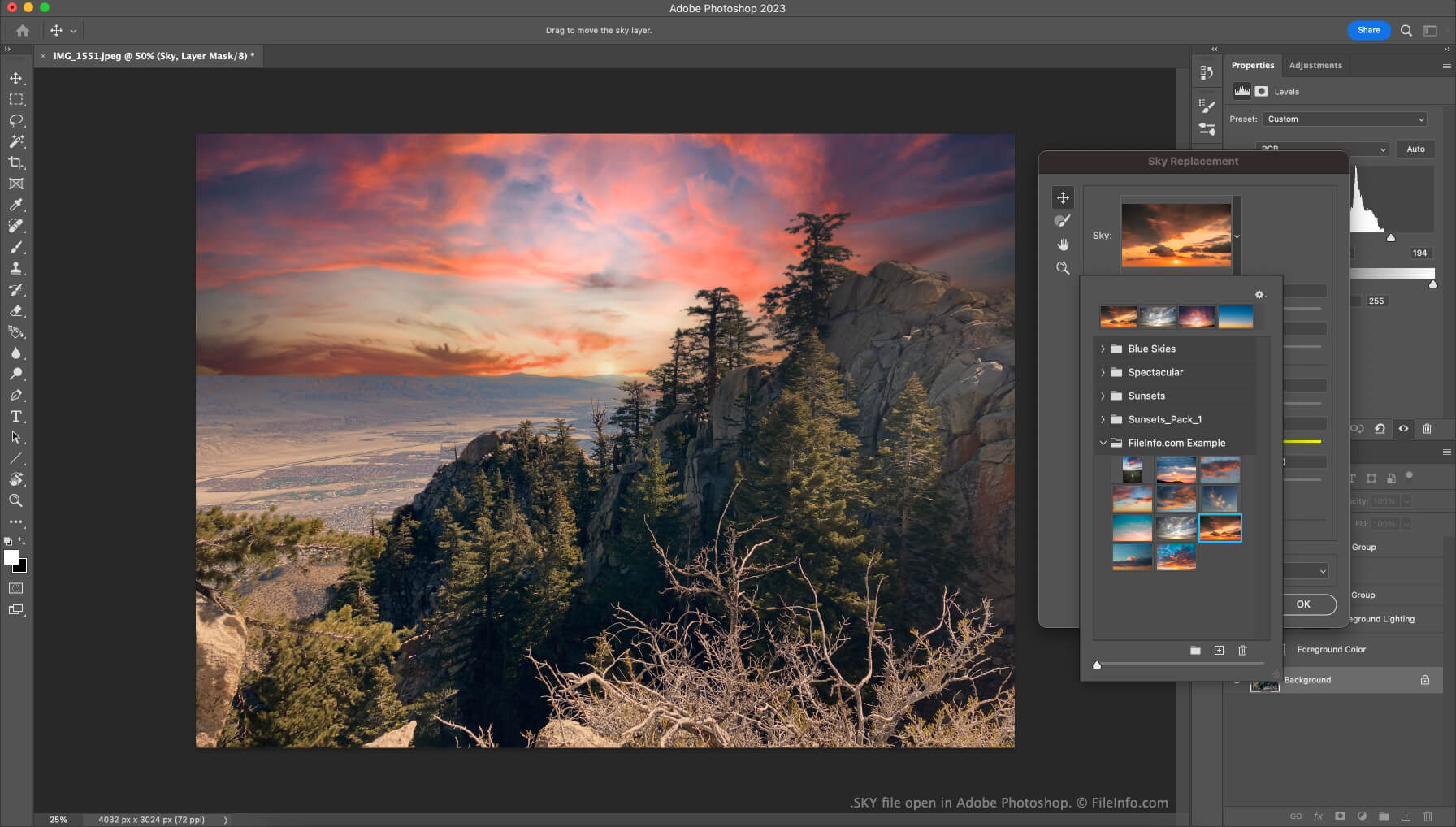
Adobe Photoshopで開いた.skyファイルのスクリーンショット
Adobe Photoshopで開いたSKYファイル

In version 22 of Photoshop (released in October 2020), Adobe introduced the Sky Replacement feature. This tool allows users to replace the pictured sky in their photos with another image of the sky, to create more majestic (or otherwise-edited) photos.

Users who want to add additional images to the Sky Replacement tool can do so by importing individual images or preset packs, which contain a collection of images. These preset packs are saved as SKY files. Adobe makes several SKY files available for free on their website. Users can download these files and then import them from within the Sky Replacement tool.

SKYファイルの開き方

To use a SKY file with Adobe Photoshop's Sky Replacement tool:

  1. Open Photoshop and select Edit → Sky Replacement....
  2. Click the drop-down arrow that appears in the Sky: field.
  3. Click the Gear icon.
  4. Select Get More Skies → Import Presets....
  5. Navigate to and open your SKY file.

The images your SKY file contains will then appear and be available for use in the Sky Replacement tool.

SKYファイルを開くプログラム

Windows
無料体験版
Mac
無料体験版

検証者 FileInfo.com

FileInfo.comチーム は、このページに掲載されているすべてのファイル形式とソフトウェアについて独自に調査しました。 私たちの目標は100%の正確性であり、検証済みのファイルタイプに関する情報のみを公開しています。

このページへの追加や更新をご提案いただける場合は、お知らせください。