.RDB Bestandsextensie

Retrospect Backup Set

Ontwikkelaar EMC
Populariteit
4.0  |  14 Stemmen
 

Wat is een RDB-bestand?

One of several files from a backup set created with Retrospect Backup software; contains exact data backed up from a hard drive and cataloged by the program; can be used to restore data that has been lost or corrupted on the original hard disk; file names are displayed incrementally as AA000000.RDB, AA000001.RDB, AA000002.RDB, etc.

Meer informatie

Retrospect was originally developed by Dantz software, but is now owned by EMC Insignia.

Open meer dan 400 bestandsformaten met File Viewer Plus.Gratis downloaden

Programma's die RDB-bestanden openen

Windows
EMC Retrospect
Mac
EMC Retrospect
Categorie: Back-up
Bijgewerkt: 2013-07-08

N64 ROM Database

Ontwikkelaar N.v.t.
Populariteit
3.7  |  9 Stemmen
 

An RDB file is a Nintendo 64 (N64) ROM database used by various N64 emulators to manage and organize ROMs. It contains a list of Nintendo 64 game ROMs, often in .N64 and .Z64 file formats, that the user can play with an emulator. RDB files help identify unknown ROMs and save emulator settings for each game, enhancing the gameplay experience.

Meer informatie

You will most likely encounter RDB files only if you are a gamer or developer using N64 emulators to play or test Nintendo 64 games on modern devices. You will typically find RDB files within the emulator's installation directory or download them from emulator-related resources to enhance ROM management.

Een RDB-bestand openen

You can open RDB files with various Nintendo 64 emulators, including Project64 and Nemu64. For example, you can load an RDB file with Project64 to manage ROM settings for better compatibility and performance.

Programma's die RDB-bestanden openen

Windows
Gratis
Gratis
Categorie: Gegevens
Bijgewerkt: 2026-07-01

Wavelet Video Images File

Ontwikkelaar N.v.t.
Populariteit
3.5  |  10 Stemmen
 

Video format known as "wavelet video" used by CCTV security cameras such as the Security VideoCam; can be played backed using the QuickView software included with the security camera hardware.

Meer informatie

RDB files are often saved along with .60D files.

Programma's die RDB-bestanden openen

Windows
QuickView
Categorie: Video
Bijgewerkt: 2008-11-07

Remote Desktop Backup

Ontwikkelaar Microsoft
Populariteit
3.0  |  1 Stem
 

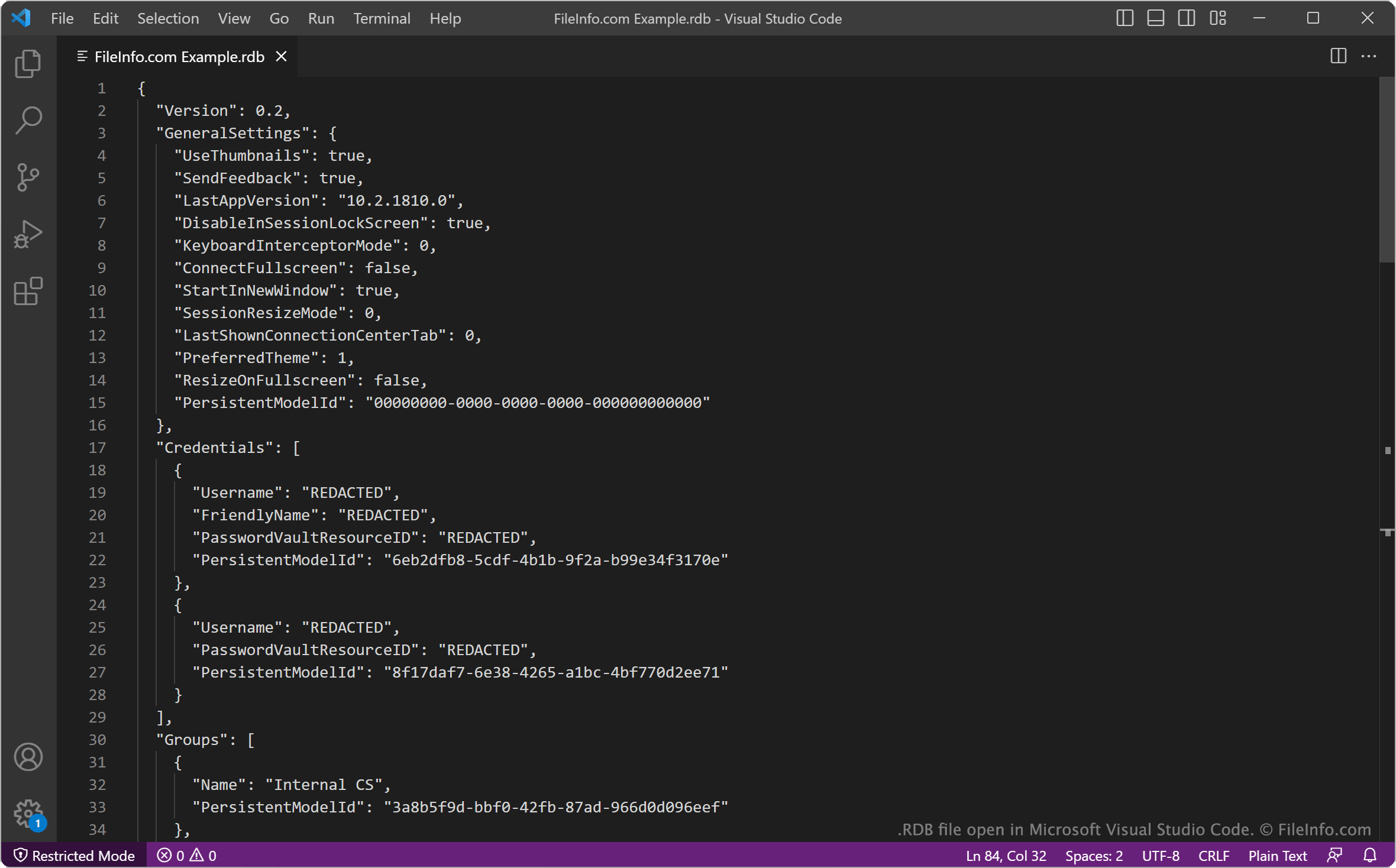
An RDB file is a backup file created by Microsoft Remote Desktop, a remote desktop app for Windows. It contains a JSON-formatted list of a user's remote desktop settings and credentials. Users can import RDB files to restore the remote desktop connections they describe.

Meer informatie

Schermafbeelding van een .rdb-bestand in Microsoft Visual Studio Code
RDB-bestand geopend in Microsoft Visual Studio Code

Microsoft Remote Desktop is an official Windows remote desktop app available in the Microsoft Store. It allows you to connect to remote PCs and virtual machines, to view and use those machines' desktops on your computer.

After configuring your remote desktop connections, you can back up those connections and your other Remote Desktop settings in an RDB file. To create an RDB file:

  1. Click the ... button in Remote Desktop's upper-right corner.
  2. Select Backup.
  3. Click Browse....
  4. Name and save your RDB file.

For example, an IT administrator may want to save users' remote desktop connections in RDB files, to ensure they can quickly restore those connections if something happens to the users' computers.

The first section of each RDB file specifies the version of Remote Desktop that created the file and the user's Remote Desktop settings at the time the backup was created. The remainder of the file specifies login credentials, remote desktop groups, and gateway and connection settings.

Een RDB-bestand openen

To use an RDB file to restore Microsoft Remote Desktop connections and settings:

  1. Open Remote Desktop and select the ... button.
  2. Select Restore.
  3. Select Browse....
  4. Navigate to and open your RDB file.

Remote Desktop will then import and apply the settings your RDB file contains.

If needed, you can also open an RDB file in Microsoft Notepad (Windows), Microsoft Visual Studio Code (multiplatform), or any other text editor, to view the settings it contains.

Programma's die RDB-bestanden openen

Windows
Inbegrepen bij het besturingssysteem
Mac
Inbegrepen bij het besturingssysteem
Categorie: Back-up
Bijgewerkt: 2023-04-27

Geverifieerd door FileInfo.com

Het FileInfo.com-team heeft onafhankelijk onderzoek gedaan naar alle bestandsformaten en softwareprogramma's die op deze pagina worden vermeld. Ons doel is 100% nauwkeurigheid en we publiceren alleen informatie over bestandstypen die we hebben geverifieerd.

Als u aanvullingen of updates voor deze pagina wilt voorstellen, kunt u het ons laten weten.