.RDB 파일 확장자

Retrospect Backup Set

개발사 EMC
인기도
4.0  |  14 투표
 

RDB 파일이란 무엇인가요?

One of several files from a backup set created with Retrospect Backup software; contains exact data backed up from a hard drive and cataloged by the program; can be used to restore data that has been lost or corrupted on the original hard disk; file names are displayed incrementally as AA000000.RDB, AA000001.RDB, AA000002.RDB, etc.

추가 정보

Retrospect was originally developed by Dantz software, but is now owned by EMC Insignia.

File Viewer Plus(으)로 400개 이상의 파일 형식을 여세요.무료 다운로드

RDB 파일을 여는 프로그램

Windows
EMC Retrospect
Mac
EMC Retrospect
카테고리: 백업
업데이트: 2013-07-08

N64 ROM Database

개발사 해당 없음
인기도
3.7  |  9 투표
 

An RDB file is a Nintendo 64 (N64) ROM database used by various N64 emulators to manage and organize ROMs. It contains a list of Nintendo 64 game ROMs, often in .N64 and .Z64 file formats, that the user can play with an emulator. RDB files help identify unknown ROMs and save emulator settings for each game, enhancing the gameplay experience.

추가 정보

You will most likely encounter RDB files only if you are a gamer or developer using N64 emulators to play or test Nintendo 64 games on modern devices. You will typically find RDB files within the emulator's installation directory or download them from emulator-related resources to enhance ROM management.

RDB 파일을 여는 방법

You can open RDB files with various Nintendo 64 emulators, including Project64 and Nemu64. For example, you can load an RDB file with Project64 to manage ROM settings for better compatibility and performance.

RDB 파일을 여는 프로그램

Windows
무료
무료
카테고리: 데이터
업데이트: 2026-07-01

Wavelet Video Images File

개발사 해당 없음
인기도
3.5  |  10 투표
 

Video format known as "wavelet video" used by CCTV security cameras such as the Security VideoCam; can be played backed using the QuickView software included with the security camera hardware.

추가 정보

RDB files are often saved along with .60D files.

RDB 파일을 여는 프로그램

Windows
QuickView
카테고리: 비디오
업데이트: 2008-11-07

Remote Desktop Backup

개발사 Microsoft
인기도
3.0  |  1 투표
 

An RDB file is a backup file created by Microsoft Remote Desktop, a remote desktop app for Windows. It contains a JSON-formatted list of a user's remote desktop settings and credentials. Users can import RDB files to restore the remote desktop connections they describe.

추가 정보

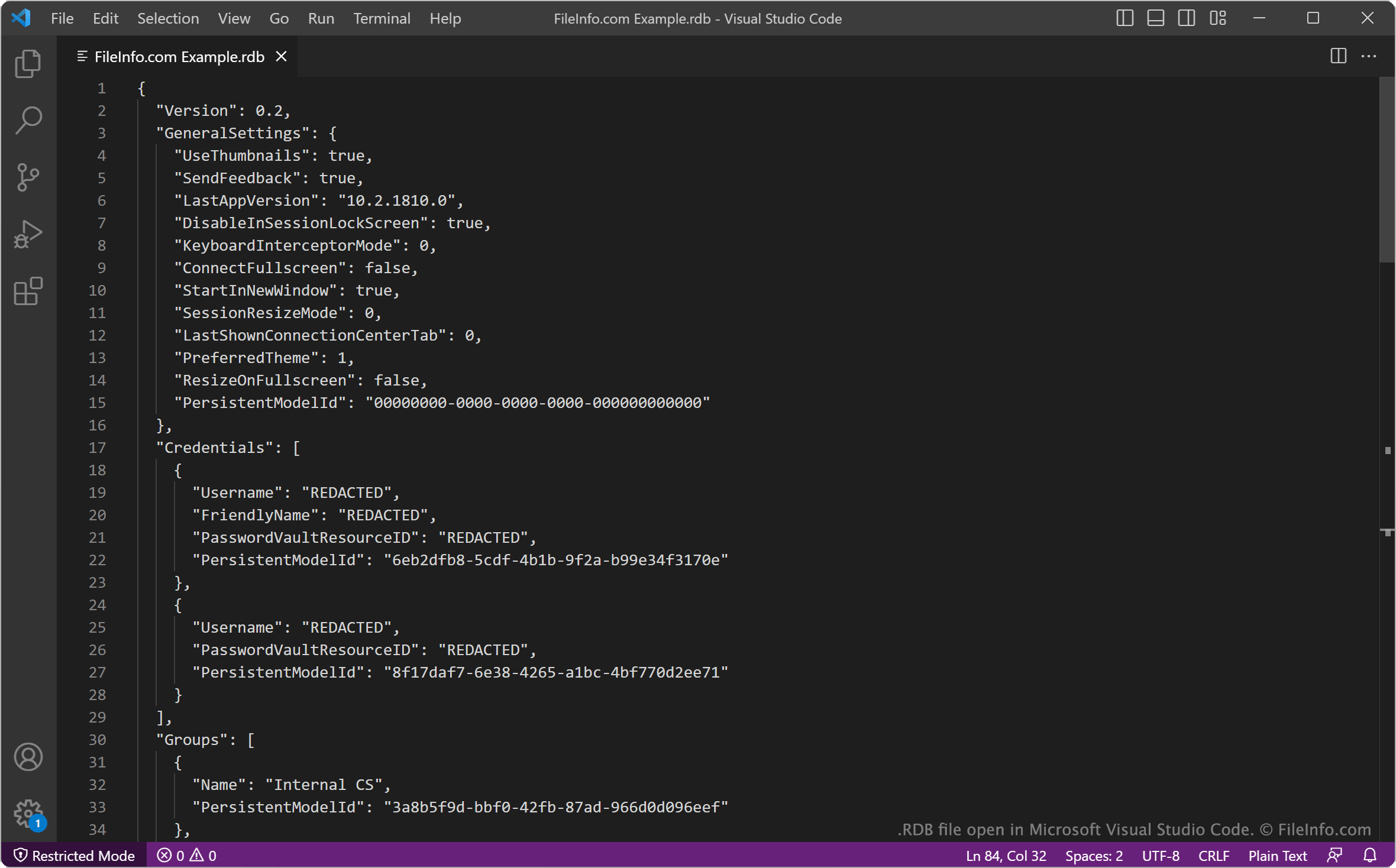
Microsoft Visual Studio Code에서 열린 .rdb 파일의 스크린샷
Microsoft Visual Studio Code에서 열린 RDB 파일

Microsoft Remote Desktop is an official Windows remote desktop app available in the Microsoft Store. It allows you to connect to remote PCs and virtual machines, to view and use those machines' desktops on your computer.

After configuring your remote desktop connections, you can back up those connections and your other Remote Desktop settings in an RDB file. To create an RDB file:

  1. Click the ... button in Remote Desktop's upper-right corner.
  2. Select Backup.
  3. Click Browse....
  4. Name and save your RDB file.

For example, an IT administrator may want to save users' remote desktop connections in RDB files, to ensure they can quickly restore those connections if something happens to the users' computers.

The first section of each RDB file specifies the version of Remote Desktop that created the file and the user's Remote Desktop settings at the time the backup was created. The remainder of the file specifies login credentials, remote desktop groups, and gateway and connection settings.

RDB 파일을 여는 방법

To use an RDB file to restore Microsoft Remote Desktop connections and settings:

  1. Open Remote Desktop and select the ... button.
  2. Select Restore.
  3. Select Browse....
  4. Navigate to and open your RDB file.

Remote Desktop will then import and apply the settings your RDB file contains.

If needed, you can also open an RDB file in Microsoft Notepad (Windows), Microsoft Visual Studio Code (multiplatform), or any other text editor, to view the settings it contains.

RDB 파일을 여는 프로그램

카테고리: 백업
업데이트: 2023-04-27

검증자 FileInfo.com

FileInfo.com 팀 이 페이지에 나열된 모든 파일 형식과 소프트웨어 프로그램을 독자적으로 조사했습니다. 저희의 목표는 100% 정확성이며, 검증한 파일 유형에 대한 정보만 게시합니다.

이 페이지에 추가하거나 업데이트할 내용을 제안하고 싶으시면 알려 주세요.