

.NFO Bestandsextensie
Warez-informatiebestand
| Ontwikkelaar | The Humble Guys |
| Populariteit |
3,8 | 36 stemmen |
Een NFO-bestand is een tekstbestand zonder opmaak waarin de inhoud wordt beschreven die in een Warez-pakket zit en die illegaal is verkregen. Elk Warez-pakket bestaat uit illegale inhoud, een NFO-bestand en een .SFV-bestand. Naast een beschrijving van de inhoud van een pakket vermeldt een NFO-bestand ook de gebruiker of groep die het pakket heeft gemaakt.
Meer informatie
De Warez-scene is een netwerk van piraterijgroepen die illegale versies van films, tv-programma's, muziek en softwareprogramma's verkrijgen, verpakken en uitbrengen. Deze groepen verspreiden de inhoud die ze illegaal hebben verkregen via internet als Warez-pakketten (vaak gewoon warez genoemd).
Alle Warez-pakketten bevatten twee extra bestanden die geen inhoud bevatten: een NFO-bestand en een SFV-bestand. Het NFO-bestand is een metadatabestand met informatie over de inhoud van het pakket. Als het pakket bijvoorbeeld een softwareprogramma bevat, bevat het NFO-bestand waarschijnlijk informatie over hoe je het programma installeert en instelt. (Het SFV-bestand van het pakket is een controlesombestand dat wordt gebruikt om de integriteit ervan te controleren.)
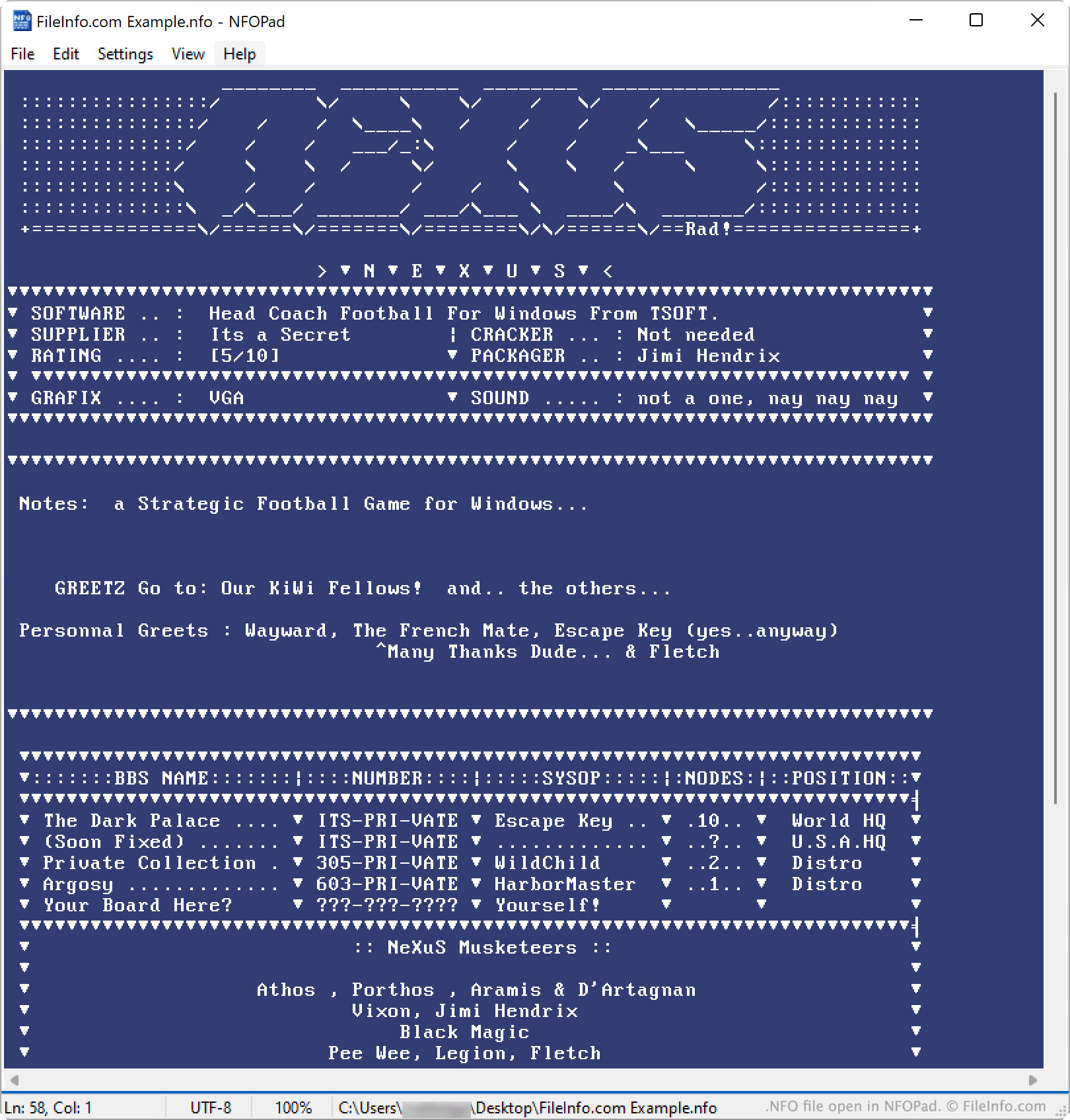
Hoewel NFO-bestanden tekstbestanden zonder opmaak zijn, bevatten ze vaak ASCII- of ANSI-kunst (afbeeldingen die uit teksttekens bestaan). Een NFO-bestand kan bijvoorbeeld het logo van een programma bevatten, getekend met ASCII-tekens. Wanneer je deze afbeeldingen in een teksteditor bekijkt, worden ze weergegeven als normale ASCII- of ANSI-tekens. In een gespecialiseerde NFO-viewer zien deze afbeeldingen er echter vaak uit als 8-bitsafbeeldingen.
OPMERKING: Aan de kraakgroep The Humble Guys (THG) wordt de eer toegeschreven de eerste NFO-bestanden te hebben gemaakt.
Een NFO-bestand openen
Je kunt een NFO-bestand openen met Microsoft Notepad, Apple TextEdit of een andere teksteditor. Misschien wil je een NFO-bestand echter openen met een gespecialiseerde NFO-viewer, zoals NFOPad (Windows) of DAMN NFO Viewer (Windows). Deze viewers geven ASCII- of ANSI-kunst in je NFO-bestand correct weer.
Houd er rekening mee dat het hulpprogramma Systeeminformatie van Windows een ander type NFO-bestanden gebruikt. Daarom kan Windows, wanneer je in Windows op een NFO-bestand dubbelklikt, proberen het bestand te openen in de viewer voor Systeeminformatie. Om dit probleem te voorkomen, open je het NFO-bestand handmatig vanuit je teksteditor of NFO-viewer.
Programma's die NFO-bestanden openen
Kodi-mediagegevens
| Ontwikkelaar | Kodi Foundation |
| Populariteit |
2,0 | 1 stem |
Een NFO-bestand is een bestand met metagegevens dat wordt gebruikt door Kodi, een gratis multiplatformmediaplayer. Het bevat informatie over een film, tv-programma, album, artiest of muziekvideo. NFO-bestanden zijn XML-bestanden die gebruikers handmatig kunnen maken of vanuit Kodi kunnen genereren.
Meer informatie
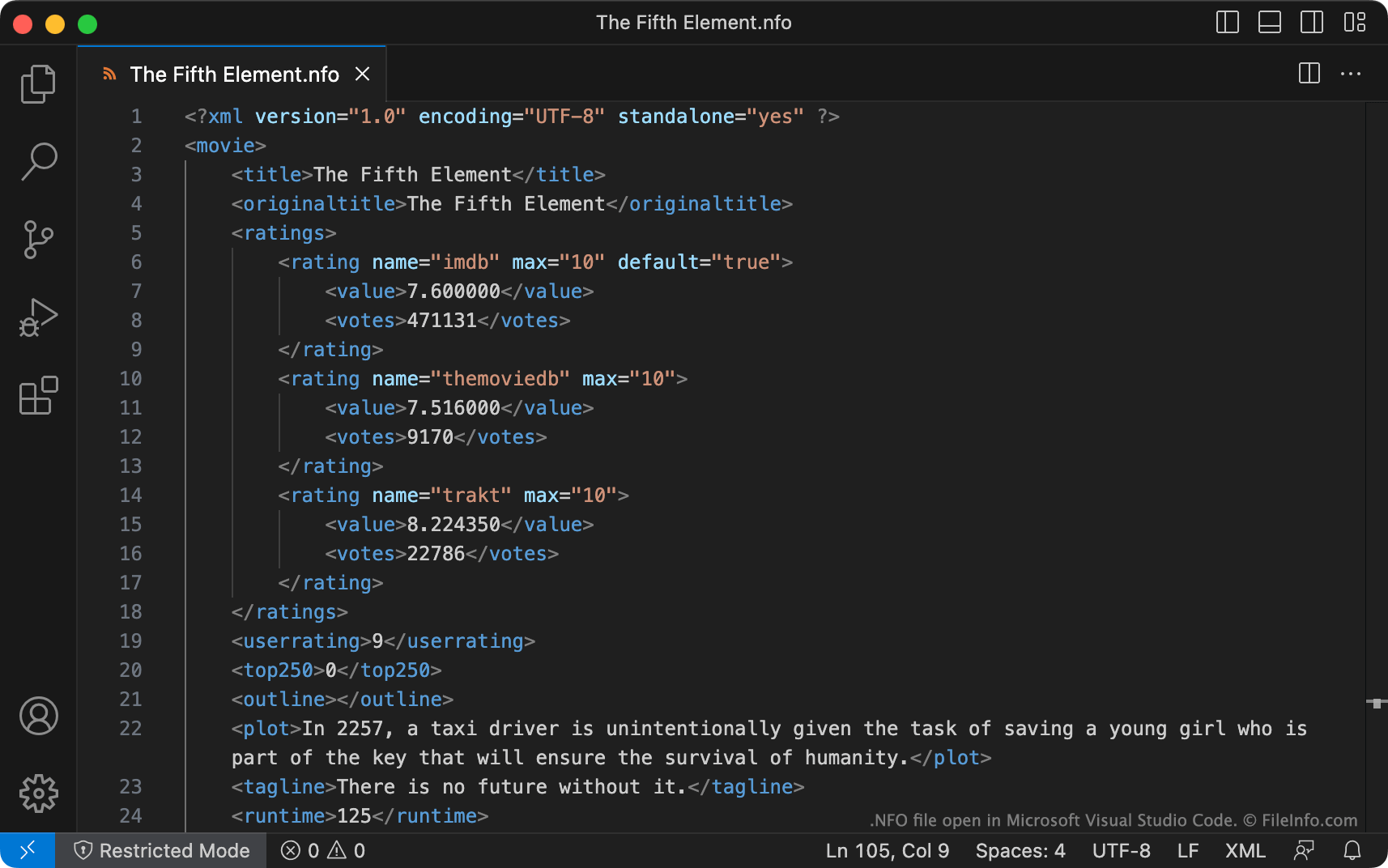
Kodi is een populaire mediaplayer waarmee gebruikers video- en muziekbestanden kunnen afspelen en ordenen. Wanneer een gebruiker een film, tv-programma, album of muziekvideo aan zijn Kodi-bibliotheek toevoegt, kan diegene de metagegevens over dat item automatisch of handmatig importeren. Om metagegevens automatisch te importeren, haalt Kodi gegevens op van websites zoals IMDb om overeenkomende titels te vinden. Om metagegevens handmatig te importeren, gebruikt Kodi NFO-bestanden. Dit zijn platte tekstbestanden in XML-indeling die identificerende informatie bevatten.
NFO-bestanden maken
Als je al een Kodi-bibliotheek hebt, kun je de exportfuncties voor bibliotheken van Kodi gebruiken om je bestaande video- en albummetagegevens naar een set NFO-bestanden te exporteren. Dit kan bijvoorbeeld handig zijn als je een deel van de metagegevens van je bestaande bibliotheek wilt opschonen en overschrijven.
Als je handmatig een NFO-bestand wilt maken, kun je dat doen met Microsoft Visual Studio Code of een andere teksteditor. Sjabloon-NFO-bestanden, waarmee je kunt beginnen met het maken van je NFO-bestanden, zijn beschikbaar op de Kodi-wiki. Je kunt ook de online NFO Maker-app gebruiken om NFO-bestanden te maken.
Hoe NFO-bestanden worden opgeslagen en benoemd
NFO-bestanden moeten worden opgeslagen in dezelfde map als de media waarnaar ze verwijzen. NFO-bestanden moeten bovendien de juiste naam hebben, zodat Kodi de metagegevens die ze bevatten kan laden.
Als je bijvoorbeeld een NFO-bestand maakt voor gebruik met Jumanji.mp4, moet je het de naam Jumanji.nfo geven en het plaatsen in de map die Jumanji.mp4 bevat. NFO-bestanden die bij muziekvideo's horen, moeten ook dezelfde bestandsnaam gebruiken als de video waarnaar ze verwijzen. NFO-bestanden voor albums, artiesten en tv-programma's moeten daarentegen altijd respectievelijk album.nfo, artist.nfo en tvshow.nfo heten.
OPMERKING: Sommige andere mediaplayers en -beheerders, zoals Plex Media Server, TinyMediaManager en Ember Media Manager, gebruiken en kunnen ook NFO-bestanden in Kodi-indeling maken.
Een NFO-bestand openen
Je kunt Microsoft Visual Studio Code of een andere teksteditor gebruiken om NFO-bestanden te openen en te bewerken.
Klik hier voor instructies over hoe je een NFO-bestand gebruikt om een nieuw item in je Kodi-bibliotheek te importeren of de metagegevens van een bestaand item te vernieuwen.