

.VSRX 파일 확장자
VSRegex 문서
| 개발사 | Lonestar Softworx |
| 인기도 |
2.0 | 1 표 |
VSRX 파일이란 무엇인가요?
VSRX 파일은 Microsoft Visual Studio용 VSRegex 확장 프로그램으로 만든 정규 표현식 문서입니다. 이 파일에는 정규 표현식을 만드는 데 사용되는 설정을 지정하는 JSON 형식의 일반 텍스트가 포함되어 있습니다. 정규 표현식을 테스트하는 데 사용되는 입력 텍스트와 대체 텍스트를 지정할 수도 있습니다.
추가 정보
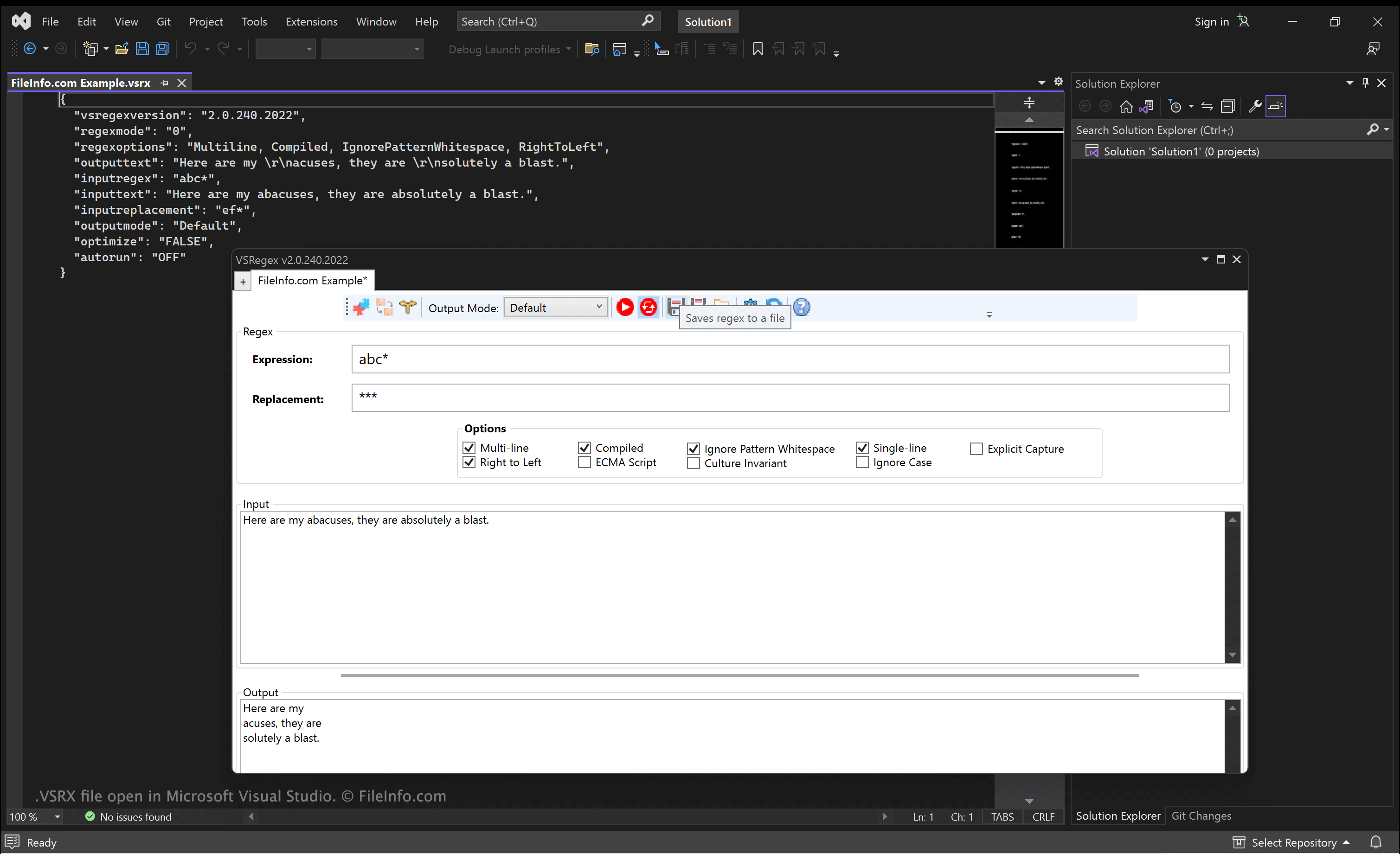
VSRegex는 개발자가 정규 표현식을 만들고 테스트할 수 있도록 해 주는 Visual Studio 확장 프로그램입니다. Lonestar Softworx에서 개발했습니다.
VSRegex를 설치하고 연 후 개발자는 정규 표현식을 만들고, VSRegex 설정(확장 프로그램의 메뉴 사용)을 조정하고, 정규 표현식을 테스트할 수 있습니다. 그런 다음 만든 정규 표현식과 지정한 옵션을 VSRX 파일에 저장할 수 있습니다. 이렇게 하면 나중에 정규 표현식을 빠르게 불러오고, 편집하고, 사용할 수 있습니다.
VSRX 파일을 여는 방법
Microsoft Visual Studio(Windows), Microsoft Visual Studio Code(다중 플랫폼) 또는 다른 텍스트 편집기나 소스 코드 편집기를 사용하여 VSRX 파일을 열고 편집할 수 있습니다.
VSRegex에서 VSRX 파일을 사용하려면 Microsoft Visual Studio에 확장 프로그램을 설치한 다음 를 선택합니다. 표시되는 VSRegex 창에서 폴더 아이콘을 클릭하여 VSRX 파일을 찾아 엽니다.
VSRX 파일을 여는 프로그램
Windows
Mac
Linux