

.SONGDATA 파일 확장자
jOeSU 레벨 데이터
| 개발사 | stoozey |
| 인기도 |
1.5 | 2 표 |
SONGDATA 파일이란 무엇인가요?
SONGDATA 파일은 플레이어가 음악에 맞춰 키보드 버튼을 누르는 종량제 리듬 게임인 jOeSU에서 사용하는 레벨 정보 파일입니다. 이 파일에는 레벨을 진행하는 동안 플레이어가 버튼을 눌러야 하는 시점과 위치가 포함되어 있거나, 레벨에 대한 추가 메타데이터가 포함되어 있습니다. SONGDATA 파일은 특정 노래와 연결되며, 파일 이름에는 해당 파일이 사용되는 노래의 이름이 포함되는 경우가 많습니다.
추가 정보
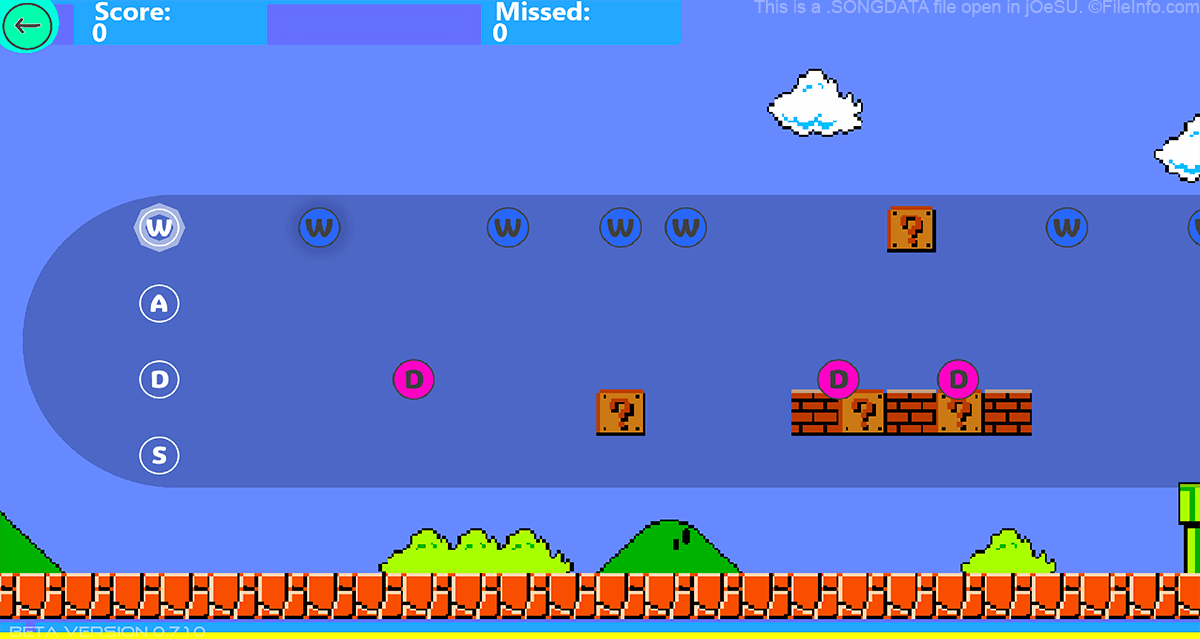
Guitar Hero, osu! 및 기타 리듬 기반 게임과 마찬가지로 jOeSU는 플레이어가 음악에 맞춰 동작을 수행하도록 합니다. jOeSU에서 플레이어는 노래가 진행되는 동안 나타나는 안내에 맞춰 키보드의 W, A, S 또는 D 키를 눌러야 합니다. jOeSU의 기본 SONGDATA 파일은 각각 특정 노래와 연결되어 있으며(파일 이름에 포함된 노래 이름으로 알 수 있음), jOeSU가 플레이어에게 안내를 표시하는 데 사용하는 숫자 정보 목록이 포함되어 있습니다.
jOeSU 플레이어는 게임의 레벨 편집기를 사용해 자신만의 레벨을 만들 수 있습니다. 레벨을 만들면 jOeSU는 플레이어의 Documents 디렉터리 안에 폴더로 레벨을 저장합니다. 이러한 폴더에는 두 개의 SONGDATA 파일이 포함됩니다. data.songdata에는 사용자 지정 레벨에서 표시해야 하는 안내에 대한 정보가 포함되고, info.songdata에는 레벨 제작자, 속도 및 난이도에 대한 정보가 포함됩니다. 플레이어는 사용자 지정 레벨이 들어 있는 폴더를 jOeSU 온라인 포럼에 업로드하여 서로 공유할 수 있습니다.
일반적인 .SONGDATA 파일 이름
s[songname].songdata - jOeSU에 포함된 기본 SONGDATA 파일입니다. 파일 이름에는 해당 파일이 사용되는 노래의 제목이 포함되어 있습니다.
data.songdata - jOeSU의 레벨 편집기에서 만든 SONGDATA 파일입니다. 사용자 지정 레벨에 대한 안내 정보가 포함되어 있습니다.
info.songdata - jOeSU의 레벨 편집기에서 만든 SONGDATA 파일입니다. 레벨 제작자, 속도 및 난이도를 비롯한 사용자 지정 레벨의 메타데이터가 포함되어 있습니다.
SONGDATA 파일을 여는 방법
SONGDATA 파일은 일반 텍스트 파일이므로 텍스트 편집기에서 열고 편집할 수 있습니다. 그러나 게임 커뮤니티에서는 SONGDATA 파일을 직접 열고 편집하지 않는 것을 권장합니다. 대신 jOeSU의 레벨 편집기를 사용해 SONGDATA 파일과 연결된 레벨을 편집해야 합니다. 그러면 jOeSU가 레벨에 적용한 편집 내용을 레벨의 SONGDATA 파일에 반영합니다.
jOeSU의 레벨 편집기에서 사용자 지정 레벨을 여는 데 문제가 있다면 레벨 폴더를 올바른 디렉터리에 넣지 않았을 수 있습니다. 사용자 지정 jOeSU 레벨은 C:\Users\~\Documents\jOeSU_Custom\songs 디렉터리에 넣어야 합니다.