.R 파일 확장자

R Script

개발사 The R Project for Statistical Computing
인기도
3.9  |  65 투표
 
🔍File Helper(으)로 .R 파일을 웹 브라우저에서 바로 여세요.온라인으로 보기

R 파일이란 무엇인가요?

An R file is a script written in R, a programming language used for statistical analysis and graphing purposes. It contains code that can be executed within the R software environment. R files may include commands that create objects (functions, values, etc.) and produce visualizations of the computed data.

추가 정보

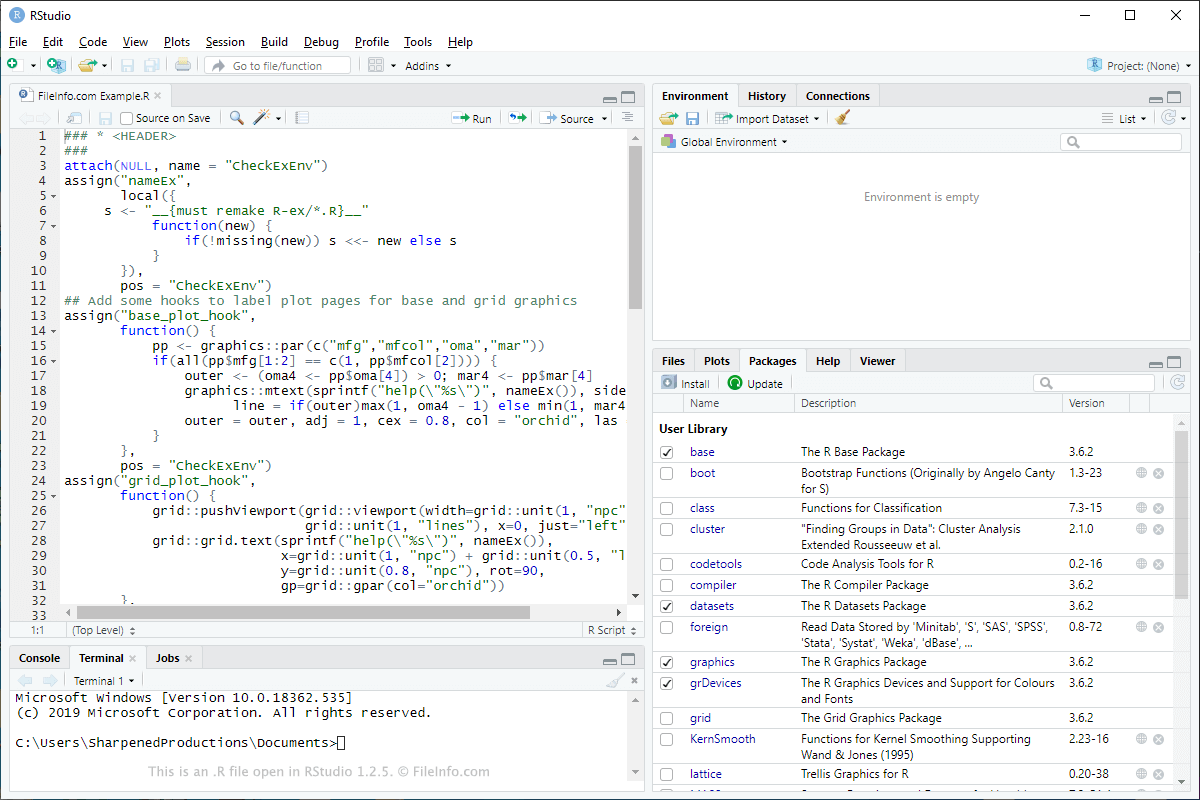
RStudio 1.2.5에서 열린 .r 파일의 스크린샷
RStudio 1.2.5에서 열린 R 파일

You will most likely only encounter R scripts if you work in a field that focuses on statistical analysis and uses the R programming language to develop data analysis programs. The R and RStudio programs are typically used to open R files since they provide helpful IDE tools.

You can also use a plain text editor to view the contents of an R script. This is especially helpful for users unsure of what the R file contains. If this pertains to you, open the file with Microsoft Notepad in Windows or Apple TextEdit in macOS to examine what is stored in the file. Both of these text editors come bundled with their respective operating systems.

R 파일을 열거나 참조하는 프로그램

Windows
Mac
무료
무료
Linux
무료
무료
Web
Android
카테고리: 개발자
업데이트: 2020-02-06

Rez Source Code File

개발사 Apple
인기도
2.6  |  11 투표
 

An R file is a source code file used by Rez, an older resource compiler once included with Apple's developer tools. It contains written definitions of application resources, such as strings, icons, menus, alerts, and other structured data. Each R file includes both the resource types and the individual resource entries that Rez uses to build a resource fork for a classic Mac application.

추가 정보

Developers wrote R files to organize and manage the resources used by applications built for classic Mac OS and early versions of macOS. Rez processed these text declarations and produced compiled resource data that could be embedded in application bundles or other files.

The companion tool DeRez could reverse this process by converting compiled resources back into readable R files. Although modern versions of Apple Xcode no longer include these tools, they were once a standard part of older Mac development workflows.

R 파일을 여는 방법

You can open R files with any text editor, such as Apple TextEdit, Sublime Text, or Microsoft Visual Studio Code. Older versions of Apple Xcode included the Rez compiler, which developers used to compile R files into application resources.

R 파일을 열거나 참조하는 프로그램

All Platforms
Mac
무료 체험판
OS에 포함됨
카테고리: 개발자
업데이트: 2025-11-21

Right Audio Channel File

개발사 해당 없음
인기도
1.9  |  9 투표
 

An R file is an audio file that stores the right channel of a stereo recording. It is typically created when audio production software exports each stereo channel as a separate file, allowing engineers to edit or process the left and right channels independently. Because the file contains only one side of a stereo mix, it must be combined with a matching .L (left channel) file to form the complete audio track.

추가 정보

Audio editing and digital audio workstation (DAW) applications create R files when users choose to work with split stereo audio rather than a single interleaved file. For example, Digital Performer, Cubase, and other multitrack editors may generate R files during export or when users record audio in a format that separates channels. This workflow can be useful for sound engineers who need separate control over each channel for mixing, effects processing, or correction.

참고: R files are usually saved in standard audio formats, such as .WAV or .AIFF. The extension .r indicates their channel role rather than their container format.

R 파일을 여는 방법

You can open R files with most DAWs, audio editors, and media players, including Avid Pro Tools, Audacity, and VideoLAN VLC Media Player (as long as the app supports the format in which the R file is saved). The apps will recognize it as a mono audio track. For full stereo playback, you must load both the R and corresponding L files and pair them within the audio software.

R 파일을 여는 프로그램

All Platforms
Windows
무료 체험판
무료 체험판
무료 체험판
무료 체험판
무료 체험판
Mac
무료 체험판
무료 체험판
무료 체험판
무료 체험판
카테고리: 오디오
업데이트: 2025-11-20

Ratfor Source Code

개발사 Brian Kerhighan
인기도
1.8  |  8 투표
 

An R file is a source code file used by Rational Fortran (Ratfor), a preprocessor for the FORTRAN programming language. It contains a mix of standard FORTRAN code and Ratfor-specific statements, which provide a more modern and flexible syntax. Before compilation, Ratfor converts the file into standard FORTRAN code that a FORTRAN compiler can process.

추가 정보

Developers use Ratfor to write code using constructs that FORTRAN does not natively support, such as C-style control flow statements, including if-else, switch, while, and for loops. This functionality makes it easier to write, read, and maintain complex programs while still generating valid FORTRAN code for execution. Developers working on scientific, engineering, or numerical computing projects often used Ratfor to simplify coding in older FORTRAN environments.

R 파일을 여는 방법

You can open R files with any plain text editor, such as Microsoft Notepad, Notepad++, or Microsoft Visual Studio Code, to view or edit the source code. To compile and run the code, you first process it with a Ratfor preprocessor to generate standard FORTRAN source code, which a FORTRAN compiler, such as gfortran or Intel Fortran Compiler, can then compile.

R 파일을 열거나 참조하는 프로그램

All Platforms
Windows
무료
Mac
무료
Linux
무료
카테고리: 개발자
업데이트: 2025-11-20

REBOL Script

개발사 REBOL Technologies
인기도
1.4  |  16 투표
 

Script written in the REBOL programming language; contains code that can be compiled into an executable program; may be a program file or a header file referenced by other REBOL program files.

추가 정보

REBOL stands for "Relative Expression Based Object Language." The language is commonly used for creating Internet scripts and applications.

R 파일을 열거나 참조하는 프로그램

Windows
REBOL/View
REBOL/Core
REBOL/SDK
Mac
REBOL/View
REBOL/Core
REBOL/SDK
Linux
REBOL/View
REBOL/Core
REBOL/SDK
카테고리: 개발자
업데이트: 2010-01-09

검증자 FileInfo.com

FileInfo.com 팀 이 페이지에 나열된 모든 파일 형식과 소프트웨어 프로그램을 독자적으로 조사했습니다. 저희의 목표는 100% 정확성이며, 검증한 파일 유형에 대한 정보만 게시합니다.

이 페이지에 추가하거나 업데이트할 내용을 제안하고 싶으시면 알려 주세요.