.PTEX 파일 확장자

Ptex Texture File

개발사 Walt Disney Animation Studios
인기도
4.2  |  5 투표
 

PTEX 파일이란 무엇인가요?

A PTEX file is a texture file used by Ptex, a texture mapping system for the rendering of production-quality animation in movies and shorts. It contains one or more texture images including channels and metadata that can be accessed through the memory-managed cache.

추가 정보

Ptex was developed by Walt Disney Animation Studios in the late 2000s. It was developed to eliminate UV assignment, provide seamless filtering, and allow thousands of textures to be stored in one file, which is the PTEX file.

The Ptex mapping system was first used in the animated short Giago's Guest in 2008 but has also been used in the full-length feature Bolt. It is now the main texture mapping method used in all productions at Walt Disney Animation Studios.

File Viewer Plus(으)로 400개 이상의 파일 형식을 여세요.무료 다운로드

PTEX 파일을 여는 프로그램

Windows
무료

Material Maker Procedural Texture

개발사 Rodz Labs
인기도
3.5  |  2 투표
 

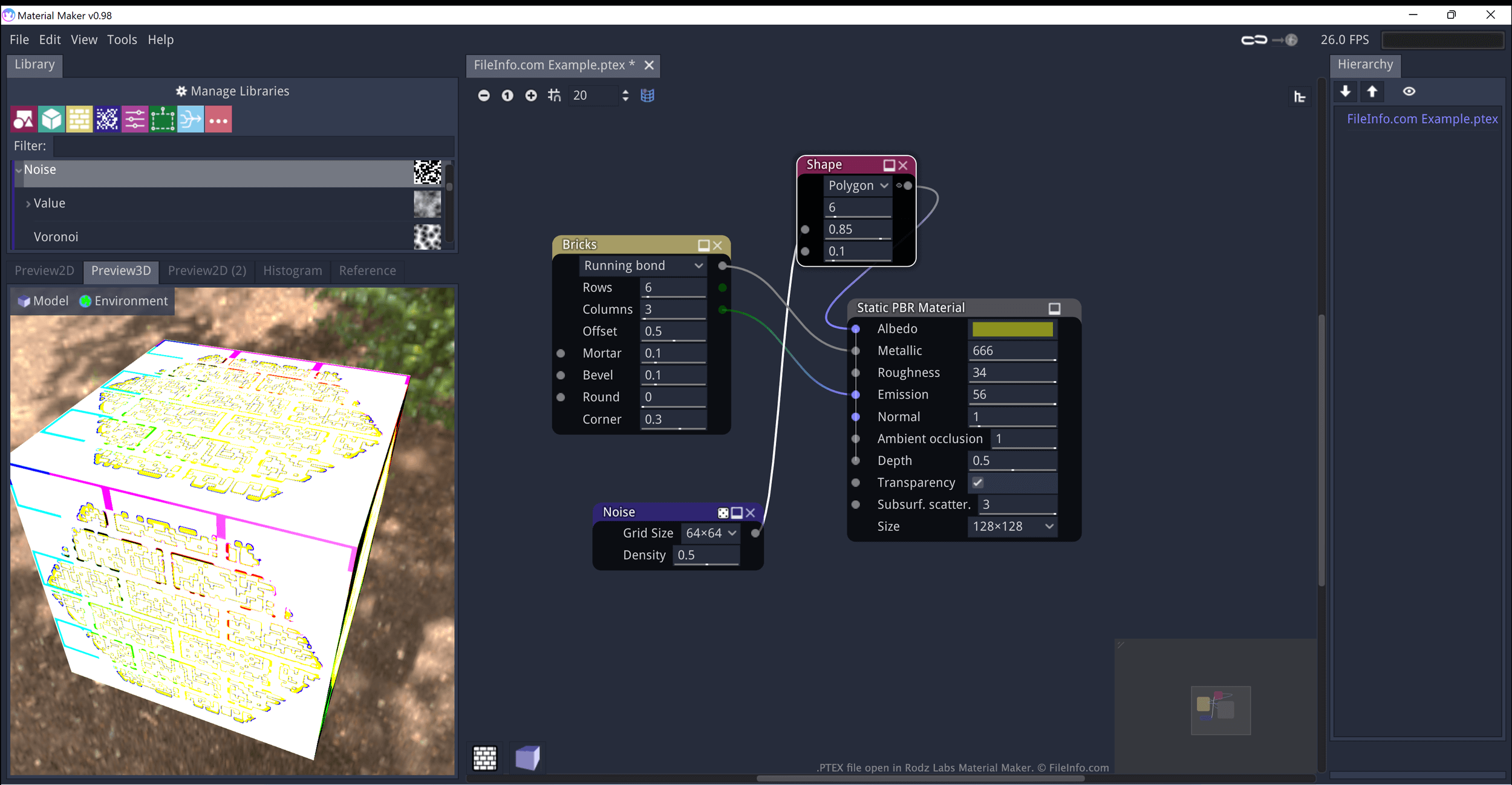
A PTEX file is a texture created by Material Maker, a procedural material creation program. It contains JSON-formatted data that defines how Material Maker generates and applies the texture to an object. When opened in Material Maker, PTEX files appear as a series of interconnected nodes.

추가 정보

Rodz Labs에서 열린 .ptex 파일의 스크린샷
Rodz Labs에서 열린 PTEX 파일

Rodz Labs Material Maker allows you to procedurally generate materials (textures) and paint 3D models. These assets are meant to be imported into video games developed using the Godot, Unity, and Unreal game engines.

Textures created in Material Maker are saved as PTEX files. Each PTEX file consists of one or more nodes, which can be connected and modified to refine how the texture appears. In Material Maker, these nodes appear as visual elements you can reposition, modify, and connect to other nodes. However, PTEX files are actually plain text files, which contain JSON-formatted data that defines the nodes' connections and settings.

PTEX 파일을 여는 방법

You can open a PTEX file in Material Maker (multiplatform):

  1. Open Material Maker and select File → Load.
  2. When the Open File(s) window appears, navigate to and open your PTEX file.

You can also open a PTEX file in any text editor, to view the JSON data it contains.

PTEX 파일을 여는 프로그램

카테고리: 게임
업데이트: 2022-06-17

검증자 FileInfo.com

FileInfo.com 팀 이 페이지에 나열된 모든 파일 형식과 소프트웨어 프로그램을 독자적으로 조사했습니다. 저희의 목표는 100% 정확성이며, 검증한 파일 유형에 대한 정보만 게시합니다.

이 페이지에 추가하거나 업데이트할 내용을 제안하고 싶으시면 알려 주세요.