.GMAP ファイル拡張子

2個のファイルタイプ.gmap拡張子を使用しています。

Garmin Map File

開発元 Garmin
人気度
4.4  |  17 
 

GMAPファイルとは?

Map bundle used by some Garmin navigation devices; saves a map of specific regions in the world (e.g., City Navigator North America); can be used with PC and Mac software such as Garmin BaseCamp and MapInstall, as well as with Garmin devices.

File Viewer Plusで400種類以上のファイル形式を開けます。無料ダウンロード

GMAPファイルを開くプログラム

Windows
Mac
カテゴリ: GIS
更新日: 2012-11-12

Google My Maps Shortcut

開発元 Google
人気度
3.4  |  11 
 

A GMAP file is a shortcut used to open a map created in Google My Maps and saved within Google Drive. The file contains a reference to the map it opens, as well as the Gmail account used to create the map. GMAP files are created by Google Drive for Desktop.

詳細情報

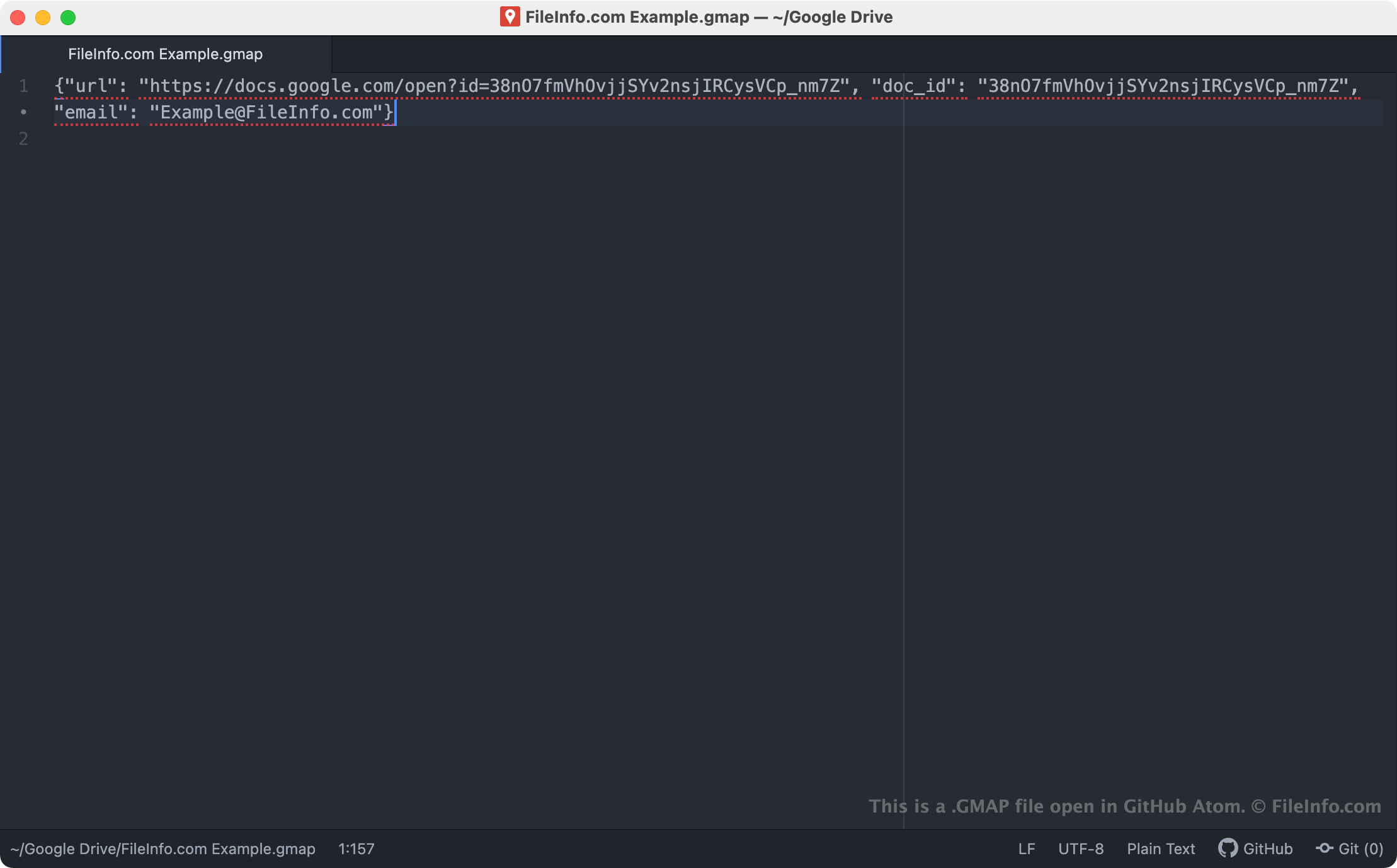
GitHub Atomで開いた.gmapファイルのスクリーンショット
GitHub Atomで開いたGMAPファイル

Google Drive for Desktop is a program that allows Google Drive users to back up and open their Google Drive files on Windows and Mac PCs. While Drive for Desktop stores actual backups of some types of files (such as .JPG and .DOCX files) on users' computers, it does not store copies of files created using Google My Maps, Docs, and other Google Workspace applications. Instead, Drive for Desktop stores shortcut files that, when double-clicked, open the associated file in the web version of the correct Google Workspace application.

GMAP files are Drive for Desktop shortcuts that open maps created in Google My Maps. When a Drive for Desktop user double-clicks a GMAP file, the related map opens in Google My Maps, provided the user is signed in to a Gmail account allowed to access the map. Each GMAP file is a JSON file that contains a map's URL and document ID, as well as the name of the Gmail account used to create the map.

注: GMAP files were previously created by Backup and Sync from Google. Google replaced Backup and Sync with Drive for Desktop in October 2021.

GMAPファイルの開き方

If you have Google Drive for Desktop installed on your PC, or you are using a Chrome OS device, you can double-click a GMAP file to open the map it references in Google My Maps. You may have to sign in to your Gmail account or request access to the map to open it.

If necessary, you can also open a GMAP file in any text editor to view the URL, document ID, and Gmail account information it contains. You may want to do this, for example, if you are having trouble using your GMAP file to open a map in Google My Maps. If double-clicking your GMAP file does not open a map, you can try copying and pasting your file's URL into your web browser to access your map.

GMAPファイルを開くプログラム

Linux
Chrome OS
OSに同梱

検証者 FileInfo.com

FileInfo.comチーム は、このページに掲載されているすべてのファイル形式とソフトウェアについて独自に調査しました。 私たちの目標は100%の正確性であり、検証済みのファイルタイプに関する情報のみを公開しています。

このページへの追加や更新をご提案いただける場合は、お知らせください。