.ASE Extension de fichier

Aseprite Sprite File

Développeur David Capello
Popularité
4.4  |  11 Votes
 

Qu'est-ce qu'un fichier ASE ?

An ASE file contains a sprite created by Aseprite, an animated sprite editor and pixel art tool. It stores a 2D animation or graphic, which includes layers, frames, palettes, tags, and settings. ASE files may also be saved as .ASEPRITE files.

Plus d'informations

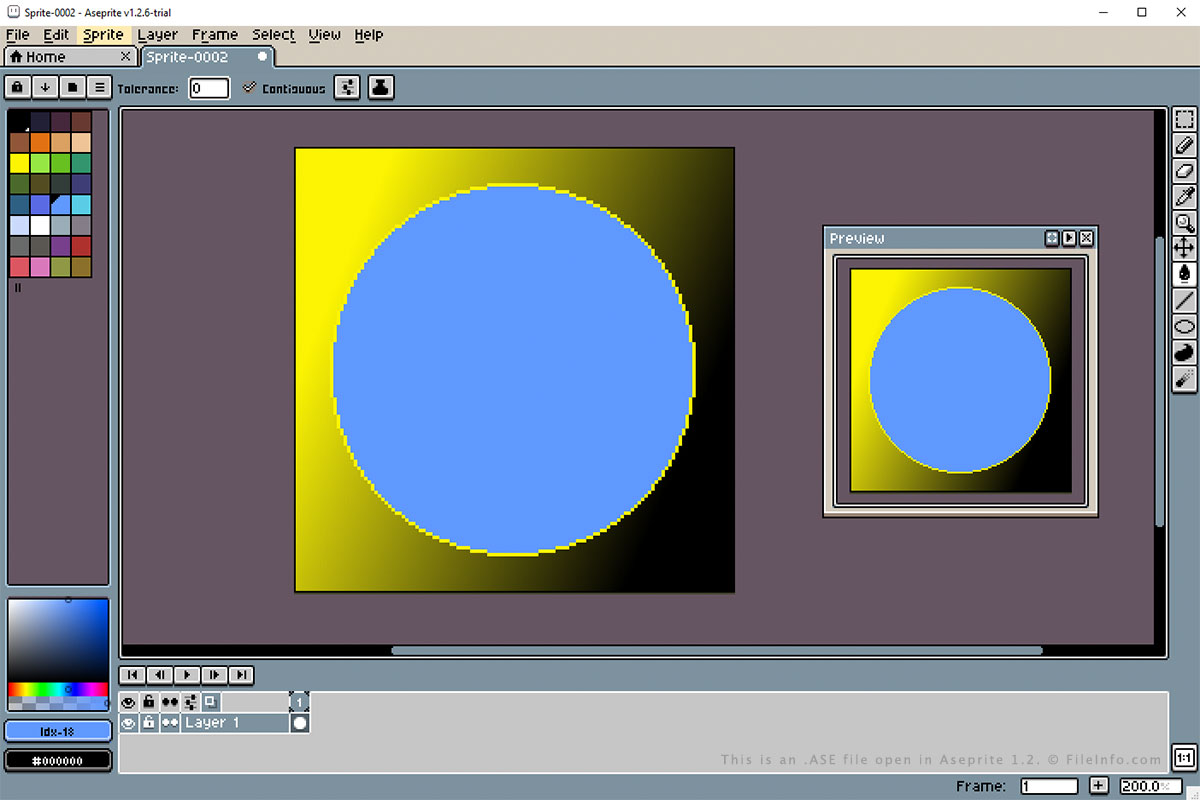
Capture d'écran d'un fichier .ase dans Aseprite 1.2
Fichier ASE ouvert dans Aseprite 1.2

ASE and ASEPRITE files are saved in the same format and are the most common files associated with Aseprite. The files are created to store the sprite graphic or animation and can be closed and re-opened for further editing in Aseprite.

You can create an ASE file in Aseprite by selecting File → New..., then File → Save or Save As..., and choosing the ASE format. You can open an ASE file in Aseprite by selecting File → Open... or Open Recent and choosing the ASE file.

Aseprite can also be used to export ASE files to more popular formats, such as .PNG or .GIF files. To do this, open the ASE file and select File → Save Copy As.

Ouvrez plus de 400 formats de fichiers avec File Viewer Plus.Téléchargement gratuit

Programmes qui ouvrent les fichiers ASE

Windows
Version d'essai gratuite
Mac
Version d'essai gratuite
Linux
Version d'essai gratuite

Adobe Swatch Exchange File

Développeur Adobe Systems
Popularité
3.3  |  24 Votes
 

File used by Adobe InDesign and Illustrator professional page layout and graphics applications; also used by Adobe Color, a touch app for Android and iOS devices; contains a color swatch, which is a saved collection of colors; allows illustrators and publishers to share color swatches.

Plus d'informations

REMARQUE: ASE files were introduced with version 2 of Adobe's Creative Suite (CS). Photoshop saves color swatches as .ACO files.

Programmes qui ouvrent ou référencent les fichiers ASE

Windows
Version d'essai gratuite
Mac
Version d'essai gratuite

Autodesk ASCII Scene Export File

Développeur Autodesk
Popularité
2.1  |  7 Votes
 

Text file containing 2D or 3D scene information; exported by various Autodesk programs; saved in a text format, which is more compatible with other programs.

Plus d'informations

ASE files are similar to Autodesk .ASC files, but contain additional scene information, as well as points and shapes.

Programmes qui ouvrent les fichiers ASE

Windows
Version d'essai gratuite
Mac
Catégorie : Texte
Mis à jour : 2007-10-04

Velvet Studio Advanced Sample System

Développeur Velvet Development
Popularité
1.8  |  6 Votes
 

An ASE file is an Advanced Sample System used by Velvet Development Velvet Studio, a music tracker developed for MS-DOS and Microsoft Windows. It contains an audio sample that can be loaded in Velvet Studio and used to create music.

Plus d'informations

Developers Patrik Oscarsson and David Broman released the first version of Velvet Studio in 1996. The program is an improved version of Extreme Tracker, the duo's previous music tracker.

In Velvet Studio, users can create or import audio samples and then use them to create music (alongside .ASI instrument files). The program saves users' samples as ASE files. Users can also edit and play samples in Velvet Studio, before adding them to a song.

Comment ouvrir un fichier ASE

You can open an ASE file in Velvet Development Velvet Studio (Windows). To do so, place the file in Velvet Studio's sample directory. (You can view the location of this directory in Velvet Studio by selecting CONFIG → Configure Paths, followed by SAMP.) Then, use Velvet Studio's Disk Option screen to find and load your AIS file.

Programmes qui ouvrent les fichiers ASE

Catégorie : Audio
Mis à jour : 2022-07-01

Vérifié par FileInfo.com

L'équipe FileInfo.com a mené des recherches indépendantes sur tous les formats de fichiers et logiciels répertoriés sur cette page. Notre objectif est une précision de 100%, et nous ne publions que des informations sur les types de fichiers que nous avons vérifiés.

Si vous souhaitez suggérer des ajouts ou des mises à jour de cette page, faites-le-nous savoir.