

.C Dateiendung
C/C++-Quellcodedatei
| Entwickler | ANSI/ISO |
| Beliebtheit |
4,1 | 258 Stimmen |
Was ist eine C-Datei?
Eine C-Datei ist eine Quelldatei für ein C- oder C++-Programm. Sie kann den vollständigen Quellcode eines Programms enthalten oder eine von vielen Quelldateien sein, auf die innerhalb eines Programmierprojekts verwiesen wird. Benutzer können C-Dateien mit Quellcode- und Texteditoren bearbeiten und sie anschließend mit einem C/C++-Compiler für die Zielplattform kompilieren, bevor der Code ausgeführt werden kann.
Weitere Informationen
Dennis Ritchie entwickelte die Programmiersprache C ursprünglich, um in den späten 1960er- und frühen 1970er-Jahren Unix-Dienstprogramme bei Bell Labs zu erstellen. Seit den 1970er-Jahren ist die Beliebtheit von C gestiegen, und viele Benutzer haben die Sprache erlernt und verwendet, um Betriebssysteme, Datenbankverwaltungssysteme, Spiele und vieles mehr zu entwickeln. Außerdem haben das American National Standards Institute (ANSI) und die International Organization for Standardization (ISO) die Programmiersprache C seit 1989 standardisiert.
Die Sprache hat auch viele Programmiersprachen beeinflusst, darunter C++, PHP, Perl, Python, Java und JavaScript. C++ ist beispielsweise eine Erweiterung der Programmiersprache C und wurde Mitte der 1980er-Jahre veröffentlicht. Entwickler verwenden die Sprache, um viele der heutigen Softwareprogramme zu erstellen. Die Sprache C++ kann in C-, .CC-, .CPP-, .CXX- und C++-Quellcodedateien gespeichert werden.
Häufige .C-Dateinamen
main.c - Eine Quellcodedatei, die typischerweise die Funktion main() oder den Einstiegspunkt eines C-Programms enthält.
So öffnen Sie eine C-Datei
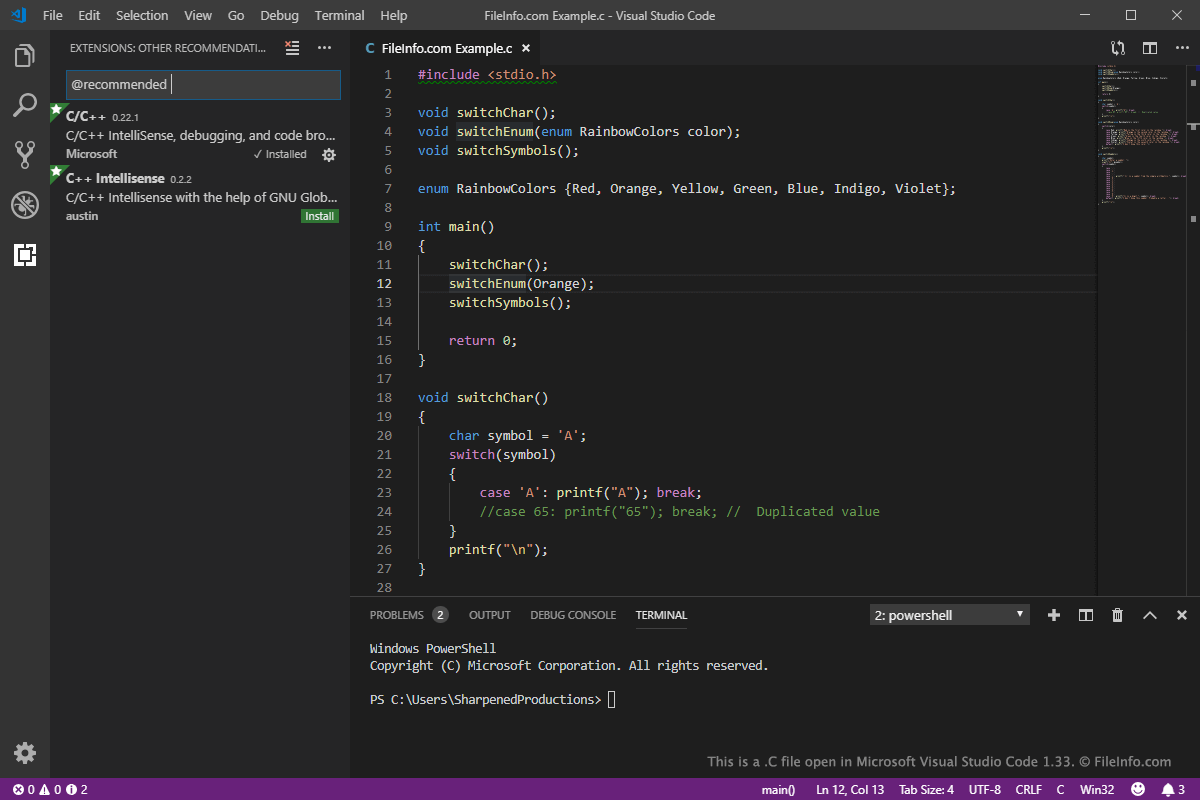
Sie können C-Dateien mit verschiedenen Quellcodeeditoren öffnen und bearbeiten, darunter Microsoft Visual Studio Code (plattformübergreifend), Code Blocks (plattformübergreifend) und Apple Xcode (macOS). Diese Anwendungen bieten hilfreiche Funktionen wie Syntaxhervorhebung und automatische Vervollständigung zum Anzeigen und Bearbeiten von C/C++-Code.
Sie können CPP-Dateien auch mit einem Texteditor öffnen und bearbeiten, beispielsweise mit Microsoft Notepad (in Windows enthalten) oder Apple TextEdit (in macOS enthalten). Diese Texteditoren bieten jedoch keine hilfreichen Funktionen zur Bearbeitung von Quellcode.
C/C++-Compiler
Sie können den in C-Dateien gespeicherten C/C++-Code mit verschiedenen kostenlosen und kommerziellen Compilern in Code kompilieren, der auf einem Computer ausgeführt werden kann. Zu den Compilern gehören Microsoft Visual Studio (Windows), GNU Compiler Collection (plattformübergreifend), Eclipse IDE for C Developers (plattformübergreifend) und Apple Xcode (macOS).