.SCPRESETS 文件扩展名

Snap Converter Presets File

开发者 Sharpened Productions
受欢迎程度
3.8  |  4 
 

什么是 SCPRESETS 文件?

An SCPRESETS file is a settings file created by Snap Converter, an image conversion utility for macOS. It contains saved settings used for converting single images or images in batch mode. Example settings include the target file type (e.g., JPEG, PNG, etc.), resize options, watermark settings, and file renaming options.

更多信息

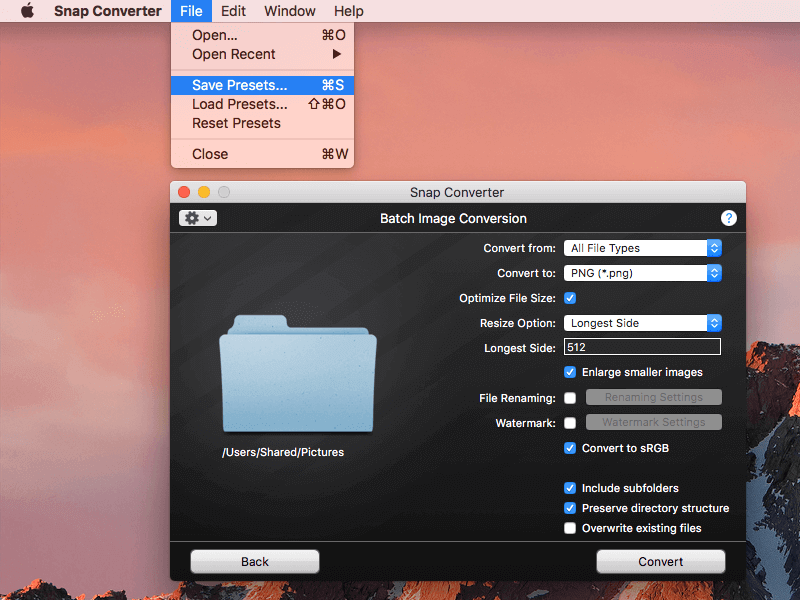
在 Snap Converter 3.0 中打开的 .scpresets 文件截图
在 Snap Converter 3.0 中打开的 SCPRESETS 文件

SCPRESETS files allow you to switch between different option sets depending on your conversion job. For example, one presets file may be used for batch converting thumbnails for your website, while another might be used for watermarking photos before sending them to a prospective client.

Snap Converter presets files are saved using Apple's .PLIST file format, and they contain plain text properties for settings on the user interface. You can modify an SCPRESETS file manually, but be careful because changes in the embedded properties could cause unintended consequences.

使用File Viewer Plus打开 400 多种文件格式。免费下载

可打开 SCPRESETS 文件的程序

Mac
分类: 设置
更新时间: 2017-09-19

验证者 FileInfo.com

FileInfo.com 团队 独立研究了本页面列出的 Snap Converter Presets 文件格式和 Mac 应用。 我们的目标是达到 100% 的准确率,并且仅发布我们已验证过的文件类型信息。

如果您想为此页面提出新增或更新建议,请告诉我们