.XML Extensão de arquivo

XML File

Desenvolvedor WC3
Popularidade
3.6  |  773 Votos
 
🔍Abra arquivos .XML diretamente no seu navegador com File Helper.Ver on-line

O que é um arquivo XML?

An XML file is an XML (Extensible Markup Language) data file. It contains a formatted dataset that is intended to be processed by a website, web application, or software program. XML files can be thought of as text-based databases.

Mais informações

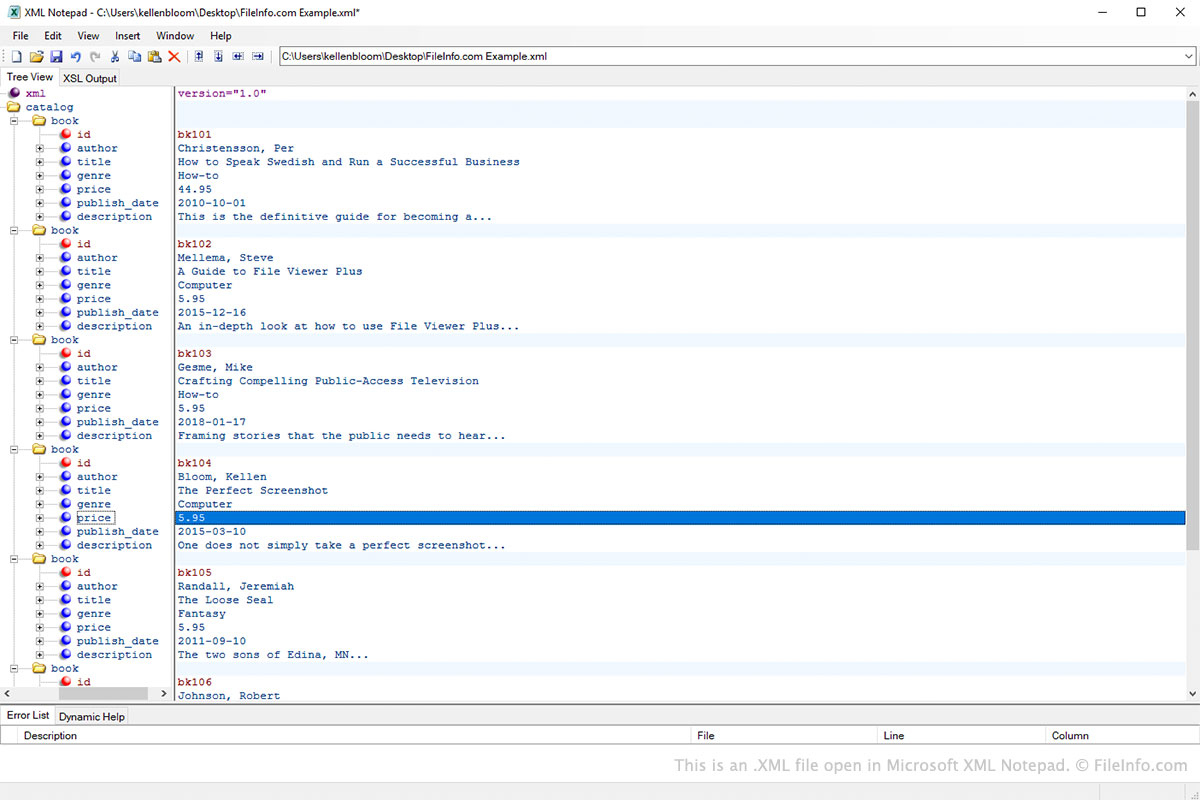
Captura de tela de um arquivo .xml em Microsoft XML Notepad
Arquivo XML aberto em Microsoft XML Notepad

Extensible Markup Language, or XML, is a markup language developers use to structure data. XML files contain datasets structured using XML.

XML allows developers to structure data using custom tags. This flexibility makes XML ideal for cataloging information about nearly any set of related items. For example, a developer creating a catalog of automobiles may include the following entry in their XML file:

<auto>
  <manufacturer>Tesla</manufacturer>
  <model>S</model>
  <horsepower>670 to 1,020</horsepower>
  <price>$69,420+</price>
</auto>

Because websites and applications can easily process XML, and humans can easily understand the data XML files contain, XML has become a standard way of transferring data over the Internet and between programs. XML is also used to structure the data contained within other types of files, such as Microsoft Office Open XML Documents (.DOCX, .PPTX, .XLSX), LibreOffice OpenDocuments (.ODT, .ODP, .ODS), .XHTML files, and .SVG files.

Como abrir um arquivo XML

You can open an XML file with any text editor or web browser. However, those who intend to edit an XML file should open it with an XML editor. XML editors provide helpful syntax highlighting, editing, and validation tools that make working with XML files easier.

Some popular XML editors include:

Programas que abrem arquivos XML

Categoria: Dados
Atualizado: 2021-03-13

Cinelerra Video Project

Desenvolvedor Heroine Virtual
Popularidade
3.3  |  174 Votos
 

An XML file is a video project created by Cinelerra, a video editing software package for Linux. It contains project data, including an edit decision list that records any edits made to the project and stores project settings. XML files do not contain actual media; instead, it stores a path to each media file.

Mais informações

Cinelerra is a free video editor for Linux users that debuted in the 1990s. It allows you to apply various effects and filters to video and features several windows, including a timeline, viewer, resource window, and compositor.

To create an XML video project, select File → Save, Save as..., Export project, or Save backup. After saving the file, you can close it and then reopen it at a later time to continue editing it. To save

NOTA: Cinelerra is available as a single release, but it was previously available as two different versions: Heroine Virtual and Community Version. While both Cinelerra versions saved projects as XML files, the versions cannot open XML files created by the other version.

Como abrir um arquivo XML

You can open an XML video project with Cinelerra in a Linux operating system. To open an XML file with Cinelerra, select File → Load Files.

Como converter um arquivo XML

Cinelerra can convert XML video project files to various file types, including the following formats:

  • .MOV - Apple QuickTime Movie
  • .MKV - Matroska Video
  • .F4V - Flash MP4 Video
  • .QT - Apple QuickTime Movie
  • .WEBM - WebM Video
  • .WAV - WAVE Audio
  • .WEBP - WebP Image
  • .JPEG - JPEG Image
  • .PNG - Portable Network Graphic
  • .GIF - Graphical Interchange Format (Animated)
  • .TIF - Tagged Image File Format

Programas que abrem arquivos XML

Linux
Grátis
Categoria: Vídeo
Atualizado: 2022-05-02

Verificado por FileInfo.com

A equipe do FileInfo.com pesquisou de forma independente todos os formatos de arquivo e programas listados nesta página. Nosso objetivo é 100% de precisão, e só publicamos informações sobre tipos de arquivo que verificamos.

Se quiser sugerir adições ou atualizações a esta página, avise-nos.