.CRP Rozszerzenie pliku

Cities: Skylines Colossal Raw Asset Package

Deweloper Paradox Interactive
Popularność
4.2  |  26 Głosów
 

Czym jest plik CRP?

Colossal Raw Asset Package file format used by Cities: Skylines, a city building simulation game; used to store a variety of data, including game progress, maps, assets, and color corrections.

Więcej informacji

UWAGA: The CRP file can be used for multiple purposes and the location in which the file is saved indicates the type of data it contains.

Otwórz ponad 400 formatów plików za pomocą File Viewer Plus.Bezpłatne pobieranie

Programy otwierające lub odwołujące się do plików CRP

Kategoria: Gra
Zaktualizowano: 2015-04-07

dBASE Custom Report

Deweloper dBASE
Popularność
4.2  |  6 Głosów
 

A CRP file is a custom report created by dBASE, an IDE with database management capabilities. It contains information about a report, including the placement of objects within the report, such as text fields, shapes, and images. dBASE users create custom reports to configure the design of other reports (.REP files) that allow users to view data across databases in a formatted print or screen output without the ability to edit the data.

Więcej informacji

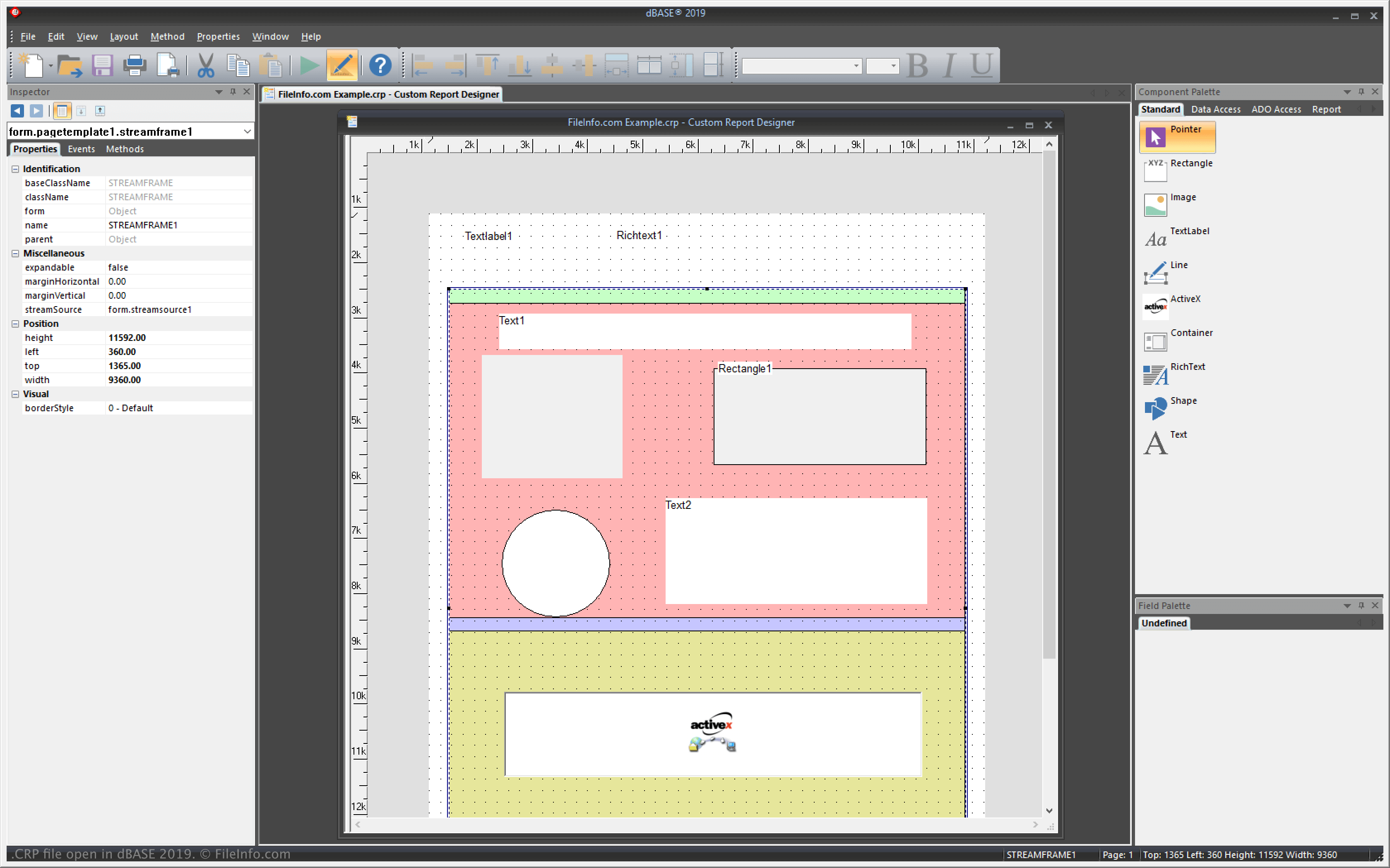
Zrzut ekranu pliku .crp w dBASE 2019
Plik CRP otwarty w dBASE 2019

dBASE is a Windows application with features for managing databases and building and compiling programs. In the program, custom reports function similarly to templates, allowing you to configure the layout of objects on which other reports are based.

For example, you might create a custom report with a text field at the top that you want to appear on all the other reports. You can create a custom report with dBASE via the Custom Report Designer by selecting File → New → Custom Report. dBASE saves CRP files in the following directory by default:

C:\​Users\​[user]\​AppData\​Local\​dBASE\​dBASE[version]\​Bin

Jak otworzyć plik CRP

You can open CRP files with dBASE in Windows. For example, you can open a CRP file by selecting File → Open.

You can also open CRP files with a text editor, such as Microsoft Notepad (Windows) or Apple TextEdit (Mac), since they store plain text information. You may need to rename the .crp file extension to .txt for the text editor to recognize it.

When opened in a text editor, you can modify the properties of the custom report. However, it will not appear the same as if you open it with dBASE. Also, incorrectly editing the file will break the custom report.

Programy otwierające pliki CRP

Windows
Bezpłatna wersja próbna

COMOS Report File

Deweloper Siemens
Popularność
1.8  |  4 Głosów
 

A CRP file is a report template, master report, or interactive report created by Siemens COMOS, an industrial plant management platform. It contains either a standardized layout and/or set of data from which a plant manager can create sub-reports (report template or master report) or an electronic drawing sheet and objects (interactive report). COMOS evaluating reports are not saved as CRP files.

Więcej informacji

Industrial plant engineers and operators use COMOS to monitor their plant's operations and efficiency by reporting on a variety of data. If an engineer or operator knows they'll want to report on a set of data often, they can use COMOS's Report Designer to create a report template or master report that includes that data. The user can then refine the report template or master report and create sub-reports from it as needed.

COMOS report templates and master reports are saved as CRP files. Interactive reports, which are COMOS documents that correspond to an electronic drawing sheet and on which objects can be placed, are also saved as CRP files, though they are not report templates.

Jak otworzyć plik CRP

You can open a CRP file in Siemens COMOS (Windows). For example, if your CRP file is a report template, you can open it in COMOS's Report Designer to edit the template your file contains.

Programy otwierające pliki CRP

Windows
Kategoria: Dane
Zaktualizowano: 2021-06-14

Zweryfikowane przez FileInfo.com

Zespół FileInfo.com niezależnie zbadał wszystkie formaty plików i programy wymienione na tej stronie. Naszym celem jest 100% dokładność i publikujemy wyłącznie informacje o zweryfikowanych typach plików.

Jeśli chcesz zaproponować dodatki lub aktualizacje tej strony, daj nam znać.