

.LQX ファイル拡張子
LG QuickMemo+メモ
| 開発元 | LG |
| 人気度 |
3.0 | 1 票 |
LQXファイルとは?
LQXファイルは、一部のLGスマートフォンにインストールされているアプリ、QuickMemo+で作成されたメモです。画像と、その画像に追加された注釈が含まれています。通常、LQXファイルに含まれる画像は、ユーザーのスマートフォンまたはタブレットのスクリーンショットです。
詳細情報
G7、Phoenix 4、Escape 2などの一部のLGデバイスには、QuickMemo+があらかじめインストールされています。このLG専用アプリを使用すると、ユーザーはスクリーンショットを撮影し、その画像に文字を書いたり絵を描いたりしてから、メモとして保存できます。これらのメモはLQXファイルとして保存されます。
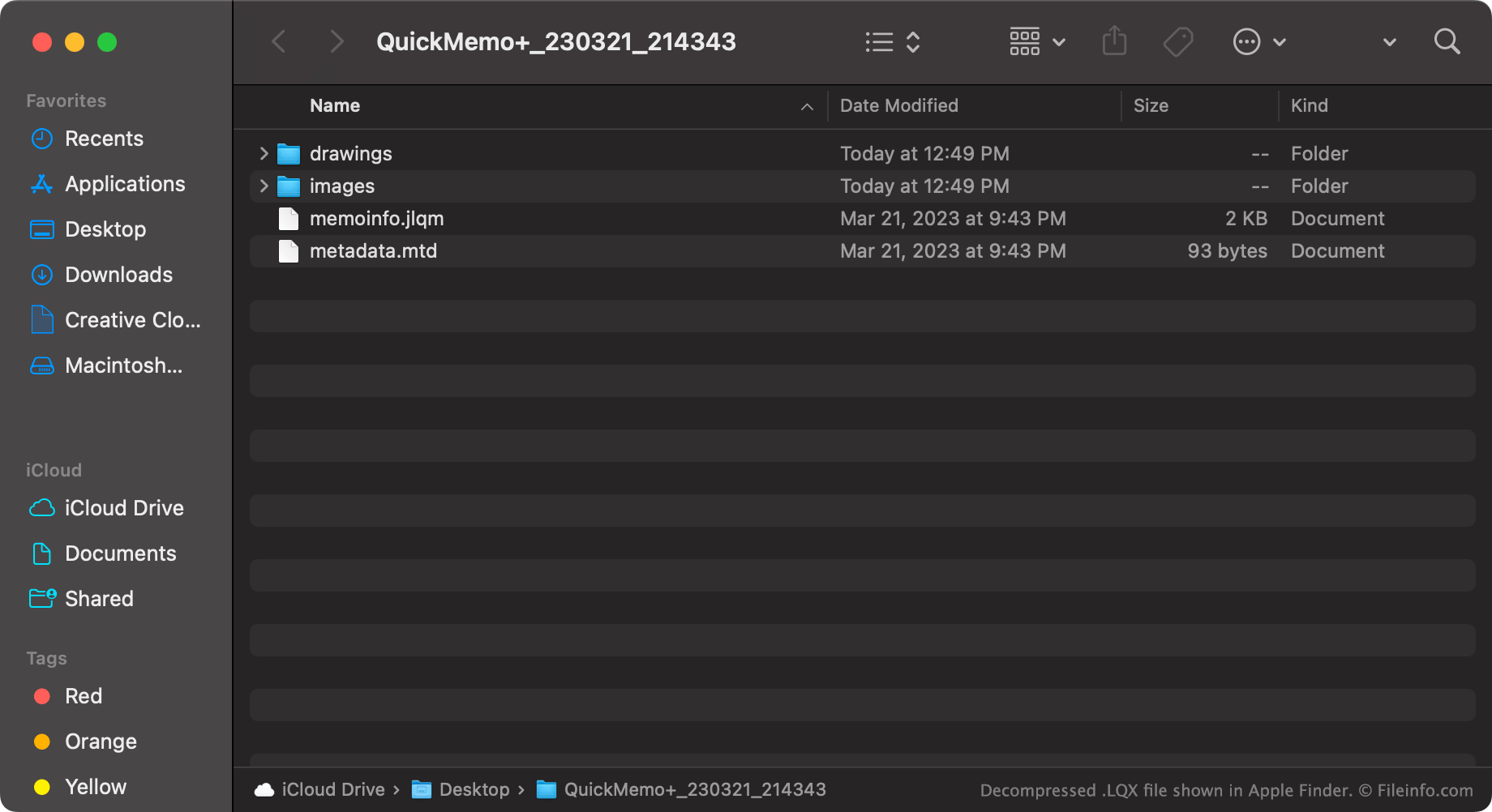
QuickMemo+ではLQXファイルは1つの画像として表示されますが、実際にはメモを構成する画像レイヤーとメタデータファイルを格納した、名前を変更した.ZIPファイルです。そのため、QuickMemo+を利用できない場合は、LQXファイルの名前を変更して.zip拡張子にし、通常のZIPファイルと同じように内容を展開できます。
各LQXファイルには、次の内容が含まれています。
- imagesディレクトリ。このディレクトリには、元のスクリーンショット画像と、注釈を追加した最終画像が含まれています
- drawingsディレクトリ。ユーザーが追加した注釈のコピーが保存されています
- メモのメタデータを含む.JLQMファイルとMTDファイル
LQXファイルの開き方
LQXファイルはLG QuickMemo+(Android)で開けます。LG QuickMemo+がインストールされたデバイスでは、LQXファイルをダブルタップするか、機能を使用して、QuickMemo+でLQXファイルを開きます。
QuickMemo+を利用できず、LQXファイルの内容を確認したい場合は、次の手順を実行します。
- ファイルの名前を変更して、.zip拡張子にします。
- 7-Zip(Windows)、Apple Archive Utility(Mac)、またはその他のZIP解凍ユーティリティを使用して展開します。
これで、LQXファイルに含まれる画像やその他のデータを確認できるようになります。
LQXファイルを開くプログラム
Windows
Mac
Linux
Android