

.SYNTHESIA Dateiendung
Synthesia-Metadaten
| Entwickler | Synthesia |
| Beliebtheit |
3,0 | 1 Stimme |
Was ist eine SYNTHESIA-Datei?
Eine SYNTHESIA-Datei ist eine Metadatendatei, die für die Verwendung mit Synthesia erstellt wurde, einer App, die Benutzern das Klavierspielen beibringt. Sie enthält XML-formatierte Informationen zu einer oder mehreren Songdateien, die ein Benutzer in Synthesia importieren kann. Eine SYNTHESIA-Datei kann beispielsweise die Titel, Bewertungen, Schwierigkeitsgrade, Komponisten, Urheberrechtsinformationen, Parts und Fingersatz-Hinweise einer Gruppe von Songs beschreiben.
Weitere Informationen
Synthesia wandelt Notenschrift in zeitlich abgestimmte, farbcodierte Hinweise um, die Benutzer mitspielen können, um zu lernen, wie man einen Song spielt. Typischerweise verwenden Synthesia-Benutzer die App zusammen mit einem MIDI-Keyboard und einer oder mehreren .MIDI- oder .MUSICXML-Dateien. Dadurch können sie Songs auf einem echten Keyboard spielen und jeden im MIDI- oder MUSICXML-Format gespeicherten Song importieren.
Optional können Synthesia-Benutzer SYNTHESIA-Dateien erstellen, die Metadaten für eine oder mehrere MIDI- oder MUSICXML-Dateien enthalten. Diese Dateien geben normalerweise die Identifikationsinformationen der Songs sowie alle Fingersatz-Hinweise oder Hand-Parts an, die ein Benutzer zu diesen Songs hinzugefügt hat.
So erstellen und verwenden Sie SYNTHESIA-Dateien
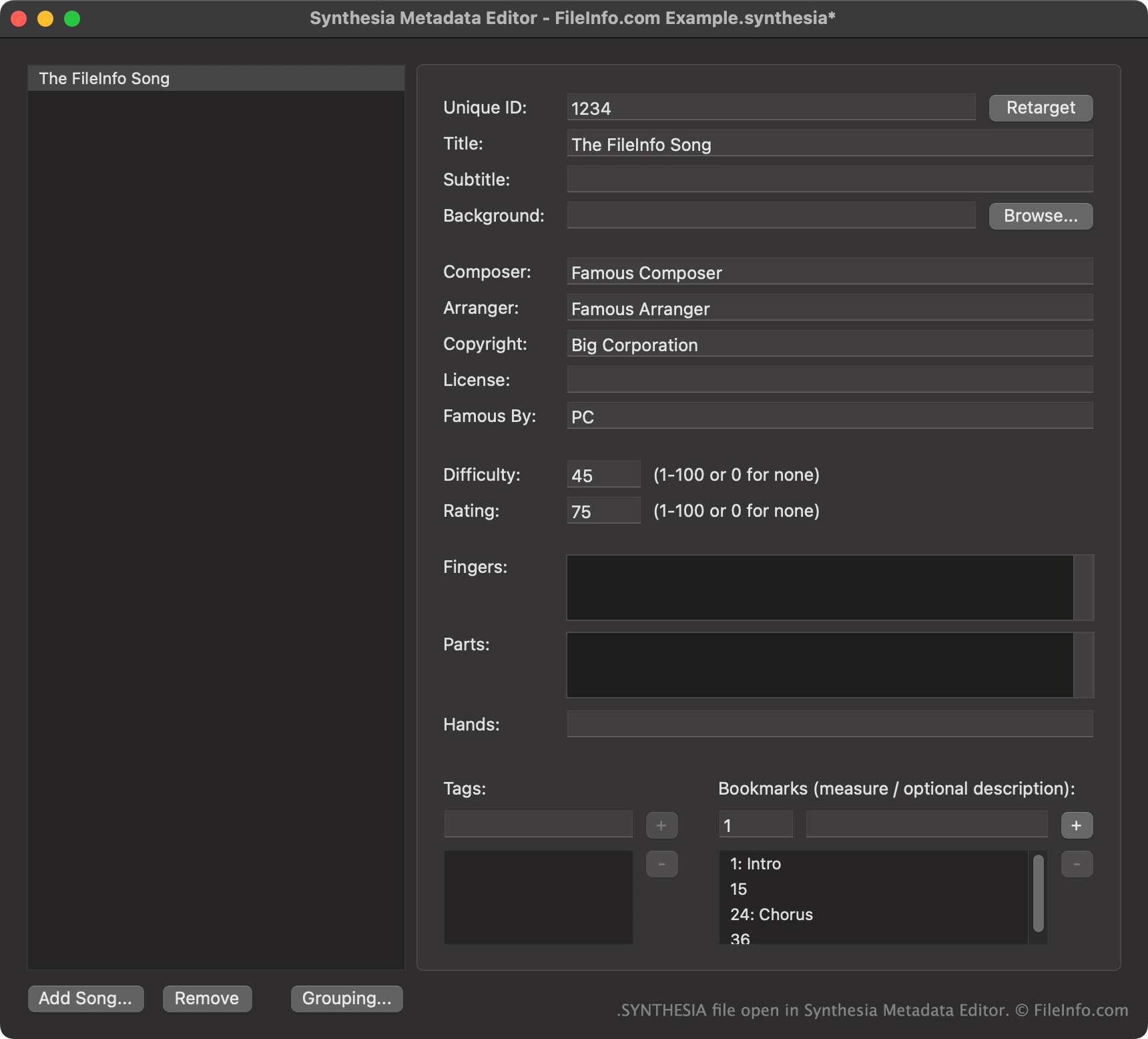
Synthesia-Benutzer erstellen SYNTHESIA-Dateien hauptsächlich mit Synthesia Metadata Editor, einer separaten, kostenlosen Begleitanwendung. Um eine SYNTHESIA-Datei aus Ihren vorhandenen Songs zu erstellen, wählen Sie .
Um eine SYNTHESIA-Datei mit Synthesia zu verwenden, sollten Benutzer sie in dem Verzeichnis ablegen, das den/die Song(s) enthält, für den/die sie vorgesehen ist. Synthesia lädt dann die in der Datei enthaltenen Metadaten zusammen mit dem/den zugehörigen Song(s).
So öffnen Sie eine SYNTHESIA-Datei
Für die besten Bearbeitungsmöglichkeiten sollten Sie SYNTHESIA-Dateien mit Synthesia Metadata Editor (Windows, Mac) öffnen. Synthesia Metadata Editor wurde speziell zum Anzeigen und Bearbeiten der in SYNTHESIA-Dateien enthaltenen Daten entwickelt.
Wenn Sie keinen Zugriff auf Synthesia Metadata Editor haben, können Sie eine SYNTHESIA-Datei in Microsoft Visual Studio Code oder einem anderen Texteditor öffnen, um die darin enthaltenen XML-Daten anzuzeigen.