.NFV 文件扩展名

Netflix Video File

开发者 Netflix
受欢迎程度
3.2  |  46 
 

什么是 NFV 文件?

An NFV file is a video file created by the Netflix streaming app, which is available for Android and iOS. It contains encrypted video for a movie or show downloaded through the app. NFV files are used for offline viewing, a feature launched in December 2016. It allows you to watch movies or shows when not connected to the Internet.

更多信息

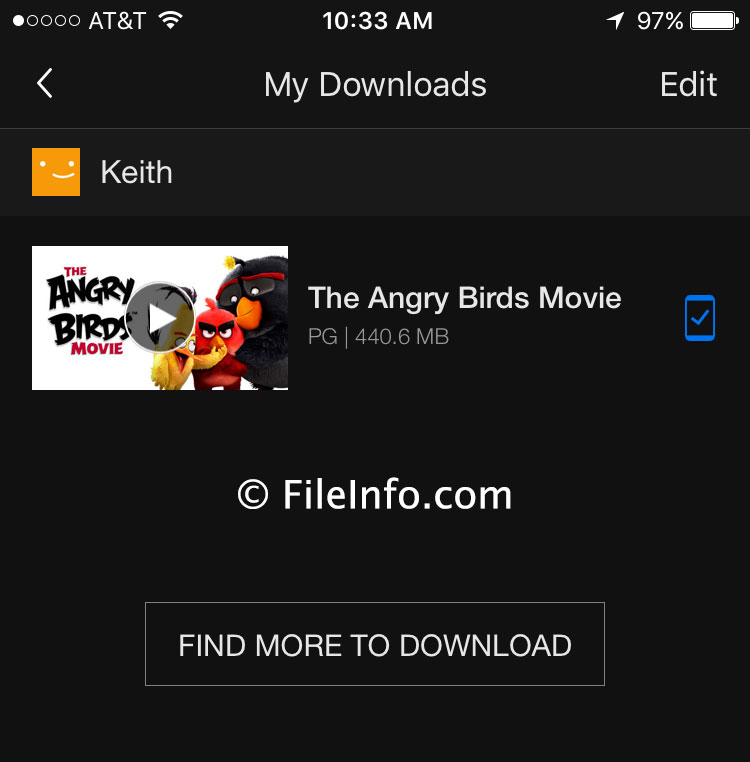
在 Netflix 9.0.1 in iOS 10.1.1 中打开的 .nfv 文件截图
在 Netflix 9.0.1 in iOS 10.1.1 中打开的 NFV 文件

Netflix is a streaming service that provides a wide variety of movies and shows, including TV shows that are currently and no longer airing and new Netflix original content. The service initially began as a video rental service with Netflix mailing DVDs and Blu-ray discs to subscribers' homes. Netflix then morphed into a web streaming service, which is now available on Android and iOS devices.

Most titles on Netflix are available for download, although Netflix excludes select content. If a movie or show can be downloaded, it has a download icon next to the name. You can search for downloadable titles by selecting "Available for Download" from the Netflix menu. Tap the download icon to begin the download then navigate to the "My Downloads" section of the app to access the downloaded movie or show.

When Netflix downloads a movie or TV show to your device, the NFV file is saved to your device in a folder along with several other files, including the .MANIFEST, .NFS, .NFI, and .NFA files. You most likely will never see the NFV file since you can play the movie or show directly in the Netflix app.

You can select the quality of your video download to fit your storage needs and desired level of video quality. High-quality video will take longer to download and more space on your device, whereas standard quality takes less time to download and less space on your device. An hour of standard quality content is approximately 280 MB, and high-quality content is approximately 440 MB. To select your download video quality, tap the menu icon in the Netflix app then select "App Settings." Under the "Downloads" heading, select "Video Quality" and choose between "Standard" and "Higher" video quality.

If you want to delete a movie or show you downloaded to your Android device, tap the menu icon in the app, select "My Downloads," tap the pencil edit icon in the upper right corner and tap the red "X" icon to delete the title.

If you want to delete a movie or show you downloaded to your iOS device tap the menu icon in the app, select "My Downloads," tap "Edit," and select the red "X" icon to delete the title.

注: To download Netflix videos on your Android or iOS app you need to have Android 4.4.2 or later or iOS 8.0 or later. You will also need the latest version of the Netflix app.

使用File Viewer Plus打开 400 多种文件格式。免费下载

可打开 NFV 文件的程序

iOS
免费+
Android
免费+
分类: 视频
更新时间: 2019-01-17

验证者 FileInfo.com

FileInfo.com 团队 独立研究了本页面列出的 Netflix Video 文件格式和 Android and iOS 应用。 我们的目标是达到 100% 的准确率,并且仅发布我们已验证过的文件类型信息。

如果您想为此页面提出新增或更新建议,请告诉我们