

.MEPX Dateiendung
Movavi-Videoprojekt
| Entwickler | Movavi |
| Beliebtheit |
3,6 | 17 Stimmen |
Was ist eine MEPX-Datei?
Eine MEPX-Datei ist ein Videoprojekt, das von bestimmten Movavi-Anwendungen erstellt wurde, darunter Movavi Video Editor und Movavi Video Suite. Sie speichert Verknüpfungen zu den in das Projekt importierten Mediendateien sowie Übergänge, Titel und Effekte. MEPX-Dateien ersetzten mit der Veröffentlichung von Version 11 von Movavi Video Editor und Version 15 von Movavi Video Suite die .MEP-Dateien.
Weitere Informationen
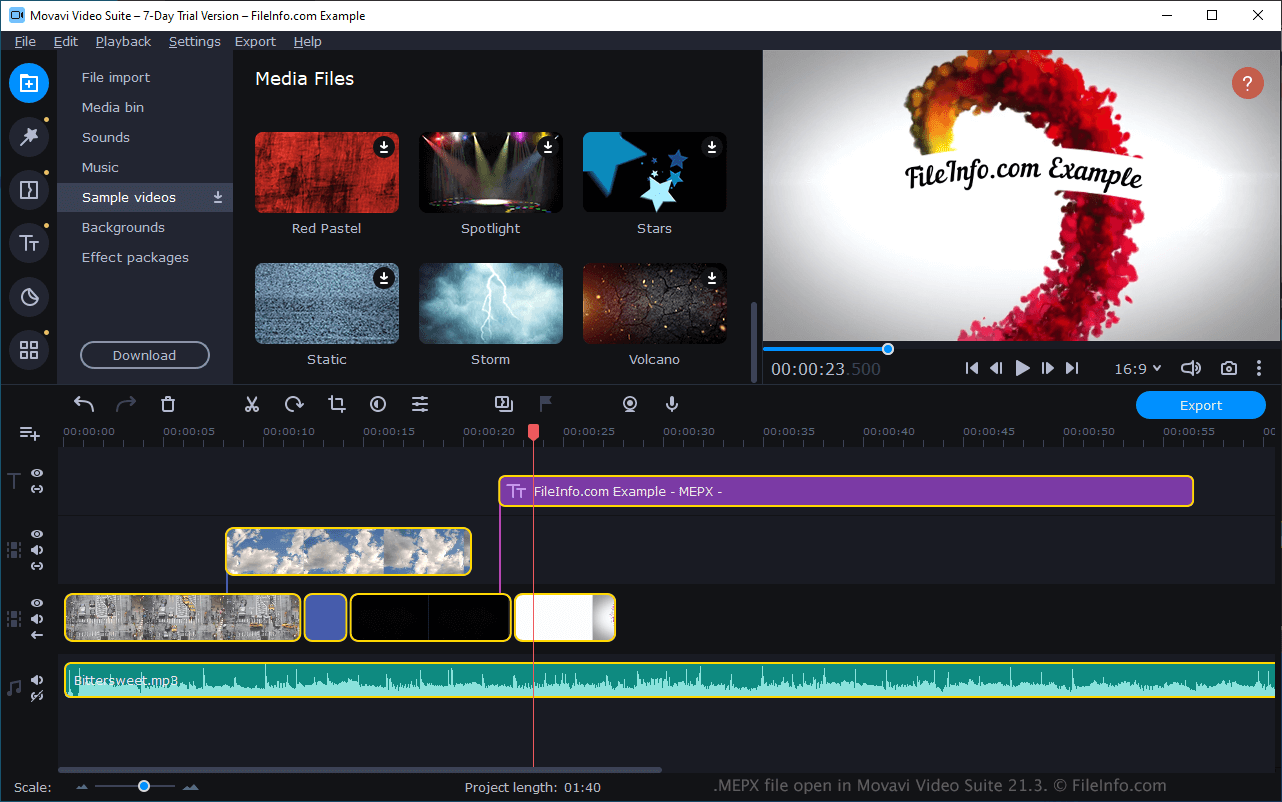
Wenn Sie eine MEPX-Datei in Video Editor oder Video Suite öffnen, wird das Projekt als eine Reihe von Mediendateien angezeigt, die in einer Zeitleiste übereinander angeordnet sind. Sie können die im Projekt enthaltenen Medien bearbeiten, weitere Medien hinzufügen sowie Übergänge oder andere Effekte hinzufügen, bevor Sie Ihr Projekt schließlich als Videodatei exportieren.
Wenn Sie eine Datei verschieben, auf die ein Movavi Video Editor-Projekt verweist, oder keinen Zugriff darauf haben, benachrichtigt Movavi Sie beim Öffnen Ihres Projekts, dass die fehlende Datei nicht gefunden werden kann. Wenn Sie Zugriff auf die Datei haben, können Sie ihren neuen Speicherort angeben, sodass das Projekt wie vorgesehen geöffnet werden kann.
So öffnen Sie eine MEPX-Datei
Sie können MEPX-Dateien mit Movavi Video Editor und Movavi Video Suite öffnen. Um eine MEPX-Datei in einer der beiden Anwendungen zu öffnen, wählen Sie in der Menüleiste aus. Suchen Sie anschließend Ihre MEPX-Datei und öffnen Sie sie.